
Lieferung heute & morgen

Qualitätsgarantie

Willkommens-Angebote freischalten: KOSTENLOSE Lieferung | Bis zu 80 % RABATT | Kostenlose 30-Tage-JoyPlus-Testphase
App herunterladen
Modern laptops like the MacBook Pro or Dell XPS favour a sleek design, often at the expense of port variety. A 10-in-1 USB-C Docking Station promises to solve this problem by bundling a wealth of ports into a single device. However, the market is flooded with products making bold claims that often don't hold up in practice. As your Joybuy Product Recommendation Officer, I'll help you identify the common pitfalls and make an informed decision.
Before you invest, you should be aware of the most common issues found in low-quality USB-C hubs that can lead to frustration.
To avoid these traps, focus on verifiable technical specifications. These three core parameters determine the performance and reliability of your docking station.
For professional users and demanding setups, the refresh rate (in Hertz, Hz) is crucial.
A powerful 100W PD laptop docking station is essential for efficiently charging modern laptops like a MacBook Pro. Check the manufacturer's specifications for "power pass-through" performance. A good docking station will state how much power is left for the laptop. As a rule of thumb, choose a docking station with a PD rating that is at least equal to your laptop's power adapter.
Not all USB ports are created equal. Speed is critical for productivity.
Instead of presenting a confusing list, we have selected products that meet specific needs and avoid the pitfalls mentioned.

Why This Fits Their Persona: This Baseus docking station is a comprehensive solution for users who need a full-fledged desktop replacement. It covers all the bases: dual-monitor setup, fast data transfer, stable power supply, and wired internet. Ideal as a central MacBook Pro accessory.
It bypasses performance traps with clear specifications: one HDMI port with 4K@120Hz, a second with 4K@60Hz, 10Gbps USB ports, and a 100W PD charging function with a declared output of 85W.
All-in-one solution with future-proof specs. The aluminium housing aids heat dissipation and ensures stability during continuous operation.
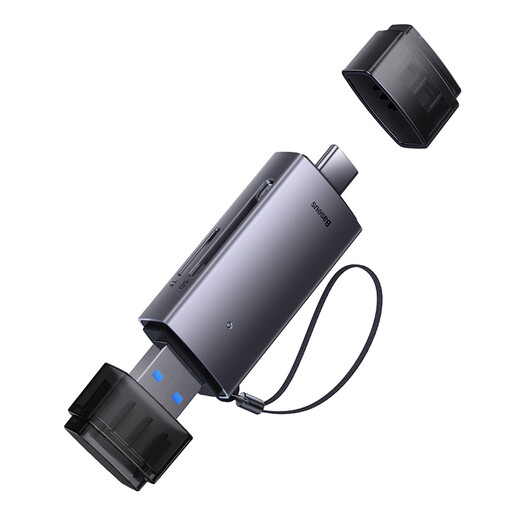
Why This Fits Their Persona: For photographers and videographers who need to quickly back up data from memory cards on the go. This specialised tool is compact, lightweight, and focuses on a single, crucial task: fast data transfer.
Instead of paying for a large dock with unused features, this adapter efficiently solves one specific problem. It avoids the trap of buying an oversized product for a simple use case.
Features both a USB-A and a USB-C plug, making it compatible with a wide range of laptops and PCs. It supports simultaneous reading of SD and TF cards.
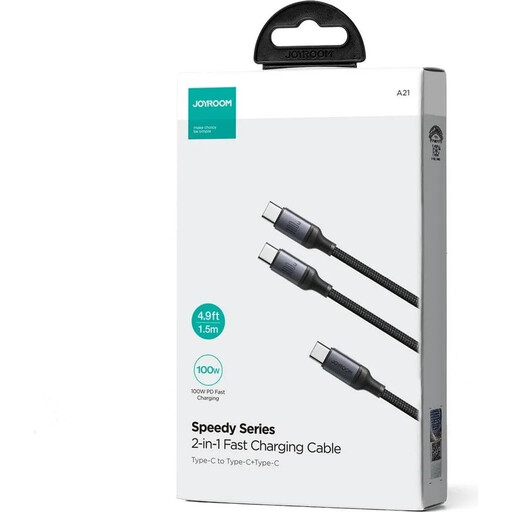
Why This Fits Their Persona: For users whose main problem is charging multiple USB-C devices (e.g., a laptop and a smartphone) with only one power adapter. This cable is a simple yet powerful charging solution without the complexity of a full docking station.
It solves a specific charging problem without requiring the user to invest in an expensive hub just to get an extra charging port. It's a targeted and cost-effective solution.
Supports up to 100W of power and can charge two devices simultaneously. An intelligent chip optimally distributes power and protects against overheating.
We have compiled a complete, up-to-date list of products that fully meet these strict selection criteria and relevant safety regulations.
Does a USB-C docking station need an external power supply? It depends on the model and the connected devices. Simple hubs without Power Delivery draw their power directly from the laptop (bus-powered). Powerful 10-in-1 docking stations, especially those supporting monitors and charging functions, require an external power source (self-powered) via the PD input to function stably and charge the laptop simultaneously.
Can a 10-in-1 docking station cause my laptop to overheat? The docking station itself generates heat, especially under load. A well-designed model with a metal housing (e.g., aluminium) can dissipate this heat effectively. The docking station should not directly overheat the laptop, but it is advisable to give both the laptop and the hub enough space for ventilation.
Do all ports on a docking station work at full speed simultaneously? Not necessarily. The total bandwidth of the USB-C port on the laptop is limited. If you use multiple high-performance devices at the same time (e.g., two 4K monitors and an external 10 Gbps SSD), performance may be split among the different ports. Quality hubs manage this bandwidth distribution better, but there are technical limits that depend on the docking station and the host laptop.