
Lieferung heute & morgen

Qualitätsgarantie

Willkommens-Angebote freischalten: KOSTENLOSE Lieferung | Bis zu 80 % RABATT | Kostenlose 30-Tage-JoyPlus-Testphase
App herunterladen
Published on August 30, 2026 by the Joybuy Product Recommendation Officer
A single, powerful adapter for your laptop, smartphone, and tablet—that's the goal for many users. However, the search for the right 100W USB-C charger can quickly become overwhelming. Manufacturers advertise high wattages and numerous ports, but not every product delivers on its promise. Before you make a purchase, it's crucial to understand the common pitfalls that can lead to inadequate charging performance or even safety hazards.
Common Pitfalls When Buying Chargers:
To make an informed decision, you should focus on a few core technical features rather than being swayed by marketing promises.
A crucial factor is how a multi-port USB-C power adapter distributes its power. A good 100W charger should be able to allocate the full 100W to a single port to efficiently power a MacBook Pro charger or another high-performance laptop. Pay close attention to the power-splitting specifications when multiple ports are used simultaneously. The Power Delivery 3.0 (PD 3.0) standard is essential here. It enables dynamic negotiation of charging power between the charger and the device. The optional PPS protocol is particularly relevant for fast-charging some Android smartphones.
Modern chargers increasingly use Gallium Nitride instead of traditional silicon. A GaN charger offers significant advantages:
Think carefully about which devices you charge regularly. A modern setup benefits from at least two USB-C ports to fast-charge a laptop and smartphone at the same time, for example. An additional USB-A port can be useful for powering older devices or accessories like smartwatches or headphones. Some models even offer a built-in charger with a display that shows real-time charging performance information—a useful feature for tech-savvy users.
We have selected a few products from our range that are suitable for different use cases and meet the criteria mentioned above.
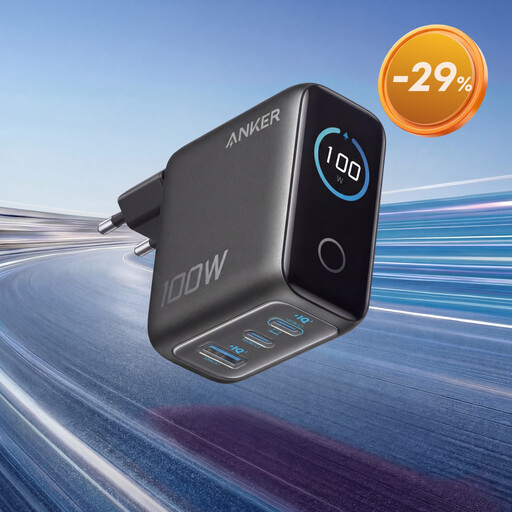
Why it's a great fit: Perfect for business travellers and commuters who need a powerful yet compact charging solution. It replaces multiple individual power adapters and simultaneously powers a laptop (e.g., MacBook Pro) and other devices like the iPhone 17.
The charger delivers a stable 100W to a single USB-C port, thus avoiding the misleading total wattage trap. According to Anker, its ActiveShield 4.0 technology monitors temperature to ensure safe charging.
The smart display shows charging power and temperature in real-time. Its compact design, thanks to GaN technology, makes it an ideal travel adapter.
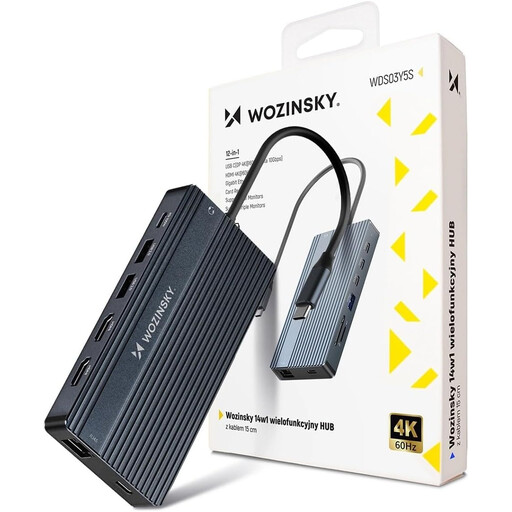
Why it's a great fit: Perfect for home office or office users who want to eliminate cable clutter and turn their laptop into a fully-fledged workstation. A single cable powers the laptop and connects it to monitors, networks, and peripherals.
This hub combines connectivity with a charging function. The USB-C PD port passes through up to 100W to the connected device, eliminating the need for a separate laptop power adapter. The robust aluminium housing ensures good heat dissipation.
Maximum connectivity: Offers 14 ports, including HDMI, DisplayPort, Ethernet, SD card readers, and numerous USB ports. Supports multi-monitor setups with up to three screens.
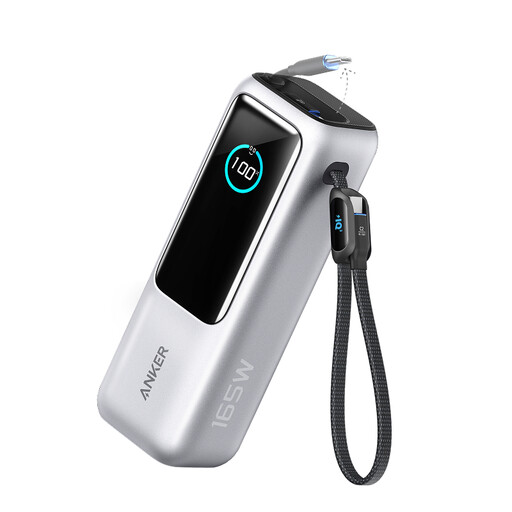
Why it's a great fit: For anyone who needs maximum power without a wall outlet. This power bank is a mobile charging hub for demanding users who can't afford to compromise on fast charging for their laptop and other devices during long journeys, outdoor activities, or on the train.
This solution offers independence from wall outlets while still delivering high power of up to 100W per port. The 25,000mAh capacity is enough to charge a MacBook multiple times or several devices simultaneously without compromising on speed.
High total capacity and power output combined with integrated USB-C cables for maximum portability. Up to four devices can be charged at the same time.
We have compiled a complete, up-to-date list of products that fully meet these strict selection criteria and UK safety regulations.
Can I use a 100W charger for my phone, or is it too powerful? Yes, it's perfectly safe. Modern chargers that support standards like Power Delivery communicate with the connected device to deliver the exact required and maximum tolerable power. A smartphone will not be "overloaded" with 100W; instead, it will only draw as much power as it can safely handle, for example, 25W or 45W.
What is the difference between a GaN charger and a regular charger? The main difference lies in the semiconductor material used. GaN chargers use Gallium Nitride instead of silicon. This material allows for higher energy efficiency with less heat generation. As a result, GaN chargers can be built significantly smaller and lighter than conventional chargers with the same power output, making them ideal for mobile use.
How many devices can I charge simultaneously on a 100W multi-port charger? This depends on the number of ports and the charger's smart power distribution. When you connect multiple devices, the total power of 100W is split among the active ports. For instance, a laptop might then be charged at 65W, a tablet at 20W, and a smartphone at 15W. The exact distribution varies depending on the model and the connected devices.