
Lieferung heute & morgen

Qualitätsgarantie

Willkommens-Angebote freischalten: KOSTENLOSE Lieferung | Bis zu 80 % RABATT | Kostenlose 30-Tage-JoyPlus-Testphase
App herunterladen
Acquiring a laser engraver opens up a world of creative possibilities, from personalised gifts to prototypes for a small business. However, the market is filled with technical specs and marketing promises that can quickly lead to a costly mistake. Before you invest, it's crucial to understand the most common pitfalls, especially those lurking in the 12W class of devices.
A frequent issue is the power rating. Many manufacturers advertise the machine's electrical input power (e.g., 40W), while the optical output power of the laser module, which is what matters for engraving and cutting, is significantly lower. A second pitfall is the promised precision. Claims of 0.01 mm are worthless if the machine's frame is unstable and vibrates during operation. The software is just as critical: a device that only works with a cumbersome, proprietary application will quickly become a source of frustration for any ambitious DIY enthusiast.
To make an informed decision, you should focus on a few indispensable technical features. These will determine whether your DIY laser engraver delivers the desired results or not.
The most critical metric is the optical output power, measured in watts (W). A 12W laser engraver (optical power) represents a powerful sweet spot. It is strong enough to precisely cut thinner wood, cardboard, leather, and dark acrylic, while also offering the finesse for detailed engravings on materials like coated metal or slate. Ensure this value is explicitly listed as "Optical Output Power" and not confused with the device's total power consumption.
The size of the work area defines the maximum dimensions of your projects. A 300x300mm laser engraving area has established itself as a practical standard for many home-based applications. At least as important is the stability of the frame. A pre-assembled or easy-to-assemble frame made of metal profiles minimises vibrations and is a prerequisite for repeatable and precise results. An unstable structure negates any high-precision claims made by the laser.
A modern workflow requires flexible data transfer methods. Models that offer Wi-Fi or hotspot connectivity in addition to the classic USB port provide significantly more convenience. Also, check for compatibility with common software. While manufacturer-provided programs may suffice for beginners, support for professional software like LightBurn is a clear hallmark of quality. It offers advanced control options and is supported by a large community, which is particularly advantageous for a hobbyist engraving machine.
Instead of making a one-size-fits-all recommendation, we match products to specific user profiles. This helps you find a tool that truly fits your projects.
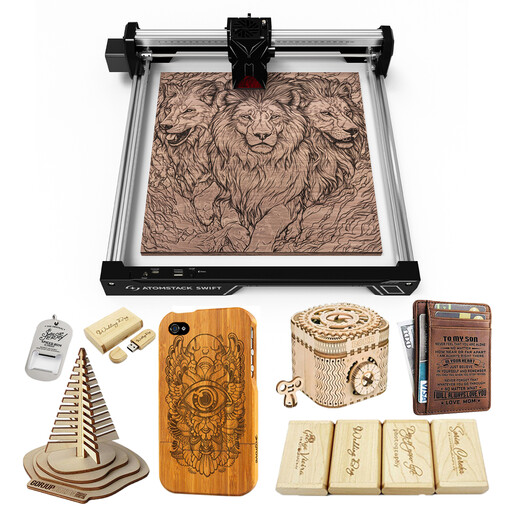
Why This Fits Their Persona: This device is aimed at users who want to go beyond simple engravings and need the power to cut wood or acrylic, as well as precisely mark metal. It's a solid choice for creating small batches or complex one-off pieces.
The model clearly specifies a 12W optical output power. The fixed-focus laser eliminates the need for manual adjustments and ensures consistent precision, while compatibility with LightBurn avoids software limitations.
Versatile material compatibility (wood, leather, dark acrylic, painted metal) and flexible data transfer via Wi-Fi, hotspot, or USB.
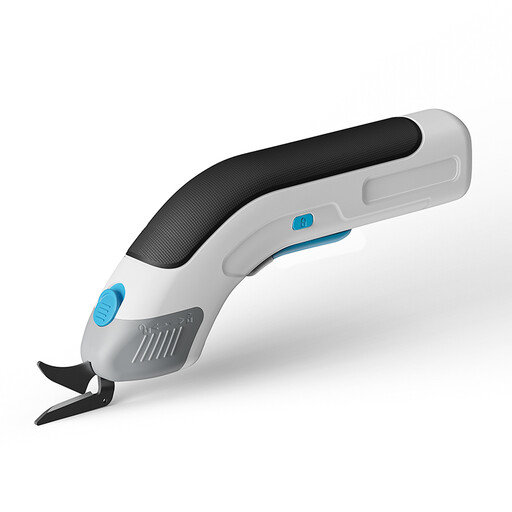
Why This Fits Their Persona: For users who primarily cut flexible materials like leather, felt, or fabric, a laser engraver can be overkill. This specialised, cordless cutting tool offers a precise and handy alternative for clean edges and corners.
This tool avoids the complexity and safety requirements of a laser. It is a straightforward solution that accomplishes one task—precisely cutting soft materials—without a steep learning curve.
Lightweight, ergonomic design and a pointed blade specifically designed for precise curve and corner cuts in materials like leather and felt.
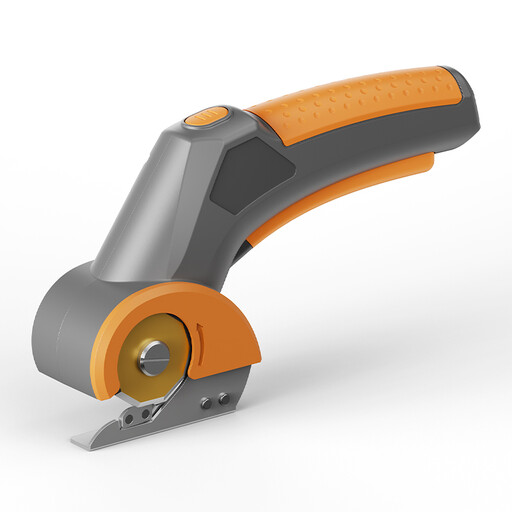
Why This Fits Their Persona: Ideal for users who frequently cut cardboard, carpet remnants, or thick fabrics. This tool replaces a conventional utility knife with a motorised, rotating blade, which saves effort and ensures more consistent cuts.
Instead of being an all-in-one device, this rotary cutter focuses on efficiently cutting sheet materials. It prevents the purchase of a laser for tasks where a mechanical cutting tool is more practical.
The powerful 11,000 RPM motor and self-sharpening blade allow for effortless cutting without hand fatigue. The cordless operation offers maximum flexibility.
There are specialised tools available, particularly for working with leather. If your focus is on this material, you will find more suitable devices in our curated selection.
The lifespan of a laser module is measured in operating hours and depends heavily on usage intensity and operating conditions. Manufacturers often state figures between 10,000 and 20,000 hours. To achieve the maximum lifespan, adequate cooling during operation and regular, careful cleaning of the laser lens according to the manufacturer's instructions are crucial.
Yes, provided that all safety regulations are strictly followed. Always wear the provided laser safety glasses to protect your eyes from direct and reflected radiation. Use the device's protective cover to shield the surrounding area. Ensure good ventilation in the room, especially when cutting materials like acrylic or leather, and never leave the machine unattended during operation.
A 12W laser engraver cannot cut metal, but it can mark or engrave certain metals. The best results are achieved on painted metal (where the paint layer is removed) and on some types of stainless steel. For untreated, reflective metals like aluminium or copper, the energy from a diode laser of this power class is generally not sufficient for a visible mark.