
Lieferung heute & morgen

Qualitätsgarantie

Willkommens-Angebote freischalten: KOSTENLOSE Lieferung | Bis zu 80 % RABATT | Kostenlose 30-Tage-JoyPlus-Testphase
App herunterladen
The terms "AI Laptop" and "Copilot+ PC" are creating a lot of buzz, but the market is flooded with devices that overpromise and underdeliver. Many buyers invest in expensive technology only to find that the advertised AI features are disappointing or that fundamental aspects like cooling and display quality have been neglected. Before you make a purchase, it's crucial to understand the most common pitfalls to avoid a bad investment.
This guide focuses on the objective criteria that define a powerful and future-proof 16-inch AI Laptop. We'll highlight the three most common marketing traps and explain which technical parameters you should focus on.
To avoid these traps, you should base your selection on three core components. These define whether a device can deliver on its promise as a high-performance companion for creatives, professionals, and gamers.
The defining feature of a true AI laptop is the NPU (Neural Processing Unit). This specialised chip is designed exclusively to accelerate AI algorithms. Unlike processing on the CPU or GPU, an NPU operates with extreme power efficiency. The result: AI features like real-time captions, intelligent camera effects, or predictive power management run locally on the device without drastically shortening battery life or impacting system performance. A Ryzen AI 7 laptop is an example of a system that features such a powerful NPU and meets the requirements for a Copilot+ PC.
For demanding users, a dedicated graphics card is indispensable. A laptop with an RTX 5050 or a comparable GPU offers far more than just good gaming performance. In creative applications like video editing, 3D modelling, or photo processing, the GPU significantly accelerates compute-intensive processes. It is a key component for anyone looking for a versatile laptop for creatives and gaming that won't hit its limits, even with complex projects.
OLED technology promises perfect black levels and vibrant colours. But the quality depends on the details. When considering a 16-inch OLED notebook, pay attention to the following parameters:
Instead of making a blanket recommendation, we have selected models for different user profiles. Each profile addresses specific needs and avoids the pitfalls mentioned earlier.

Why This Fits Their Persona: Ideal for tech-savvy professionals and creatives who need a powerful, portable device for hybrid work models. It combines AI performance, a dedicated GPU, and a high-quality display in a slim chassis.
The AMD Ryzen AI 7 processor includes a true NPU. The 16-inch 2K OLED display with 120 Hz meets professional standards. The cooling system is designed to handle the performance of the CPU and RTX 5050 within the lightweight chassis.
A balanced combination of portability (approx. 1.9 kg) and high performance for work, creativity, and gaming. Meets the criteria of a Copilot+ PC.
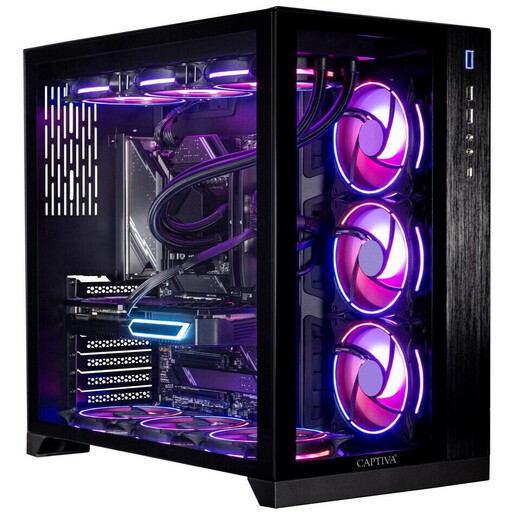
Why This Fits Their Persona: For users whose performance needs exceed the capabilities of a laptop. Ideal for professional 3D rendering, complex simulations, or 4K gaming at the highest settings, where mobility is not a factor.
Completely bypasses the compromises of a mobile form factor. The large chassis and liquid cooling prevent thermal throttling even under sustained load. The RTX 5070 Ti offers significantly higher performance than any mobile GPU.
Maximum computing and graphics performance without thermal compromises. Extensive upgrade options for future requirements.
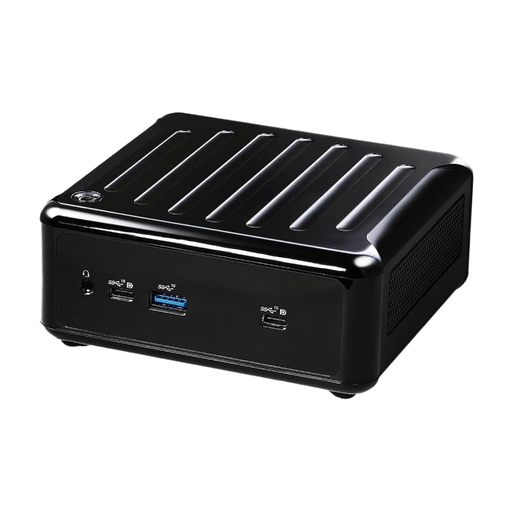
Why This Fits Their Persona: A space-saving and energy-efficient solution for home office users whose tasks primarily consist of office applications, web browsing, and media consumption, and who do not prioritise mobility or high-end graphics.
This barebones system focuses on efficiency rather than exaggerated marketing promises. It offers solid performance for everyday tasks without the cost and power consumption of a dedicated GPU and an expensive display.
Extremely compact, quiet in operation, and flexibly configurable (RAM and SSD must be purchased separately). Supports up to four monitors for maximum productivity.
If your requirements differ from the profiles shown here, you can find more devices in our comprehensive category, selected based on objective performance criteria and current standards.
A Copilot+ PC is a new class of device defined by Microsoft, designed for optimised, local execution of AI applications. The core requirement is an integrated NPU with a performance of at least 40 TOPS (Trillion Operations Per Second). If you plan to regularly use AI-powered features, such as enhanced Windows Studio Effects, live translations, or the Recall function in Windows, a Copilot+ PC will provide a significantly smoother and more power-efficient experience.
Battery life depends heavily on usage. For everyday tasks like web browsing or video playback, a modern AI laptop with an efficient NPU can achieve long runtimes, as the NPU takes over power-intensive tasks from the CPU. Under full load, such as during gaming or video rendering with the dedicated GPU, the battery life will be considerably shorter. Models with advanced power management that intelligently switch between the NPU, integrated graphics, and dedicated GPU offer the most balanced performance.
Yes, provided it has the right specifications. A 16-inch OLED notebook with a high resolution (2K or 4K), a 120 Hz refresh rate, and certified colour accuracy (e.g., 100% DCI-P3) is very well-suited for professional photo and video editing. The OLED technology ensures precise colours and deep contrasts, which allows for an accurate assessment of visual content. Pay close attention to the manufacturer's stated values for colour accuracy and brightness.