
Lieferung heute & morgen

Qualitätsgarantie

Willkommens-Angebote freischalten: KOSTENLOSE Lieferung | Bis zu 80 % RABATT | Kostenlose 30-Tage-JoyPlus-Testphase
App herunterladen
A 1TB SSD offers enough space for your operating system, programmes, games, photos and plenty of video files. However, choosing one is not simply a matter of storage capacity. If you focus only on the advertised speed or a low price, you could end up with an SSD that fails to deliver the expected performance in your PC, laptop or PlayStation 5.
As a Joybuy Product Recommendation Officer, I filter through the most important product specifications and show you which factors matter before buying an internal SSD or an external portable SSD.
Manufacturers usually quote sequential read speeds under optimum conditions. A PCIe 4.0 SSD offering speeds of up to 7,000 MB/s requires a compatible PCIe-4.0-x4 system, up-to-date firmware and suitable cooling. It will often also work in an older PCIe 3.0 slot, but at a reduced speed.
The same principle applies to an external USB-C SSD: an SSD with USB 3.2 Gen 2×2 can support speeds of up to 20 Gbit/s, provided that both the port and cable support this standard. When connected to a slower USB port, the transfer rate will be correspondingly lower.
“M.2” initially describes the form factor and slot. An M.2 SSD 2280 is 22 mm wide and 80 mm long. The transfer protocol is also crucial: modern NVMe SSDs usually use PCIe, while older M.2 SATA models require a different interface.
Before buying, check your motherboard or laptop manual to find out:
During short file transfers or when launching programmes, heat generation is often barely noticeable. However, temperatures can rise when copying large video files, during extended gaming sessions or while rendering. The SSD may then reduce its speed to protect the electronics.
An SSD with heatsink is particularly useful for desktop PCs, high-performance gaming systems and the PS5. With a laptop, however, you need to check whether the additional heatsink will actually fit in the available space. The M.2 heatsink already fitted to the motherboard may be sufficient.
A PCIe-4.0 SSD offers a balanced combination of transfer performance, heat generation and device compatibility for many PCs, laptops and gaming systems. According to the relevant product specifications, PCIe 5.0 delivers significantly higher maximum speeds, but requires a motherboard with a suitable slot and often careful cooling.
A PCIe-5.0 SSD is backwards compatible with PCIe 4.0 in many cases, but it will not run at the advertised PCIe 5.0 speed. For an older computer, a more affordable generation is therefore often a better choice than a premium model whose performance cannot be fully utilised.
The specification TBW stands for “Terabytes Written” and describes the amount of data the manufacturer states can be written over the intended service life. It is particularly relevant for video editors, content creators and professional users who regularly write large amounts of data.
The type of NAND memory also plays a role. TLC and QLC differ in areas including write behaviour, endurance and cost structure. To make an informed decision, you should consider TBW, warranty terms and intended use together, rather than comparing read speed alone.
An internal NVMe SSD is installed directly into the M.2 slot. It is suitable as a system drive and for games and frequently used applications. An external portable SSD connects via USB and offers greater flexibility when used between a PC, laptop, camera, tablet or smartphone.
For mobile video recording, the connection standard, cable, impact resistance and smartphone compatibility are particularly important. According to the product specifications, the DigiEra LPS2000M-3 is designed for iPhone 15 and iPhone 16 models, as well as other USB-C devices. The stated iPhone compatibility does not automatically apply to older models.
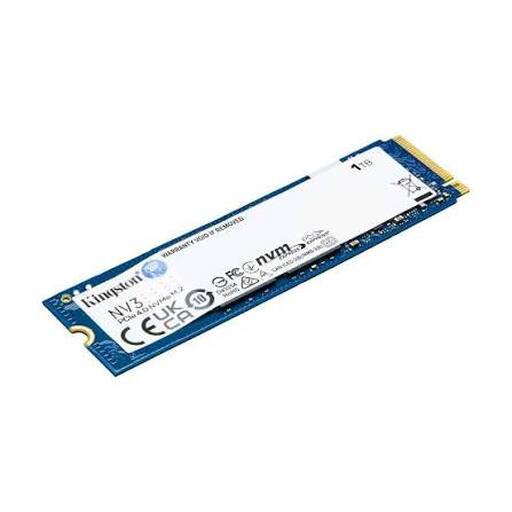
Why this product suits this profile: This internal SSD offers 1 TB of capacity, PCIe 4.0 x4 and the compact M.2 2280 form factor for compatible PCs, laptops and small systems.
The product data explicitly states PCIe 4.0, NVMe and the 2280 form factor. This makes it easier to check compatibility more precisely before buying.
Up to 6,000 MB/s read and 4,000 MB/s write speeds according to the product specifications; 5.7 g weight and 2.3 mm height.
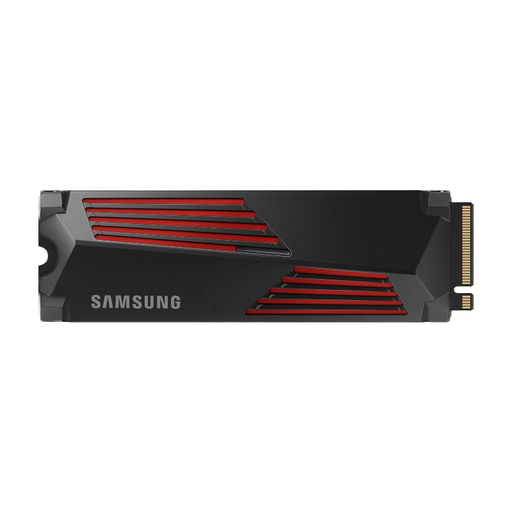
Why this product suits this profile: The combination of PCIe 4.0, integrated cooling and compatibility with PCs and PlayStation 5 is ideal for demanding gaming and editing setups.
The integrated heatsink helps manage heat during longer transfers. For use with the PS5, the heatsink dimensions must be checked against the console requirements.
Up to 7,450 MB/s read and 6,900 MB/s write speeds; M.2 2280 and Samsung Magician software according to the product specifications.
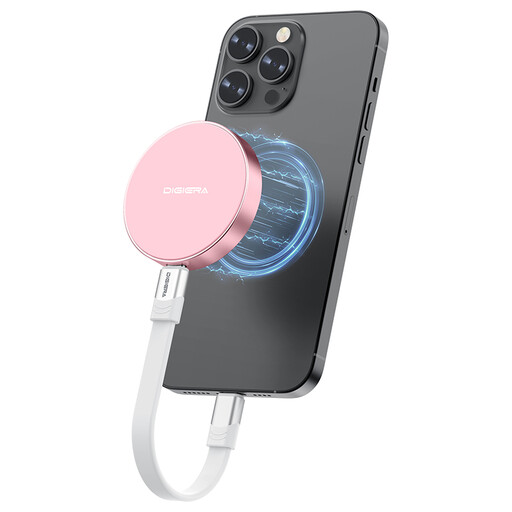
Why this product suits this profile: This external portable SSD is designed for mobile video creators and users who move data between a USB-C smartphone, laptop, camera or console.
The product specifications explicitly state USB 3.2 Gen 2×2, cable and device compatibility, as well as the restriction to iPhone 15 and newer models.
Up to 2,000 MB/s read and 1,800 MB/s write speeds, magnetic attachment and 1 TB capacity according to the manufacturer’s specifications.
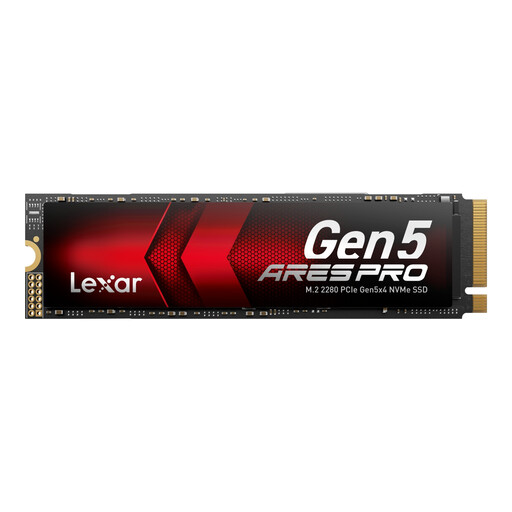
Why this product suits this profile: A PCIe-5.0 SSD is an appealing choice for compatible desktop systems with powerful cooling and data-intensive tasks such as video or AI applications.
The product description highlights heat dissipation and backwards compatibility. However, a PCIe-5.0 slot is required to achieve the advertised performance.
Up to 14,000 MB/s read and 7,500 MB/s write speeds, 750 TBW and a five-year limited warranty according to the product specifications.
We have put together a complete, regularly updated list of products that fully meet these strict selection criteria and the safety regulations applicable in the EU.
1 TB is often enough for the operating system, programmes and several games. However, large game titles and video projects can quickly take up additional storage. If you install many games at the same time or archive extensive raw footage, you should compare capacities of 2 TB or more.
Service life depends on write volume, temperature, power supply and model. Manufacturer specifications such as TBW provide a technical guideline, but they are not an exact prediction for every use case. Regular backups remain sensible regardless of the type of drive.
SSDs generally use less energy than mechanical hard drives when operating, although actual consumption varies by model and usage. PCIe-5.0 models can generate more heat and use more power under heavy loads. For a laptop, power consumption and thermal behaviour are therefore just as relevant as speed.