
Lieferung heute & morgen

Qualitätsgarantie

Willkommens-Angebote freischalten: KOSTENLOSE Lieferung | Bis zu 80 % RABATT | Kostenlose 30-Tage-JoyPlus-Testphase
App herunterladen
The search for the right mechanical keyboard can quickly become overwhelming. Manufacturers flood the market with technical jargon and features, often creating more confusion than clarity. As a Joybuy Product Recommendation Officer, I'll help you find objective criteria for your decision and avoid common purchasing pitfalls, ensuring you find a model that truly fits your needs.
Before we dive into the key features, let's look at three common marketing traps that often lead to disappointment:
To avoid a bad purchase, you should focus on a few crucial technical features.
The mechanical switches define the typing feel and acoustics of your keyboard. The three main types are:
The physical arrangement of the keys and the connection options are crucial for daily use.
The internal construction and useful extras set high-quality keyboards apart from the rest.
Here are some models that represent a considered choice for specific user groups, based on objective features.
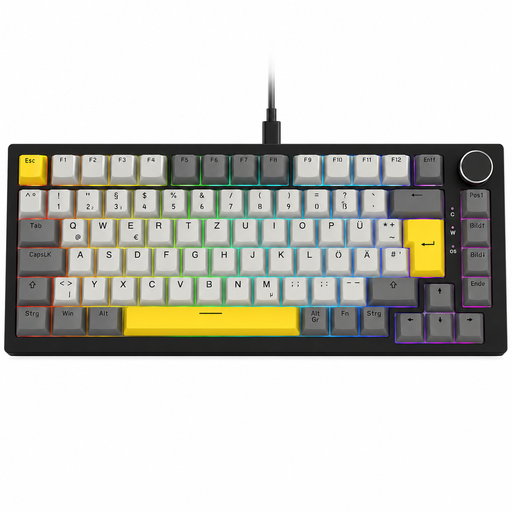
Why This Fits Their Persona: Ideal for users seeking a high-quality mechanical typing feel without a large budget. The compact 75% format with a German QWERTZ layout and a volume knob offers features usually reserved for more expensive models.
This model avoids the "gaming" trap by offering concrete, useful features like a gasket-mount structure and 3-pin hot-swap capability, rather than just relying on a label.
German QWERTZ layout and a convenient volume knob in a budget-friendly package. The gasket structure ensures a pleasant typing experience.

Why This Fits Their Persona: Designed for professional users who value efficiency and a quiet work environment. The low-profile, quiet tactile switches and multi-device connectivity are ideal for working across multiple devices (PC, Mac, tablet).
Battery life is communicated transparently (up to 15 days with, up to 10 months without backlighting). The smart illumination also adapts to the ambient environment, saving energy.
Quiet tactile switches for a pleasant typing experience without disruptive noise. Seamlessly switch between up to three devices via Bluetooth or the Logi Bolt receiver.
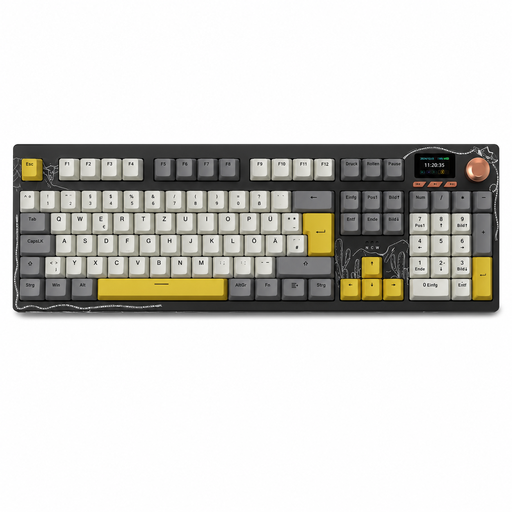
Why This Fits Their Persona: This model is aimed at users who don't want to compromise. It combines a full-size German QWERTZ layout with tri-mode connectivity, hot-swap capability, and premium features like a TFT display and a rotary knob.
It avoids the hot-swap trap with a PCB that allows for switch replacement without soldering, ensuring maximum customisation for enthusiasts. The large battery (10000mAh according to the manufacturer) counters the short battery life trap.
Full functionality with a German full-size layout and maximum flexibility thanks to tri-mode connectivity and a hot-swappable design. The TFT display is a useful extra.
We have compiled a complete, up-to-date list of products that fully meet these strict selection criteria and German safety regulations.
The lifespan of a mechanical keyboard is largely determined by its switches. Many manufacturers specify a durability of 50 million or more keystrokes per switch. With normal use, a well-built mechanical keyboard can function reliably for many years—often significantly longer than conventional rubber-dome keyboards.
"Hot-swappable" means that the keyboard's mechanical switches can be replaced without needing to solder. Using a special tool, the switches can be easily pulled from the PCB and replaced with other compatible switches. This allows users to customise the typing feel and sound of their keyboard or easily replace faulty switches.
Modern wireless mechanical keyboards are perfectly suitable for gaming, provided they support a connection via a 2.4 GHz wireless receiver (dongle). This technology offers very low latency, comparable to a wired connection. While Bluetooth is convenient for connecting to mobile devices, it generally has higher latency and is therefore less recommended for competitive gaming.