
Lieferung heute & morgen

Qualitätsgarantie

Willkommens-Angebote freischalten: KOSTENLOSE Lieferung | Bis zu 80 % RABATT | Kostenlose 30-Tage-JoyPlus-Testphase
App herunterladen
A 2TB SSD gives you plenty of space for game libraries, videos, photos, software and backups. But with so much choice, it’s easy to end up with the wrong drive. Capacity isn’t the only thing that matters: you’ll also need to consider the form factor, connection, speed and compatibility.
Manufacturers usually quote sequential read speeds, which measure performance with large, continuous files. Starting Windows, loading lots of small files and playing games also depend on random access, the controller and cache technology.
On paper, a PCIe 5.0 SSD can be much faster than a PCIe 4.0 model. But if you install it in an older slot, its potential speed will be limited accordingly. For many home users, a PCIe 4.0 SSD that’s a good fit for their system makes more sense than a high-end model that can’t reach its full potential.
M.2 refers to the form factor, not the interface. Depending on the model, an M.2 SSD may use SATA or PCIe/NVMe. Before buying, check that your motherboard or laptop has an M.2 slot with NVMe support.
Length matters too: the common M.2 2280 format measures around 22 × 80 mm. Not every compact laptop can accommodate this size.
An external 2TB SSD with USB 3.2 Gen 2 will only reach its quoted speeds if your computer, games console or mobile device supports the right connection. The drive will usually still work with a slower USB port, but transfer speeds will be lower.
With portable drives, it’s also worth checking the cables, power supply, casing and data security. Hardware or software encryption is useful for confidential work files and backups, but it doesn’t replace keeping an additional backup copy.
An internal 2TB SSD is installed directly in a desktop PC, laptop or compatible games console. It doesn’t need a separate cable and can be used as a system, gaming or work drive.
An external 2TB SSD, also known as a portable 2TB SSD, connects via USB. It’s a more flexible option for backups, transporting large media projects and switching between devices. Models such as the Samsung Portable SSD T7 and KIOXIA Exceria Plus G2 Portable SSD use USB Type-C and come with cables for both USB-C and USB-A.
Fast NVMe SSDs can get warm under sustained load. With PCIe 4.0 and PCIe 5.0 models, an M.2 heatsink or a well-ventilated case can help reduce performance loss from thermal throttling.
Before installing the drive, switch the device off completely and disconnect it from the power supply. Touching a grounded metal surface or wearing an anti-static wrist strap can reduce the risk of electrostatic discharge. Once installed, a new drive often needs to be initialised and formatted in Windows, macOS or Linux.
For a gaming SSD, your platform matters too. According to the product details, the Samsung 990 PRO with heatsink is designed for compatible PCs and games consoles. If you’re choosing an SSD for PS5, check the console’s requirements, the M.2 format and the cooling as well.
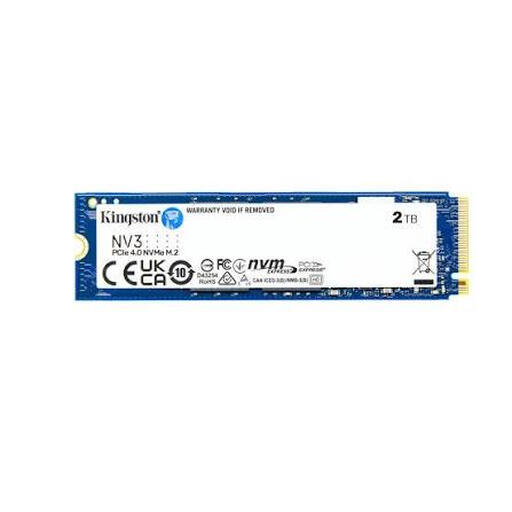
Why it’s a good fit: This internal 2TB NVMe SSD is designed for PC and laptop users with a compatible M.2 2280 slot and PCIe 4.0 support.
The product details explicitly list PCIe Gen 4x4, NVMe and the 2280 format, making it easier to check compatibility before you buy.
2 TB capacity, with read speeds of up to 6,000 MB/s and write speeds of up to 5,000 MB/s, according to the product details.

Why it’s a good fit: This PCIe 4.0 SSD is built for demanding PC applications, gaming and video editing, provided your system supports the interface.
The integrated heatsink helps manage the heat generated by fast NVMe drives. You’ll still need to check system compatibility before installation.
Read speeds of up to 7,450 MB/s and write speeds of up to 6,900 MB/s, plus a heatsink and 2TB capacity, according to the product description.
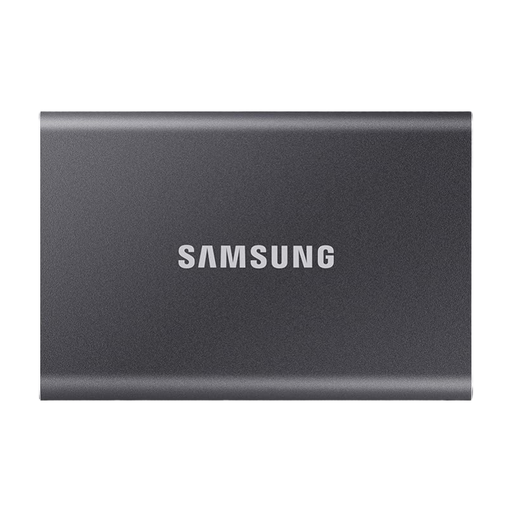
Why it’s a good fit: This external 2TB SSD is ideal for mobile backups, large media files and switching between PCs, Macs, compatible consoles and USB-C devices.
USB-C to USB-C and USB-C to USB-A cables are included. You can check which connection works with your devices without having to buy an extra cable straight away.
USB 3.2 Gen 2, read speeds of up to 1,050 MB/s and write speeds of up to 1,000 MB/s, plus an aluminium casing and optional hardware encryption, according to the product details.
We’ve put together a complete, regularly updated list of products that meet these strict selection criteria and the safety regulations in force in the EU.
For many home users, 2 TB is enough for a system and games drive. The usable capacity will be slightly lower than advertised once the drive has been formatted. Large games, video archives and backups can still fill it up quickly. An external 2TB SSD can provide extra space for a game library or backups.
A PS5 needs a compatible M.2 NVMe SSD with sufficient read speeds, the right form factor and adequate cooling. A model with a heatsink, such as the Samsung 990 PRO in the relevant version, can make installation easier. Before buying, check Sony’s latest requirements and the heatsink’s dimensions.
Lifespan depends on the storage technology, write volume, temperature and how you use the drive. Some manufacturers provide a TBW rating, which specifies the amount of data that can be written. This isn’t an exact expiry date. Regular backups are still important, as an SSD can fail without warning.