
Lieferung heute & morgen

Qualitätsgarantie

Willkommens-Angebote freischalten: KOSTENLOSE Lieferung | Bis zu 80 % RABATT | Kostenlose 30-Tage-JoyPlus-Testphase
App herunterladen
A 34 inch ultrawide gaming monitor can bring together gaming, streaming and productive work across a wide screen. At the same time, unclear manufacturer specifications, unsuitable connections or a desk that’s too small can quickly lead to a bad purchase. Focusing only on a high refresh rate or a quoted response time means you risk missing important details.
This buying guide shows which technical specifications actually matter for a UWQHD gaming monitor and which model suits different usage scenarios.
A monitor might be advertised with 144 Hz, 165 Hz, 180 Hz or 200 Hz. Whether that frequency is actually available at 3440 × 1440 pixels depends on the connection and the cable you use. On some devices, HDMI only supports a lower frequency, while DisplayPort delivers the full performance.
Before you buy, you should therefore check:
A specification of 1 ms gaming monitor can refer to different measurement methods, such as GtG or MPRT. MPRT is often quoted in connection with a backlight designed to reduce motion blur. This can affect the image quality and may reduce brightness.
Response time should therefore be considered together with panel technology, refresh rate and synchronisation. A low manufacturer figure alone doesn’t guarantee identical performance across every game setting.
An HDR gaming monitor needs not only HDR support but also suitable brightness and contrast control. On LCD models, local dimming can make bright and dark areas of the image more distinct. An OLED panel, by contrast, inherently delivers very deep blacks, but has its own requirements when it comes to handling static content.
Look at the specific certification, the quoted peak brightness and the type of backlight. The term “HDR ready” is far less meaningful than concrete specifications such as DisplayHDR 400 or DisplayHDR True Black.
For a classic 21:9 monitor at 34 inches, 3440 × 1440 pixels is the key resolution. Compared to 2560 × 1080, it offers more pixels and a finer display of text, games and videos. At the same time, UWQHD demands significantly more graphics power than Full HD.
Before you buy, also check the native resolution. Product data may list additional supported or maximum resolutions, but it’s the native panel resolution that counts for everyday sharpness.
A VA gaming monitor typically offers a high native contrast ratio and is well suited to dark game scenes and films. Depending on the model, however, visible smearing can occur during fast motion.
IPS models are generally designed for consistent colour reproduction and wide viewing angles. An OLED gaming monitor impresses with self-emissive pixels and very deep blacks. For permanently static elements such as taskbars or interface overlays, you should use the built-in protection features and follow the manufacturer’s guidance.
A Mini-LED gaming monitor uses an LCD display with many individually controllable LED zones. This can improve HDR performance. The number of dimming zones, the peak brightness and the specific tuning are all crucial to the real-world image quality.
Technologies such as AMD FreeSync Premium synchronise the image output of your graphics card and monitor within a supported frequency range. This can reduce screen tearing and uneven motion. Compatibility depends on your graphics card, driver, connection and settings.
For gaming and multitasking, the following connections are also relevant:
A 34-inch model is roughly 80 cm wide. So check your desk width, the depth of the stand and the distance to your seating position. A VESA mount can help with placement, but it must be compatible with the monitor’s weight and VESA standard.
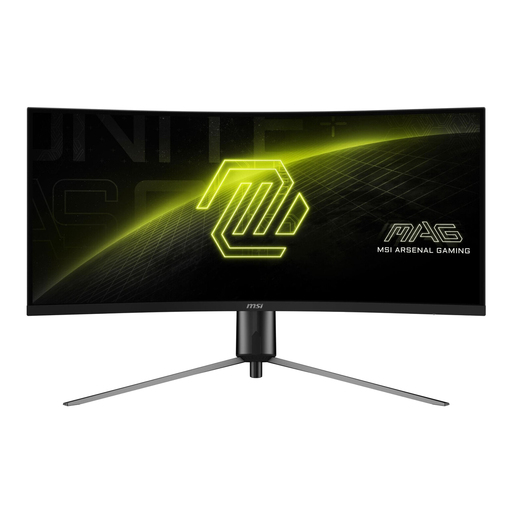
Why this product fits the profile: This 34-inch monitor combines UWQHD, a VA panel and 180 Hz. It’s well suited to PC gaming and everyday multimedia use, without relying on an unusual format.
The specifications list native 3440 × 1440 pixels and the maximum WQHD frequency over DisplayPort. HDMI is listed with a lower maximum frequency.
180 Hz, 3000:1 contrast, Adaptive Sync, DisplayPort 1.4a and HDMI 2.0b.
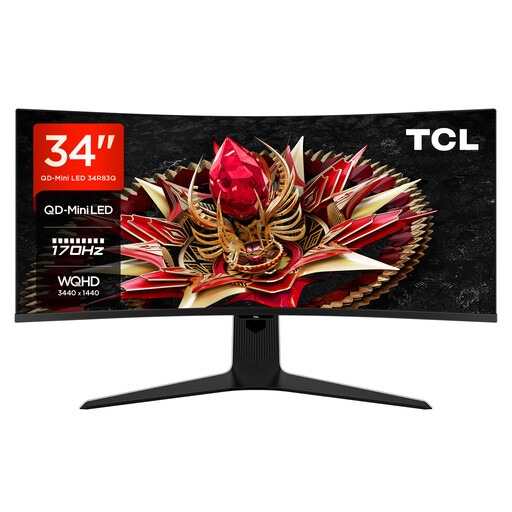
Why this product fits the profile: This model is aimed at users who want to combine UWQHD gaming with Mini-LED backlighting, high brightness and USB-C charging.
The product data lists 1152 Mini-LED zones, 170 Hz, 3440 × 1440 pixels and DisplayHDR 1400. This means the relevant HDR parameters are specified more concretely.
Mini-LED LCD, 1600 Nits quoted peak brightness, AMD FreeSync Premium and USB-C with 90 W.
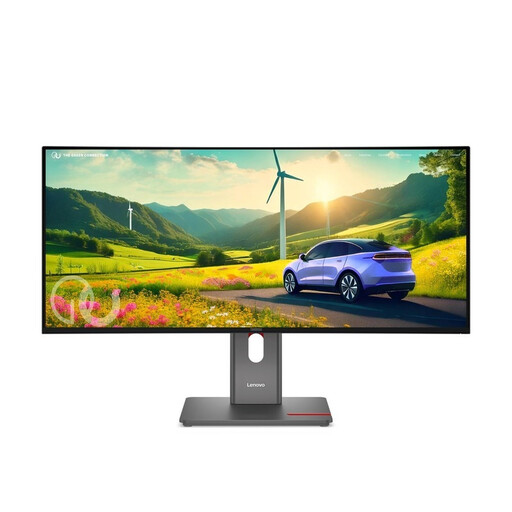
Why this product fits the profile: For professionals, creatives and users with multiple devices, USB-C, docking features, Ethernet and ergonomic adjustment options take centre stage.
The features aren’t limited to gaming specs: USB-C with 140 W, RJ45, USB hub and height-adjustable stand are all listed in detail.
IPS panel, 120 Hz, HDR10, 98 % DCI-P3, five USB-A ports and Gigabit Ethernet.
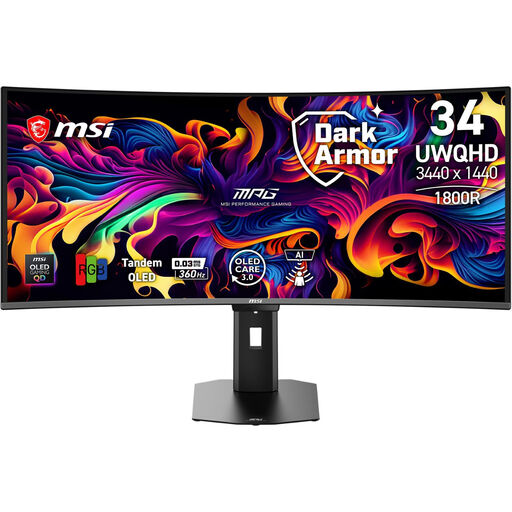
Why this product fits the profile: This QD-OLED model is aimed at users who prioritise a very high refresh rate and fast panel response for competitive gaming.
The product data explicitly lists 360 Hz and 0.03 ms GtG. For OLED-typical static content, the integrated OLED Care function is provided.
QD-OLED, UWQHD, VESA DisplayHDR True Black 500, HDMI 2.1, DisplayPort and USB-C.
We’ve put together a complete, regularly updated list of products that fully meet these strict selection criteria and the safety regulations in force in the EU.
That depends on the game, the graphics settings and the desired frequency. For 144 Hz or more, you’ll need significantly more power than for 60 Hz. Check the connections on your graphics card and use DisplayPort if possible. Adaptive Sync can help when the frame rate fluctuates during gameplay.
A curved gaming monitor with 1500R or 1800R can work well for games, spreadsheets and multiple windows. What matters is your seating distance, the curvature and the ergonomic adjustability. For longer working hours, you should set the height, tilt and viewing angle correctly.
Power consumption depends on brightness, HDR usage, refresh rate and operating time. For a rough estimate, multiply the consumption in kWh per 1,000 hours by your electricity price. The energy efficiency rating of the specific model provides a standardised comparison value for this.