
Lieferung heute & morgen

Qualitätsgarantie

Willkommens-Angebote freischalten: KOSTENLOSE Lieferung | Bis zu 80 % RABATT | Kostenlose 30-Tage-JoyPlus-Testphase
App herunterladen
Modern processors from Intel and AMD offer impressive computing power, but they also generate significant heat. Especially during demanding applications like gaming, video editing, or overclocking, inadequate cooling can lead to performance reduction (thermal throttling). A 360mm AIO water cooler is an effective solution to keep CPU temperatures stable and ensure your system's maximum performance.
This guide is designed to help you understand the technical features and make an informed decision. We will introduce a selection of models and explain what to look for when choosing one.
Before you decide on a model, several fundamental criteria should be checked to ensure compatibility and performance for your specific PC system.
The most critical prerequisite is physical and technical compatibility. First, check your motherboard's CPU socket. Current models require a water cooler for Intel LGA 1700 or a water cooler for AMD AM5. Manufacturers specify the supported sockets precisely. Equally crucial is the space in your PC case. A 360mm radiator is approximately 39 centimetres long and requires three adjacent 120mm fan slots. Measure the available space at the top, front, or side of your case and check the manufacturer's specifications for compatibility with 360mm radiators.
The efficiency of an AIO cooler depends on several factors: the pump, the radiator, and the fans. Pay attention to the fan specifications, especially the airflow (measured in CFM or m?/h) and static pressure (in mmH?O). High static pressure is important for effectively pushing air through the fine fins of the radiator. For a quiet AIO water cooler, models with PWM (Pulse Width Modulation) controlled fans are recommended. These dynamically adjust their speed based on the CPU temperature, running only as fast as necessary, which minimises noise at idle.
Today, an all-in-one PC water cooling kit is more than just a functional component; it's also a central design element. For example, a white AIO water cooler can be the centrepiece of a light-themed PC build. An AIO cooler with RGB lighting offers extensive options for customisation and synchronisation with other components. Some models go a step further, integrating an AIO with an LCD display on the pump head. This display can show real-time system information like CPU temperature and fan speed, or be personalised with your own images and GIFs.
Here is a selection of models that cover different requirements for performance, design, and functionality.
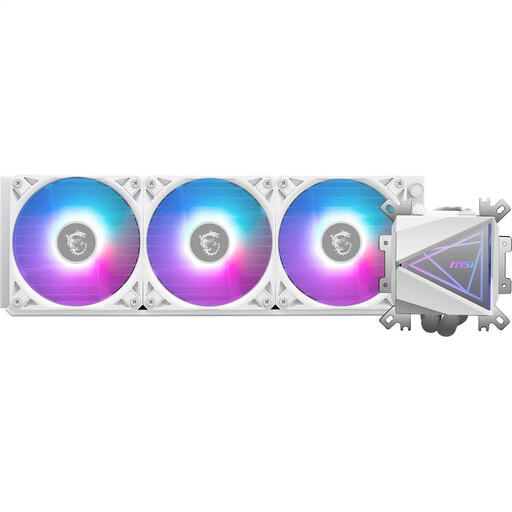
Why it stands out: The MSI MAG Coreliquid I360 WHITE combines high cooling performance with a sophisticated white aesthetic. The "Infinity Mirror" style pump head with ARGB lighting is a visual focal point, while the enlarged copper baseplate has been specially optimised for heat absorption from modern multi-die CPUs.
Benefits:
Who is it for? For users building a white-themed PC who are looking for a powerful cooling solution with striking ARGB effects that is also straightforward to install.
View details for the MSI MAG Coreliquid I360 WHITE
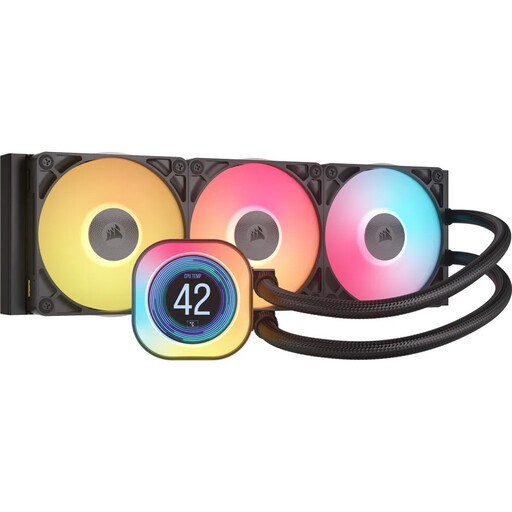
Why it stands out: The standout feature of this cooler is its integrated 2.1-inch IPS LCD, which allows for real-time system monitoring and extensive customisation. The iCUE LINK technology also significantly simplifies cable management and control.
Benefits:
Who is it for? For PC enthusiasts who value detailed system monitoring, maximum customisation, and a clean system with minimal cable clutter. Ideal for users who already use other Corsair iCUE components or plan to build such an ecosystem.
View details for the iCUE LINK TITAN 360 RX LCD
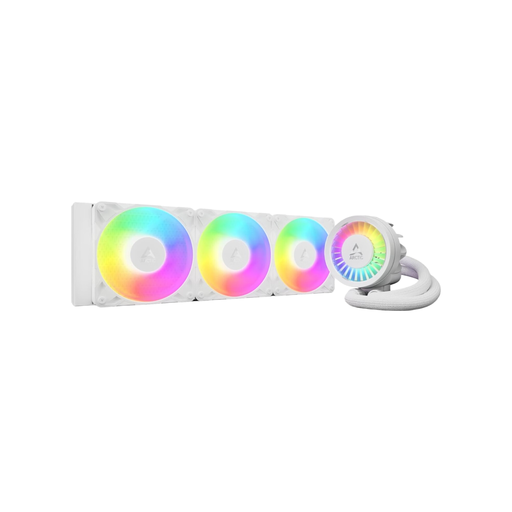
Why it stands out: The Liquid Freezer III Pro is distinguished by an integrated VRM fan that provides additional cooling for the motherboard's voltage regulators. Other features include a special offset mount for AMD CPUs and a contact frame for Intel sockets to optimise contact pressure.
Benefits:
Who is it for? For performance-oriented users and overclockers seeking a comprehensive cooling solution that stabilises not only the CPU but also the surrounding motherboard components. The clean cable management is an added bonus for aesthetically demanding builds.
View details for the ARCTIC Liquid Freezer III Pro 360
The range of cooling solutions is vast and constantly evolving. If the models presented here don't exactly meet your requirements, you might find the right component for your system in our broader selection.
Discover More CPU Fans and Coolers
What is the advantage of a 360mm AIO water cooler over an air cooler? A 360mm AIO has a larger surface area for heat dissipation than most air coolers. This allows it to handle a higher thermal load (TDP), which can lead to lower peak temperatures, especially with high-end CPUs under full load. Additionally, it shifts the weight of the heatsink from the motherboard to the case and often provides more clearance for tall RAM modules.
How often does an AIO water cooler need maintenance? An all-in-one CPU cooler is a closed-loop system, filled and sealed by the manufacturer. No fluid maintenance or refilling is required. The only recommended maintenance is to periodically clean dust from the radiator and fans to maintain optimal cooling performance.
Will any 360mm AIO fit in my case? No. Compatibility must be carefully checked before purchase. Your PC case must explicitly support the installation of a 360mm radiator. Check your case's technical specifications to ensure there is enough space at the intended location (usually the front or top) for the radiator and fans, and that there are no conflicts with other components like the motherboard or RAM.