
Same-day & Next-day Delivery

Quality Guaranteed

Unlock Your Welcome Offers: FREE Delivery | Up to 80% OFF | Free 30-day JoyPlus trial
Download the APP
A 3D printer can make prototypes, spare parts, figurines and functional components right on your desk. But choosing one can be tricky: high speed claims, multi-colour printing systems and so-called smart features may sound appealing, but on their own they reveal little about how well a printer will suit your day-to-day needs.
As Joybuy Product Recommendation Officer, I sort through the relevant product details and show you which specifications really matter when buying. This can help you avoid common buying mistakes, whether you’re looking for a 3D printer for beginners, a multi-colour 3D printer or a machine for technical materials.
Figures such as 500, 600 or 800 mm/s often refer to a technically achievable top speed. The speed that’s practical for a particular print depends on the model’s geometry, material, layer height, acceleration and cooling. For many projects, the recommended speed is a more useful guide than the maximum.
So check both figures. A fast 3D printer should also have a sturdy frame, suitable motion guides and reliable print bed calibration.
A printer for multi-colour 3D printing needs a suitable material-changing system. Depending on how it’s set up, changing colours can create extra purge material or waste. And the number of colours you can use at once isn’t necessarily the same as the maximum number the system can be expanded to support.
So check:
A 3D printer with automatic levelling can make setup easier. But it can’t compensate fully for a damp filament spool, a dirty build plate or an unsuitable location. An AI camera won’t detect every possible print issue either.
A stable, heat-resistant surface, good ventilation and proper filament storage are still important. For printers with heated chambers, you’ll also need to consider the space available, the power supply and safety clearances.
Build volume is given in millimetres, for example 260 × 260 × 260 mm or 350 × 350 × 350 mm. It describes the maximum printing area, not the printer’s external dimensions. A mid-sized printer is often enough for figurines and smaller functional parts. Model makers, designers and small businesses, on the other hand, may benefit from more room for larger components or several parts in one print job.
Remember to allow extra space for the filament holder, cables, covers and, if needed, a separate multi-colour system.
An FDM 3D printer processes filament by heating it and laying it down in layers. PLA and PETG are suitable for many everyday models. TPU is flexible, while carbon-fibre-reinforced filaments place greater demands on the nozzle and extruder.
Look at three key figures:
Temperature figures don’t guarantee compatibility with every filament. The recommendations from the filament manufacturer and the relevant print profile are what matter.
Automatic levelling, Z-offset correction, filament detection, power-loss recovery and print failure detection can all reduce the work involved in operating a printer. Depending on the model, a camera can let you monitor prints remotely or record time-lapse footage. For features such as ‘spaghetti detection’, bear in mind that performance depends on lighting, model shape and software.
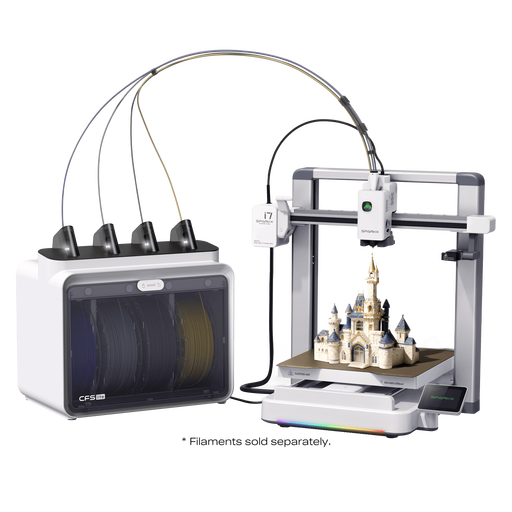
Why this product suits this profile: This printer has a build volume of 260 × 260 × 255 mm, automatic levelling, a 4-colour option and a stated print speed of up to 500 mm/s. Features such as a quick-change hotend and a model platform can make it easier to get started.
The specifications include more than just the maximum speed, with specific features such as automatic levelling and filament detection also listed.
4-colour printing, 720p camera, 0.05–0.3 mm layer height and compatibility with materials such as PLA, PETG and TPU.
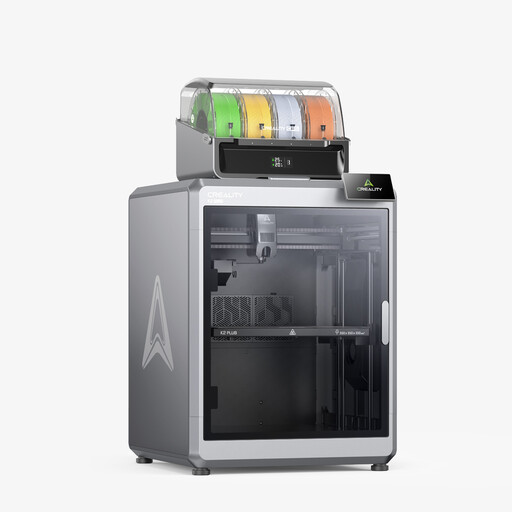
Why this product suits this profile: This enclosed FDM system combines a build volume of 350 × 350 × 350 mm with a maximum print speed of 600 mm/s, automatic levelling and two AI cameras.
The product specifications list the build volume, filament types, nozzle and print bed temperatures, and enclosed design separately.
Supports PLA, ABS, PETG, PA-CF and other filaments, with a nozzle temperature of up to 350 °C and the option to expand to up to 16 colours.
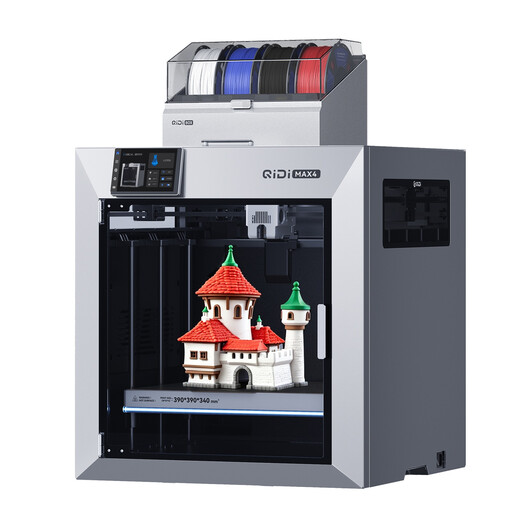
Why this product suits this profile: Designed as a 3D printer for large models, it offers a build volume of 390 × 390 × 340 mm, a heated chamber reaching up to 65 °C and support for technical materials.
Build size, chamber temperature, filament compatibility and AI camera are listed as separate technical specifications.
Maximum speed of 800 mm/s, an active 65 °C heated chamber, up to 16 colours with QIDI Box and support for carbon-fibre-reinforced filaments.
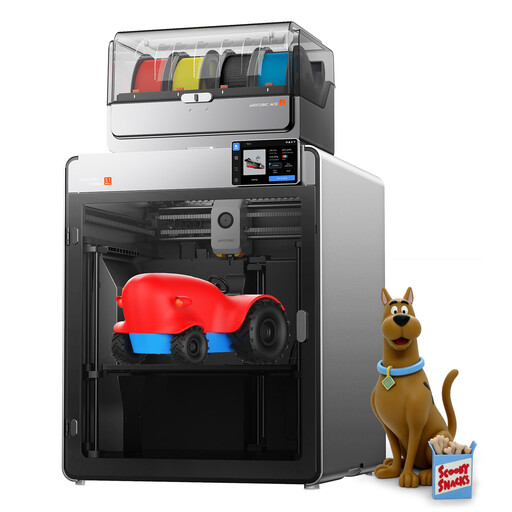
Why this product suits this profile: This enclosed CoreXY system is designed for users who want to combine large models, multi-colour printing and high-temperature materials in one workflow.
The product description distinguishes between the standard number of colours, expansion options, TPU limitations and active filament drying.
350 °C hotend, 65 °C heated chamber, 350 × 350 × 350 mm build volume and the option to expand to up to 16 colours.
We’ve put together a complete, regularly updated list of products that meet these strict selection criteria and fully comply with the safety regulations in force in the EU.
As well as the purchase price, you’ll need to budget for filament, replacement nozzles, build plates and electricity. PLA is often easy to work with. Technical or fibre-reinforced materials can place greater demands on nozzles and storage. With multi-colour 3D printers, you should also factor in the material used during colour changes.
Its lifespan depends on print volume, maintenance, material choice and the environment. Clean the build plate and nozzle regularly, store filament in a dry place and check moving parts. A sturdy frame, automatic calibration and readily available spare parts can make long-term use easier.
Automatic levelling, a filament sensor, power-loss recovery and easy-to-access print profiles are handy for beginners. An AI camera can help with monitoring, but it doesn’t replace checking the material, print bed and first layer. If you’re starting with simple models, you don’t necessarily need a heated chamber or a 16-colour system.