
Lieferung heute & morgen

Qualitätsgarantie

Willkommens-Angebote freischalten: KOSTENLOSE Lieferung | Bis zu 80 % RABATT | Kostenlose 30-Tage-JoyPlus-Testphase
App herunterladen
A 3D printer can produce prototypes, replacement parts, models and creative objects at home or in the workplace. However, choosing the right one can be challenging: manufacturers often quote high maximum speeds, wide temperature ranges and numerous automatic functions. These figures do not automatically translate into suitable print results in everyday use.
Three common purchasing pitfalls occur particularly often:
Build volume determines whether a model can be produced in one piece. For figures, brackets and smaller prototypes, 220 × 220 × 220 mm is often sufficient. If you want to print casings, moulds or larger scale-modelling components, look for a volume with an edge length of at least 260 mm.
A large 3D printer such as the QIDIxJOYBUY Max4 offers 390 × 390 × 340 mm, according to the manufacturer. This can reduce the number of sections and the amount of post-processing required. At the same time, space requirements, heating time and material consumption increase. The key factor is therefore not simply the maximum size, but the size of the objects you intend to produce regularly.
An FDM 3D printer processes filament layer by layer. PLA filament is considered relatively easy to work with and is often suitable for decorative objects, educational projects and models. PETG filament is frequently used for functional components, but requires adjusted print, cooling and adhesion settings.
For ABS, ASA, nylon or fibre-reinforced materials, a suitable hotend temperature range, a heated print bed and, depending on the material, an enclosed build chamber are important. An enclosed 3D printer can shield the printing environment more effectively, but it does not replace checking the specific materials approved by the manufacturer.
When buying filament, the diameter, material type, recommended temperature and storage requirements should match. For example, eSUN Matte PETG comes as 1.75 mm filament on a 1 kg spool. Its matt surface can visually reduce the prominence of visible layer lines; however, the actual results still depend on the nozzle, layer height, temperature and component geometry. Once opened, filament should be stored in a dry and preferably airtight environment.
A 3D printer with automatic levelling can make first-layer preparation easier. However, this function does not replace a clean print bed or suitable Z-height and material calibration. Other practical features include:
A fast 3D printer is particularly useful when producing many parts or prototypes. At high speeds, make sure the printer has a stable mechanism, sufficient cooling and a suitable slicing profile.
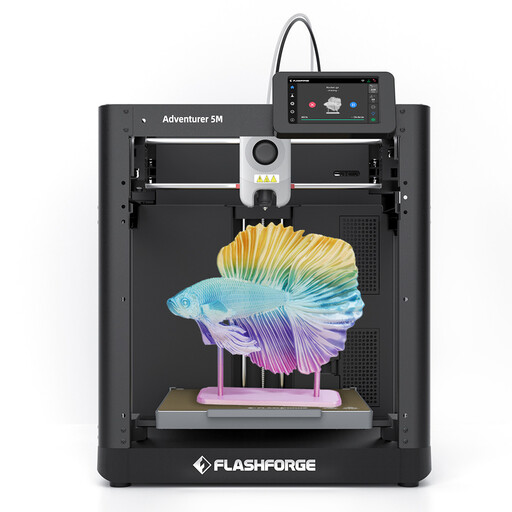
Why this product suits the profile: This compact FDM 3D printer offers a 220 × 220 × 220 mm build volume, automatic bed levelling and a 280 °C direct-drive extruder for typical PLA and PETG projects.
Automatic levelling and an easily accessible nozzle system reduce manual preparation and make getting started easier.
Up to 600 mm/s according to the product details, a 35-second heat-up time to 200 °C according to the manufacturer’s description, and several nozzle sizes.
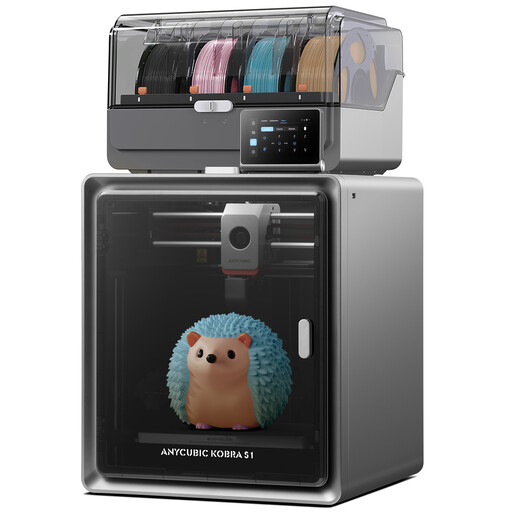
Why this product suits the profile: This enclosed CoreXY system combines a 250 × 250 × 250 mm build volume with automatic levelling, filament monitoring and multicolour support.
The enclosed casing and automatic calibration address the need for repeatable processes and controlled conditions.
Up to four colours as standard, expandable to up to 16 colours; ACE 2 Pro supports active drying at up to 65 °C.
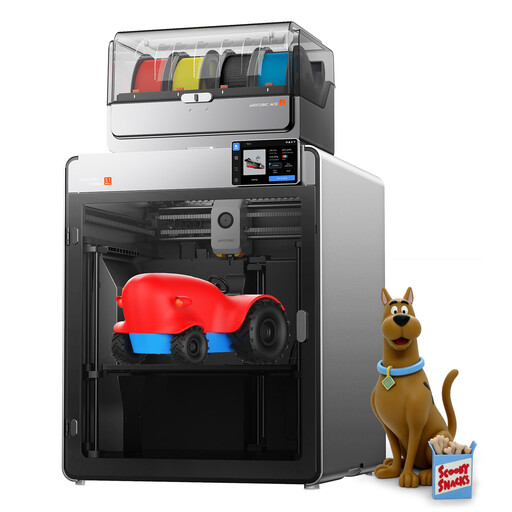
Why this product suits the profile: For large models, series production of small components and material-intensive projects, it offers a 350 × 350 × 350 mm build volume, an enclosed design and a heated chamber.
The large build volume is clearly specified, while temperature limits and supported materials can be checked carefully before buying.
350 °C hotend, 65 °C chamber, hardened steel components and multicolour printing with up to 16 colours according to the product specifications.
We have put together a complete, regularly updated list of products that fully meet these strict selection criteria and the safety regulations applicable in the EU.
A printer often requires additional nozzles, a suitable print bed, cleaning tools and spare parts. Hardened nozzles may be necessary when using abrasive filaments such as carbon-fibre-reinforced nylon. A Quick-swap-Hardened-Steel-Nozzle 0,4 mm for Kobra S1 Max may also be a useful replacement part.
Ongoing costs consist of more than just filament. You should also budget for electricity, wear parts, cleaning products and, where necessary, a filament dryer box. PLA filament is straightforward for many beginner projects; PETG filament can be useful for functional applications, but requires a suitably tuned print profile. Compare spool price, weight and waste rather than looking only at the initial purchase price.
A compact FDM 3D printer with automatic levelling, straightforward software and easily accessible wear parts makes getting started easier. PLA and PETG are suitable starting materials for typical models, provided you follow the manufacturer’s specifications.
Service life depends on usage, maintenance and the availability of spare parts. The print bed, nozzle, PTFE guide and extruder gears are wear parts. Regular cleaning, storing filament in a dry environment and tightening loosened components can help maintain reliable operation.
Costs depend on the material, print duration, temperature and amount of waste. In addition to filament consumption, you should factor in electricity, nozzles, print beds and, where applicable, a multicolour system. For long print jobs, you should also check that the installation location is dry, well ventilated and suitable for unattended operation.