
Lieferung heute & morgen

Qualitätsgarantie

Willkommens-Angebote freischalten: KOSTENLOSE Lieferung | Bis zu 80 % RABATT | Kostenlose 30-Tage-JoyPlus-Testphase
App herunterladen
Choosing the right gaming monitor is crucial for an immersive and responsive gaming experience. A 4K 144Hz gaming monitor promises the combination of razor-sharp resolution and fluid visuals that demanding PC and console gamers seek. However, the vast array of technologies, ports, and specifications can make the selection process daunting.
This guide is designed to provide clarity. We'll explain the key technical features you should look for and present a selection of monitors suited for various user profiles. Our goal is to offer you an objective foundation for your purchasing decision.
Before you decide on a model, it's helpful to understand a few core criteria. These factors significantly determine the performance and image quality of your future monitor.
The panel technology is the heart of any monitor, influencing colour reproduction, contrast, and response speed.
To unlock the full potential of a 4K monitor with a high refresh rate, the right connections are essential.
Two values are critical for smooth gameplay:
Here is a selection of monitors that cover different strengths and use cases.
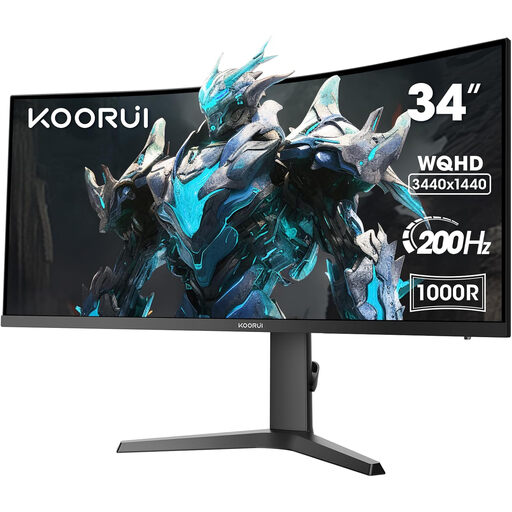
Why it stands out: The KOORUI 34E6UC offers an exceptionally immersive experience with its 34-inch, 21:9 aspect ratio panel. The aggressive 1000R curve fills your peripheral vision, which truly shines in racing simulations and open-world games. With a 200Hz refresh rate, this UWQHD ultrawide 200Hz monitor is exceptionally smooth.
Advantages:
Who is it for? For gamers seeking maximum immersion who want to leverage the wide field of view for a competitive edge or for productive multitasking. It's a great choice for fans of RPGs, strategy games, and simulations.
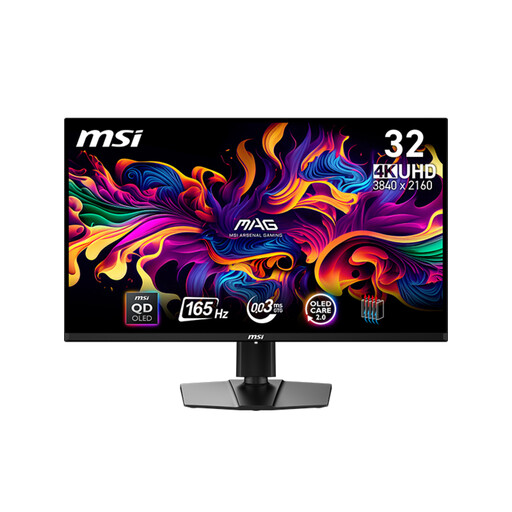
Why it stands out: This monitor from MSI uses advanced QD-OLED technology to deliver outstanding image quality. The combination of 4K resolution, perfect black levels, and an ultra-fast 0.03ms (GTG) response time makes it an enthusiast-grade device. The HDR PC monitor supports VESA DisplayHDR True Black 400 for stunning contrast.
Advantages:
Who is it for? For discerning gamers and content creators who refuse to compromise on image quality. Ideal for cinematic AAA titles, HDR content, and colour-critical work.
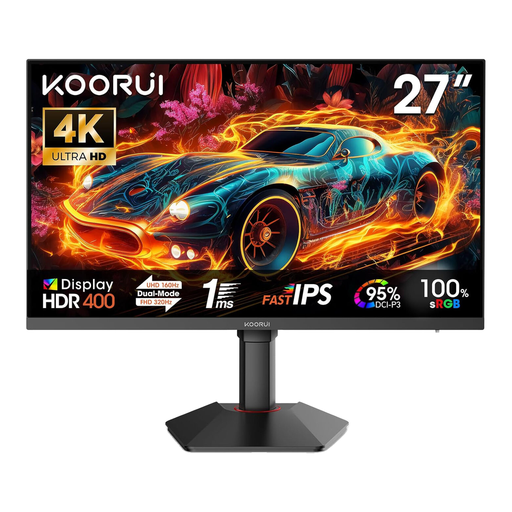
Why it stands out: The KOORUI G2741L offers an innovative dual-mode feature. At the press of a button, you can switch between crisp 4K UHD at 160Hz and ultra-fast Full HD at 320Hz. This flexibility makes it a versatile all-rounder for a wide variety of game genres.
Advantages:
Who is it for? For versatile gamers who want to enjoy graphically rich single-player games in 4K and also benefit from maximum refresh rates in fast-paced multiplayer shooters like CS:GO or Valorant.
This selection represents just a small fraction of the available models. Every gamer has individual requirements for size, shape, and features. If you want to compare more options or are looking for a model with specific characteristics, you are sure to find the right device in our broader selection.
Discover our entire range of gaming PC monitors and find the perfect model for your setup.
The PlayStation 5 supports a maximum output of 4K at 120Hz. To take advantage of this, you absolutely need a monitor with HDMI 2.1. A model with 144Hz or 160Hz is fully compatible and offers a degree of future-proofing, especially for PC use. The console will limit the frame rate to 120Hz.
To play modern games in 4K resolution with consistently high frame rates (over 100 FPS), a high-performance graphics card is recommended. Models like the NVIDIA GeForce RTX 4070 Ti, AMD Radeon RX 7900 XT, or more powerful cards are a good starting point to unlock the potential of such a monitor.
4K UHD (Ultra High Definition) has a resolution of 3840 x 2160 pixels and a standard 16:9 aspect ratio. UWQHD (Ultra-Wide Quad High Definition) has a resolution of 3440 x 1440 pixels and a wider 21:9 aspect ratio. UWQHD offers a wider field of view, while 4K UHD has a higher overall pixel density and thus a sharper image.