
Lieferung heute & morgen

Qualitätsgarantie

Willkommens-Angebote freischalten: KOSTENLOSE Lieferung | Bis zu 80 % RABATT | Kostenlose 30-Tage-JoyPlus-Testphase
App herunterladen
The search for a 27-inch, 4K, 160Hz gaming monitor is a specific one. You know the performance you're aiming for: razor-sharp visuals combined with exceptionally fluid motion. But the market is saturated with technical specs and marketing jargon that often obscure more than they clarify. Before you invest, it's crucial to understand the most common pitfalls that can lead to buyer's remorse.
This guide focuses on the objective criteria that truly matter, helping you find a model that delivers on its promises in real-world use.
Many monitors advertise impressive numbers, but the reality is often different. Pay attention to these three points to avoid disappointment.
Misleading Response Time Specs (MPRT vs. GtG): Many manufacturers advertise a response time of 1ms with the "MPRT" (Moving Picture Response Time) label. This value is often achieved through techniques like backlight strobing, which, while reducing motion blur, can also decrease brightness or cause visible flickering. A more relevant metric for actual panel speed is the "GtG" (Grey-to-Grey) response time. A good monitor offers a low GtG value without compromising on image quality.
Inadequate Ports for Full Performance: A monitor might offer 4K and a high refresh rate on paper, but without the right connections, this performance is unattainable. For console gamers, a monitor with HDMI 2.1 is essential to unlock the full potential of a PlayStation 5 or Xbox Series X at 4K 120Hz. For PC gamers, DisplayPort 1.4 with Display Stream Compression (DSC) is the standard for transmitting 4K at 160Hz without colour compromise.
Poor Ergonomics on Premium Models: A high-priced monitor should adapt to your workspace, not the other way around. A fixed, non-adjustable stand is a significant drawback. For long gaming sessions or home office use, a height-adjustable gaming monitor is a must-have to promote healthy posture and prevent neck strain. Swivel and tilt functions are also important quality indicators.
To separate the wheat from the chaff, you should closely examine three core technical aspects.
For the combination of gaming and productivity, IPS (In-Plane Switching) panel technology has established itself as the go-to choice. A modern 1ms IPS gaming monitor offers the ideal compromise:
HDR (High Dynamic Range) promises more lifelike images through a wider range of brightness and colour. The VESA DisplayHDR 400 certification is the entry-level tier here. Specifically, this means:
However, it's important to know that true, impactful HDR with local dimming (the ability to illuminate parts of the screen independently) only begins at higher tiers like DisplayHDR 600 or 1000. DisplayHDR 400 is a solid foundation, but set your expectations accordingly.
Adaptive Sync synchronises the monitor's refresh rate with the frame rate output by the graphics card. This effectively prevents screen tearing and stuttering.
For a fluid gaming experience, compatibility with one of these technologies is an indispensable feature.
Here are some models tailored to specific user profiles that avoid the pitfalls mentioned above.
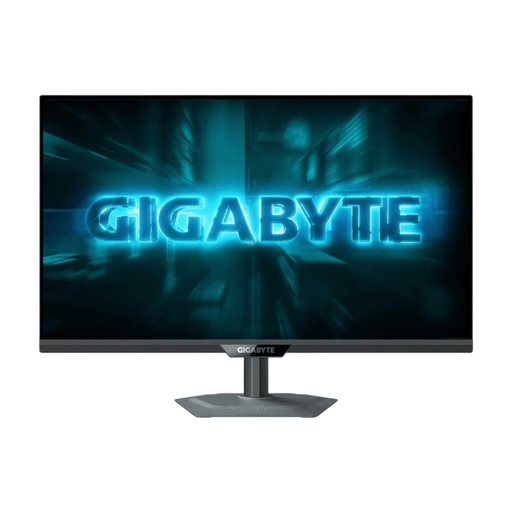
Why This Fits Their Persona: This user makes no compromises. They play fast-paced esports titles where every millisecond counts, while also enjoying graphics-intensive single-player games in full 4K glory. Flexibility is key here.
It features a fully ergonomic, height-adjustable stand, HDMI 2.1 for consoles, and a true 1ms GtG response time. It confidently sidesteps all three major pitfalls.
The unique dual-mode allows switching between 4K at 160Hz and FHD at an ultra-fast 320Hz. The Tactical Switch makes this change possible at the touch of a button.
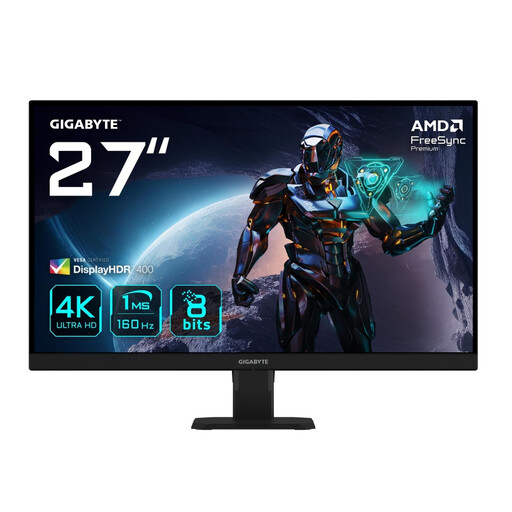
Why This Fits Their Persona: This user owns a PS5 or Xbox Series X and a powerful PC. They are looking for a reliable 4K 120Hz PS5 monitor that also performs excellently on PC at 160Hz, without unnecessary extra features.
With HDMI ports supporting 4K at 120Hz and a DisplayPort for 160Hz on PC, it bypasses the connectivity trap for both platforms. The SS-IPS panel ensures great image quality.
Focuses on the essentials: 4K, 160Hz, and high colour accuracy (95% DCI-P3). It offers a strong price-to-performance ratio for a pure, high-end display experience.
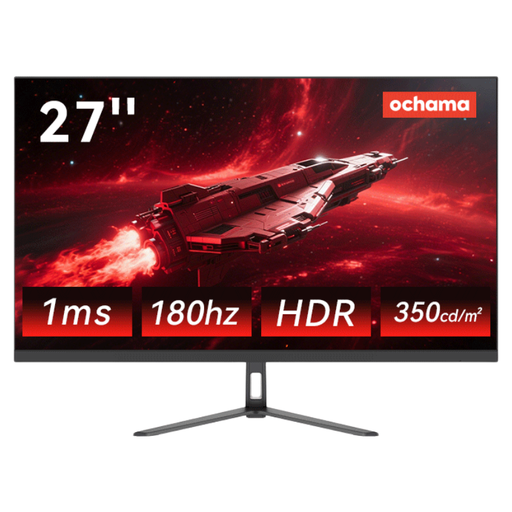
Why This Fits Their Persona: This user knows their graphics card won't hit 160 FPS at 4K resolution. They prioritise a high refresh rate for smooth gameplay and deliberately choose 2K (QHD) resolution as a smart compromise.
It avoids the "4K trap," where users pay for a resolution their hardware can't fully utilise. Instead, it offers a more practical and financially accessible alternative.
Delivers a very high 180Hz refresh rate at a 2K resolution, which can be smoothly rendered by a wider range of graphics cards. The ultra-thin bezel design is ideal for multi-monitor setups.
We have compiled a complete, up-to-date list of products that fully meet these strict selection criteria and German safety regulations.
Do I need a specific graphics card for a 27-inch, 4K, 160Hz gaming monitor? Yes, definitely. To leverage the full performance of 4K at 160Hz, a high-end graphics card is recommended, such as one from the NVIDIA GeForce RTX 4080/4090 series or the AMD Radeon RX 7900 XTX series (or newer models). Also, ensure the card has a DisplayPort 1.4 with DSC or an HDMI 2.1 port.
Isn't a 27-inch monitor too small for 4K resolution? This is a matter of personal preference and viewing distance. At a typical desk distance, a 27-inch 4K monitor offers a very high pixel density of 163 PPI (Pixels Per Inch). The result is extremely sharp text and images. This size is a popular compromise between immersion and desk space.
Can I also use a 4K 160Hz monitor for home office work? Yes, these monitors are excellent for productivity tasks. The high resolution provides a large workspace for multitasking, and the razor-sharp text rendering is easy on the eyes. An IPS gaming monitor also delivers high colour accuracy for creative work. A height-adjustable gaming monitor is particularly beneficial for office ergonomics.