
Lieferung heute & morgen

Qualitätsgarantie
App herunterladen
Kategorien
The combination of 4K resolution and a 240Hz refresh rate marks a significant technological milestone for display devices. This specification, long considered the pinnacle for high-end gaming, has now become a reality through advancements in panel technology, particularly QD-OLED, and interfaces like HDMI 2.1 and DisplayPort 2.1. A 4K 240Hz Gaming Monitor offers an unprecedented synthesis of visual detail and fluid motion. This article analyses the key technical parameters for selecting such a monitor and presents two models that meet these criteria.
Selecting a monitor in this performance class requires a careful examination of its technical specifications. The following criteria are essential for making an informed decision.
The current generation of high-end gaming monitors predominantly uses QD-OLED (Quantum Dot Organic Light Emitting Diode) technology. Unlike traditional LCD panels (IPS, VA), OLED displays do not require a backlight. Each pixel is self-emissive, enabling perfect blacks and a theoretically infinite contrast ratio.
QD-OLED technology combines a blue OLED layer with a quantum dot conversion layer for red and green. Compared to WOLED (White OLED) panels, this results in higher colour saturation at peak brightness and a larger colour volume. Look for specifications on colour gamut coverage, such as 99% DCI-P3, which indicates professional-grade colour accuracy.
To transmit the full bandwidth required for 4K at 240Hz, a modern interface is necessary.
Based on the technical criteria above, we have selected two models for a detailed review.
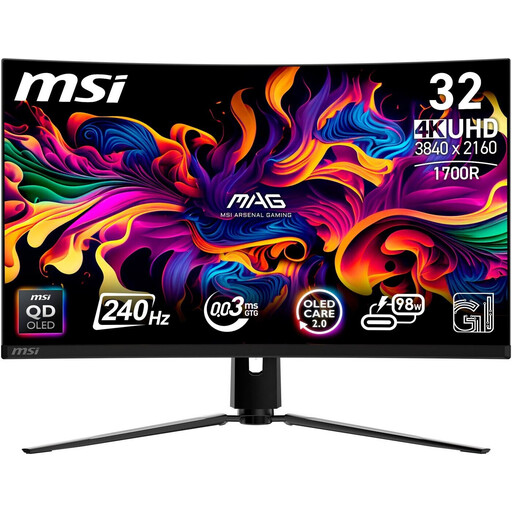
[€10 off with Code: M10] MSI MPG 321CURXDE 31.5-Inch 4K (UHD) Curved QD-OLED 16:9 240 Hz Gaming Monitor
Why we recommend this product: The MSI MPG 321CURXDE integrates a latest-generation QD-OLED panel with a comprehensive software suite (Gaming Intelligence). The combination of 98W USB-C Power Delivery, an integrated KVM switch, and advanced OLED Care 2.0 features makes it a versatile hub for a High-End Gaming Monitor setup. The passive cooling via a graphene heatsink ensures silent operation.
Pros:
Who It's For: This model is aimed at PC and console gamers seeking a powerful all-in-one solution. Users who frequently switch between a gaming PC and a work laptop will particularly benefit from the KVM switch and the high power delivery of the USB-C port.
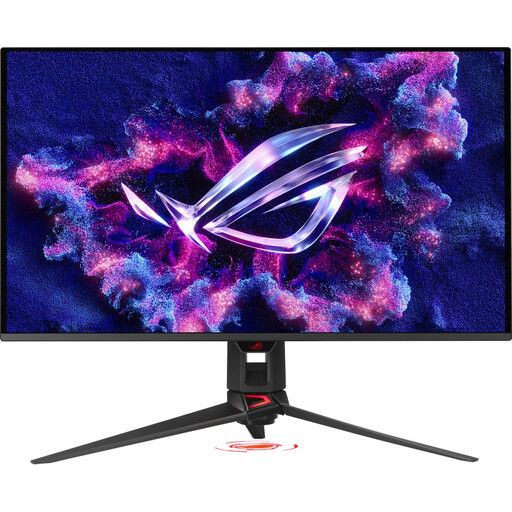
[€10 off with Code: M10] ASUS ROG Swift OLED PG32UCDMR 32-Inch 4K UHD Gaming Monitor (240 Hz, 0.03ms GtG, G-Sync, FreeSync, AdaptiveSync)
Why we recommend this product: The ASUS ROG Swift OLED PG32UCDMR positions itself as a future-proof option for PC enthusiasts with its DisplayPort 2.1 connection. It combines the outstanding image quality of a QD-OLED panel with a suite of esports-focused features. Support for Dolby Vision extends its HDR capabilities beyond the HDR10 standard, and the ASUS OLED Care Pro system provides a robust protection mechanism for panel longevity.
Pros:
Who It's For: This model is ideal for competitive PC gamers and tech enthusiasts who prioritise the best possible motion clarity and future-proof connectivity. Content creators and film lovers will also benefit from the broad HDR support, including Dolby Vision.
Monitor technology is constantly evolving. If the models presented here do not exactly match your specific requirements, or if you are looking for different sizes and specifications, the market offers a wide range of alternatives. You can find a larger selection of displays for gaming and professional applications in our main category for Computers with Monitors.
1. Do I need a specific graphics card for a 4K 240Hz monitor? Yes. To achieve the full 3840 x 2160 resolution at 240Hz in demanding games, a high-end graphics card is mandatory. Models like the NVIDIA GeForce RTX 4080 Super, RTX 4090, or comparable top-tier AMD cards are recommended. To use DisplayPort 2.1, a GPU that supports this standard is required.
2. What is the difference between QD-OLED and conventional OLED (WOLED)? The main difference lies in colour generation. WOLED panels use white OLEDs with colour filters, which can lead to a slight desaturation of colours at high brightness. QD-OLED panels use a blue OLED light source in combination with quantum dots to generate red and green. This results in purer primary colours and a larger colour volume, especially at peak HDR brightness levels.