
Lieferung heute & morgen

Qualitätsgarantie

Willkommens-Angebote freischalten: KOSTENLOSE Lieferung | Bis zu 80 % RABATT | Kostenlose 30-Tage-JoyPlus-Testphase
App herunterladen
Buying a projector for your home theatre promises a large-screen experience that a TV can hardly match. But the market is filled with technical jargon and marketing promises that often confuse more than they help. Many buyers invest in a device that looks impressive on paper but disappoints in practice. The most common problems are an image that's too dim in daylight, a complicated setup, and smart features that don't work as expected.
As your Joybuy Product Recommendation Officer, I'll help you identify these pitfalls. This guide focuses on the objective criteria that truly matter, so you can make an informed decision and find a device that meets your needs for movie nights, gaming, or casual streaming.
Before you decide on a model, you should be aware of the most common marketing exaggerations that lead to buyer's remorse.
Trap 1: Misleading Brightness Claims. Many manufacturers advertise values like "9000 lumens" without specifying the unit of measurement. These numbers are often not standardised and say little about the actual image brightness. A projector that works well in a darkened room may produce a washed-out image in even slight ambient light.
Trap 2: "4K Support" is not Native 4K Resolution. A 4K home theatre projector suggests the highest level of image sharpness. However, many budget-friendly models can only receive and process a 4K signal (4K decoding) but output the image at a lower native resolution, such as 1080p (Full HD) or even 720p. The result is sharper than a pure 720p signal but doesn't achieve the detail of a true 4K projection.
Trap 3: Unstable "Smart" Operating Systems. A smart projector with an integrated Android projector system promises direct access to streaming services. In practice, these systems are often outdated, slow, or lack official licenses. This means apps like Netflix may not work at all or only in poor quality, forcing you to connect an external TV stick anyway.
To make the right choice, focus on these three technical features. They are the primary determinants of your projector's performance and user-friendliness.
Brightness is crucial for image quality, especially if the room cannot be completely darkened.
Contrast (e.g., 1500:1) describes the difference between the brightest white and the darkest black. A higher value creates a more three-dimensional and vibrant image. Modern LED projectors often offer good values here and a long light source lifespan.
As mentioned, native resolution is critical for image sharpness.
Modern projectors take a lot of the work off your hands and integrate seamlessly into your home.
Here are some models that represent a considered choice for different user profiles, based on objective features.
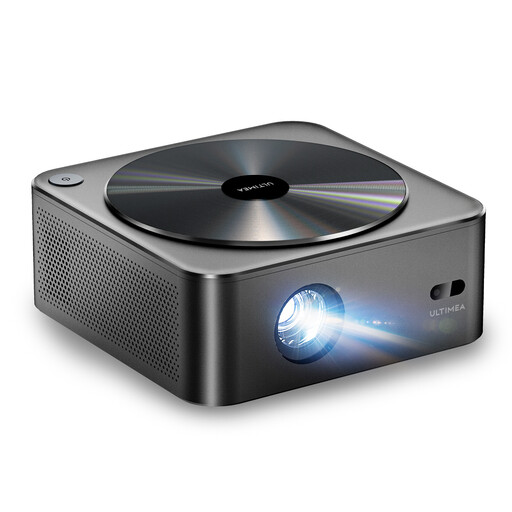
Why This Fits Their Persona: This model offers a well-balanced package for anyone seeking a high-quality home theatre experience without breaking the bank. It combines solid image quality with modern convenience features.
The Apollo P40 states its brightness at 700 ANSI lumens, an honest value suitable for darkened living rooms. It also features a native 1080p resolution, thus avoiding the "4K support" trap.
The combination of autofocus and 6D keystone correction makes setup significantly easier. The dust-proof optical system promises a longer lifespan without image defects.
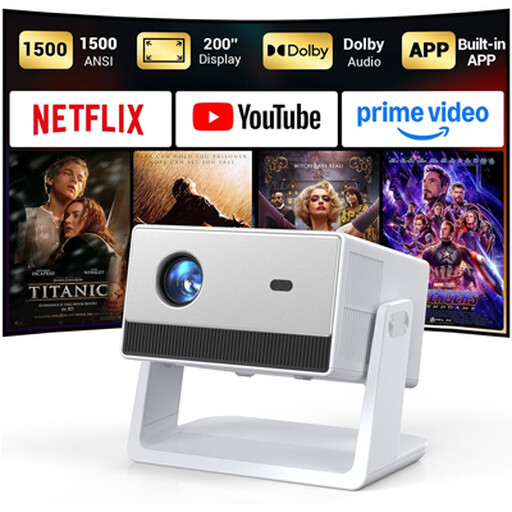
Why This Fits Their Persona: Ideal for users who want maximum flexibility. Whether for a movie night in the living room, gaming in the den, or a spontaneous screening in the garden, this device is designed as an all-in-one solution.
This model bypasses the smart-function trap with officially licensed Netflix, YouTube, and Prime Video. This means stable, high-quality streams without additional hardware. The brightness is rated at a high 1500 ANSI lumens.
The integrated, adjustable stand eliminates the need for a separate tripod and allows for easy projection onto walls or ceilings. Support for Dolby Audio ensures clear and room-filling sound.
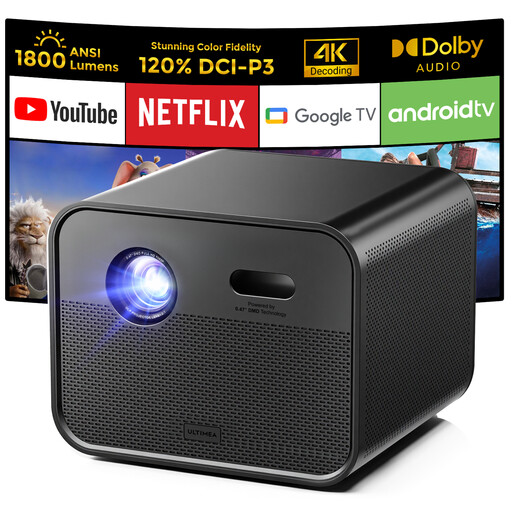
Why This Fits Their Persona: For users who refuse to compromise on image quality and are looking for a powerful, future-proof solution to replace their TV. Ideal for film lovers and gaming projector enthusiasts.
This model uses higher-end DLP technology for better contrast and motion. With an extremely bright 1800 ANSI lumens, it is also suitable for rooms that are not completely dark. The integrated Google TV is a full-featured, stable smart system.
MEMC technology ensures smooth motion handling for sports and action films. The expanded DCI-P3 colour gamut (120% according to the manufacturer) delivers exceptionally vibrant and accurate colours.
We have compiled a complete, up-to-date list of products that fully meet these strict selection criteria and German safety regulations.
1. How many ANSI lumens do I really need for a home theatre projector? For a classic home theatre experience in a darkened room, 500 to 800 ANSI lumens are generally sufficient. If you also want to use the projector with some ambient light, for example in the living room in the evening, you should consider a model with 1000 ANSI lumens or more. For use during the day as a TV replacement, values from 1500 ANSI lumens are recommended.
2. Is a native 4K projector worth it, or is 4K support enough? A native 4K projector offers the highest possible sharpness but is significantly more expensive. For most users, a projector with a native 1080p resolution and 4K decoding is an excellent compromise. It can process high-resolution 4K content and downscales it to a very sharp Full HD image, which often provides a visible advantage over pure 1080p content.
3. Can a projector completely replace my TV? Yes, a modern, bright projector can replace a TV, but there are a few points to consider. You need a suitable projection surface (a screen or a smooth, white wall) and a model with high brightness (at least 1500 ANSI lumens) for good visibility in daylight. Additionally, the lifespan of the light source (usually between 20,000 and 30,000 hours for LED models) should be taken into account, although this is sufficient for many years of normal use. The major advantage is a flexible, giant image that creates a more immersive experience.