What should you look for when buying?
First, check that the size and scaling make your work areas easy to read. Then make sure the colour workflow, setup and computer connections suit the way you’ll use the monitor.
| What matters |
What to check before buying |
Who should pay particular attention? |
| Readable space for your timeline and frames |
Compare the screen size, native resolution and readability at your preferred scaling setting. |
If I want to keep my timeline, frames and canvas in view at the same time, the space I can actually read matters more to me than resolution alone. Around 36% of consumers say workspace is their top buying consideration. |
| Colours suited to your output |
Check the target colour space, colour modes, and the calibration and profiling process required for the specific model. |
If I’m assessing colours for a specific output, I want the monitor to suit that target and my colour management workflow. Around 29% of consumers say colour workflow is their top buying consideration. |
| A setup that works on your desk |
Check the dimensions, including the stand, and make sure the adjustment options suit your workspace. |
If desk space is limited or I need to position the screen just right, dimensions and adjustability matter. Around 21% of consumers put suitability for their workspace first. |
| Connecting your laptop properly |
Check that the video connection, power delivery and cable meet the monitor’s specifications and your laptop’s requirements. |
If I want to connect my laptop through the monitor, the connection needs to suit my computer and supply enough power. For around 14% of consumers, connecting a laptop is their top buying consideration. |
Related products from Joybuy
The Joybuy products below include 4K monitors in various sizes, as well as an item described as a TV stand. The stand is not a monitor, so check that it’s compatible with your specific display before buying.
 No image available
TCL 32X3A 32-inch OLED monitor, 4K UHD
If you’re considering a larger screen for your timeline and canvas, you could include this 32-inch model in your size comparison.
The product title lists OLED, 4K UHD and 3840 × 2160 pixels.
View at Joybuy
 No image available
MSI MAG 274UPDFDE E16M, 27-inch Mini LED Rapid IPS monitor
If you’re looking for a 27-inch monitor for working with frames, check that its physical screen size and display are right for your workflow at your preferred scaling setting.
The product title lists UHD at 160 Hz or FHD at 320 Hz, as well as Mini LED and Rapid IPS.
View at Joybuy
 No image available
MSI PRO MP273UPDE E6, 27-inch 4K UHD IPS monitor
Consider this 27-inch model if you’re looking for a 4K monitor to work with frames and a canvas.
The product title lists 4K UHD, IPS and 60 Hz.
View at Joybuy
 No image available
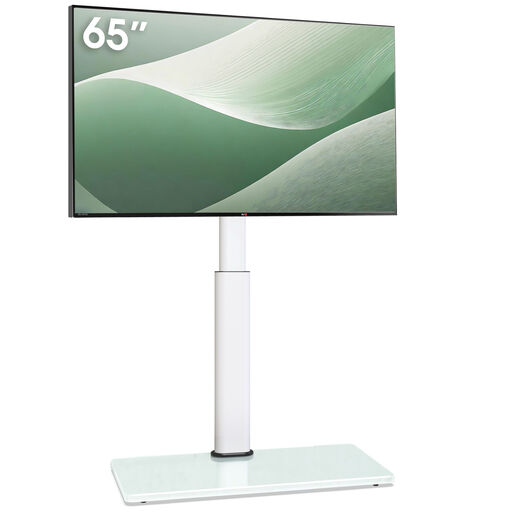
TV stand, height-adjustable, tilting and swivelling, for 32–65 inches, white
The product title describes this item as a TV stand, not a monitor. Check that it’s compatible with your specific display before buying.
The product title lists cable management and non-slip feet.
View at Joybuy
 No image available
INNOCN CB27U1, 27-inch 4K UHD monitor
If you’re considering a 27-inch screen for working with frames and a canvas, check that the size suits your preferred scaling setting.
The product title lists IPS, 3840 × 2160 pixels, 120 Hz and USB-C with 90 W Power Delivery.
View at Joybuy
Frequently asked questions
Is 4K alone enough to make an animation timeline easier to read?
No. As well as the native resolution, check the screen size and how your software looks at your preferred scaling setting. You need to be able to see the timeline and frames clearly alongside the canvas.
How do I set up colours for a specific output?
Start by defining the target colour space. The International Color Consortium describes calibration and profiling as complementary steps towards consistent colour reproduction. A wide colour gamut on its own won’t complete this process.
What should I check when connecting and setting up my monitor?
Check that the video connection and any power delivery you need are compatible with your computer, and allow for the monitor’s dimensions, including the stand. BenQ lists DisplayPort Alt Mode over USB-C and 110 mm of height adjustment for the PD2706U.
How can I compare energy consumption, and what is the cooling-off period for online purchases in Germany?
The EU energy label for monitors runs from A to G. The label and EPREL information can help you compare specific models. According to Verbraucherzentrale, consumers generally have 14 days from receiving goods bought online to notify the seller that they wish to withdraw from the purchase. Your statutory rights against the seller are separate from any voluntary guarantee.
Does the German ASR A6 workplace rule automatically apply to every private home office?
No. ASR A6 covers workplaces and teleworking workstations, but excludes the use of display screen equipment in private settings outside teleworking workstations. Whether a particular workspace legally counts as a teleworking workstation depends on the circumstances.


