What should you look for when buying?
First check the connection and charging output for your laptop, then make sure you have enough desk space for your frame layout, and finally consider your colour requirements and power consumption.
| What matters |
What to check before buying |
Who will find this especially important? |
| Laptop connection and plug sockets |
Check that the USB-C video signal, specified charging input, Power Delivery and suitable cable meet your laptop’s requirements. |
If I work on a laptop and would rather not plug in a separate laptop charger at my desk, a suitable connection for both video and charging matters. Around 36% of consumers put this connection requirement first. |
| Space for frames and panels |
Try a typical project using your preferred font size and scaling, and take the monitor’s width and stand depth into account. |
If I need the timeline, preview and tools visible at the same time, usable screen space and readability matter just as much as the pixel count. Around 29% of consumers prioritise this frame layout. |
| Colour reproduction |
Check the colour modes and calibration support for your specific output. |
If I need to assess colours for a defined output workflow, I need suitable display modes and, where appropriate, a calibration process. Around 21% of consumers put this colour workflow first. |
| Monitor power consumption |
Compare the EU energy label and product information; don’t treat typical and maximum power consumption as equivalent. |
If I want to take the screen’s power consumption into account, I check comparable consumption figures and consider whether I’ll be charging a laptop while using the monitor. Around 14% of consumers prioritise the monitor’s energy consumption. |
4K monitors at Joybuy
This selection includes 4K monitors for working with frames and previews, from portable and larger models to devices with USB-C Power Delivery. Check that each model’s charging output meets your laptop’s requirements.
 No image available
Portable 23.8-inch 4K monitor, 60 Hz
This portable model with an integrated stand could be a good option as an extra screen for your laptop.
23.8 inches, 3840 × 2160, 60 Hz, 100% sRGB, USB-C and Mini-HDMI inputs. The title also mentions integrated speakers and VESA compatibility.
View at Joybuy
 No image available
INNOCN CB27U1, 27-inch 4K
Work with frames and previews on a 27-inch screen, with USB-C offering 90 W Power Delivery for compatible laptops.
3840 × 2160, IPS, 120 Hz and USB-C with 90 W Power Delivery. The title also mentions PIP and PBP, as well as a height-adjustable stand.
Whether your laptop can run without its own charger depends on compatibility and its charging requirements.
View at Joybuy
 No image available
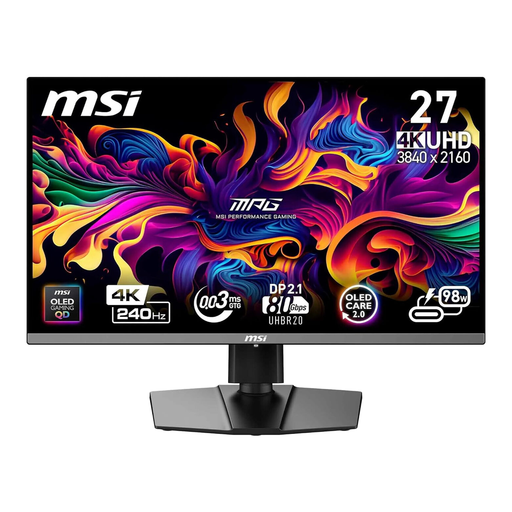
MSI MPG 272URXDE, 26.5-inch 4K QD-OLED
4K resolution and USB-C Power Delivery may be useful for working with frames while connected to a laptop.
The product name specifies USB-C with 98 W Power Delivery and 240 Hz. Check that the charging output suits your laptop.
View at Joybuy
 No image available
MSI MPG 322URXDE, 32-inch 4K QD-OLED
If you’d like more physical screen space for your timeline, preview and tools, the 32-inch size is worth considering.
3840 × 2160, 240 Hz and USB-C with 98 W Power Delivery. The title also mentions a height-adjustable stand; the description lists a USB hub and KVM.
Charging requires a compatible laptop whose power requirements match the stated output.
View at Joybuy
 No image available
KTC M27P6, 27-inch 4K Mini-LED
For working with frames and previews on a 27-inch 4K screen, with USB-C charging output that should suit your laptop.
The product name specifies 4K at 160 Hz or FHD at 320 Hz, as well as Type-C at 65 W. The description lists KVM and a height-adjustable stand.
USB-C charging requires a compatible laptop. Check its charging requirements before buying.
View at Joybuy
Frequently asked questions
Will a USB-C monitor mean I no longer need a second plug socket?
You may be able to leave your laptop charger unplugged at your desk if your laptop’s video connection and charging requirements are compatible with the monitor’s USB-C connection. The monitor still needs its own power supply, so check the Power Delivery output of the input you plan to use.
How should I set up my screen for animation frames?
Open a typical project with the timeline, layers, preview and tools, then check it using your preferred scaling and font size. Adobe describes layers, frames and the playhead as parts of the Animate timeline; the best layout depends on your software and how you work.
What should I know about faulty monitors and buying online?
For faulty goods, your statutory rights are generally against the seller; a voluntary guarantee is separate. Consumers generally have a right to cancel distance-selling contracts, with a cancellation period that is usually 14 days. Conditions and possible exceptions apply in individual cases.
Which labels are relevant when buying in Germany?
The German Federal Network Agency explains that the CE marking is the manufacturer’s declaration that the relevant requirements have been met, not a mark of origin. The European Commission also describes an A-to-G energy label for electronic displays, including computer monitors.


