Comparing two plan views
If you often compare old and new versions of a plan side by side, a usable screen area and clearly legible labels are important.


If you regularly compare two architectural drawings, a well-positioned 31.5- to 32-inch 4K monitor is a good starting point, provided your desk and viewing distance allow for it. F.A.Z. Kaufkompass identifies 32 inches as a good balance between size and sharpness for 4K monitors. If space is limited, a 27-inch model may be a better fit. Before deciding, open two typical drawings in your software and test your preferred scaling, then check that the connections and adjustment options suit your workspace.
If you often compare old and new versions of a plan side by side, a usable screen area and clearly legible labels are important.
If space for a screen and stand is limited, consider the footprint and positioning as well as how clearly details are displayed.
If you want to connect your work laptop, make sure the video output, cable and, if needed, USB-C power delivery are all compatible.
A good fit if: you regularly want to compare two drawings side by side and have enough desk space.
Consider: check the screen width, viewing distance and position on your desk before choosing the larger screen.
A good fit if: workspace is limited or you mainly check individual sections and details.
Consider: there’s less physical screen space for viewing two plans at once, so check your preferred scaling in the software you use.
For comparing plans, the key things to consider are how legible they are on screen, the space available on your desk and whether the connection works with your laptop.
| What you need | What to check before buying | Who it matters most to |
|---|---|---|
| Two plans side by side | Open two typical project files, including their toolbars, and test the zoom level and operating system scaling. | If I want to read old and new versions of a plan at the same time, I need enough screen space without constantly enlarging labels. Comparing plans is the main priority for around 31% of consumers. |
| Lines and labels | Check fine lines and text at native UHD resolution and your usual scaling; check the specific model for any colour modes you need. | If I need to assess fine lines, text or coloured layers, what matters is how they look in the software I actually use. Around 25% of consumers prioritise detail clarity. |
| Space and positioning | Check the screen and stand depth against your desk; look at the adjustment range and, if using a clamp arm, make sure it’s suitable for your desk edge. | If my desk is short on space, I want to position the screen to suit how I sit. Around 19% of consumers place particular importance on space and positioning. |
| Connecting a laptop | Check that your laptop’s video output, cable, connection type and required charging power are compatible with the monitor. | If I’m connecting my work laptop, I want to know whether the connection and power supply will work with my device. Around 13% of consumers prioritise laptop connectivity. |
| Features and energy use | Compare only the connection and adjustment features you need; for specific models, check the EU energy label and stated energy consumption. | If I want to avoid paying for features I won’t use and take energy use into account, I compare the specifications of individual models. Around 12% of consumers prioritise suitable features and energy use. |
Even at 3840 × 2160 pixels, labels in two scaled-down views may look too small.
Before choosing a screen size, test typical plans in your software using the scaling you expect to use.
Video transmission and power delivery depend on the capabilities of your laptop, monitor and cable.
Before buying, check the stated video output, the charging power you need and what the cable supports.
A larger display is only practical if you can position and adjust it to suit your existing workspace.
Check the desk space, stand depth and adjustment range, as well as the desk edge if you’re using a clamp arm.
The PD2706U is a 27-inch option with stated CAD/CAM and connectivity features; BenQ’s MA320U range is aimed at Mac users.
The models mentioned range from the 31.5-inch S3225QS to the UltraSharp hub models U2725QE and U3225QE.
The 32UN880K-B is a 31.5-inch option with a movable clamp arm, making it suitable for workspaces where flexible screen positioning is useful.
The ProArt PA279CRV is a 27-inch model with documented colour modes and additional connectivity features.
The 27E1N1900AE/00 is a 27-inch 4K option with an IPS panel and height-adjustable stand.
This selection includes 31.5- to 32-inch 4K monitors for larger plan views, as well as a 27-inch option for workspaces with less room.
 No image available
The 32-inch size could work well for two plan views, provided your desk and seating position allow for it.
The product name specifies a VA panel, 3840 × 2160 pixels, 60 Hz and a webcam. The product description advises against exposing the screen to static images for extended periods.
Height adjustment, tilt and USB-C with 65 W Power Delivery are specified for this model.
 No image available
The stated 32-inch size provides more physical screen space for plan views, if it suits your workspace.
The product name specifies 3840 × 2160 pixels and 240 Hz; USB-C with 90 W Power Delivery, HDMI and DisplayPort are also listed.
Height adjustment, pivot, tilt and swivel are specified for this model.
 No image available
The 32-inch display could suit comparing two versions of a plan, provided you have enough desk space.
The product name specifies OLED and 3840 × 2160 pixels. Height adjustment, tilt, swivel and pivot are also listed.
Connections include HDMI, DisplayPort and USB.
 No image available
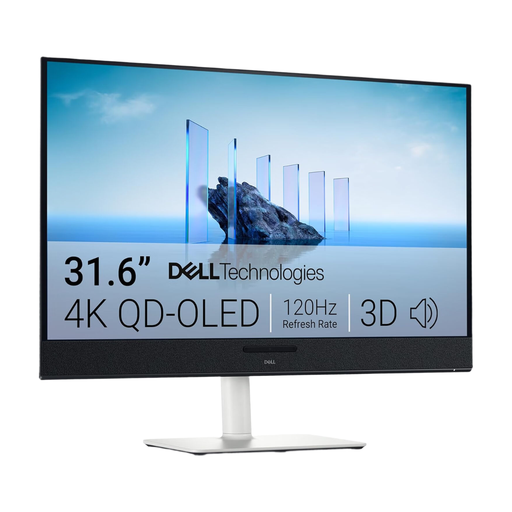
The stated screen size could suit two plan views, provided your desk space and viewing distance are suitable.
The product name specifies 3840 × 2160 pixels and QD-OLED. USB-C with 90 W Power Delivery, height adjustment, tilt, swivel and rotation are specified for this model.
 No image available
The 27-inch size could suit a smaller desk; it offers less physical screen space for two plan views than a 31.5- to 32-inch monitor.
An IPS panel, 3840 × 2160 pixels, PIP/PBP and USB-C with 90 W Power Delivery are specified. Height adjustment is also listed.
It depends on your drawings, toolbars and the scaling that’s comfortable for you to read. For frequently viewing plans side by side, a 31.5- to 32-inch model offers more physical screen space; if space is limited, 27 inches may be a better fit. If you can, test two typical plans in your software.
Only if your laptop, cable and monitor support the video connection you need, and the power supply is suitable for your laptop. For the BenQ PD2706U, BenQ explicitly lists DisplayPort Alt Mode, data transfer and 90 W Power Delivery through the USB-C port.
Before installation, check the dimensions and, if you’re using a clamp arm, make sure it’s suitable for your desk edge. Position the screen to suit how you sit, and follow the instructions for cleaning and care for the specific model. The LG 32UN880K-B is listed with a movable arm.
For online purchases by consumers in Germany, a 14-day right to cancel generally applies, as explained by Verbraucherzentrale on 13 August 2026; statutory rights relating to faulty goods are separate from a voluntary manufacturer’s warranty. Compare energy use using the energy label and consumption figures for specific models; the European Commission classifies monitors as electronic displays.
The BAuA-ASR A6, July 2024 edition, sets out requirements for display screen workstations in workplaces and, within its scope, for teleworking workplaces. The text states that it does not automatically apply to screen use in private homes outside a teleworking workplace. How it applies therefore depends on the specific setup of your home workspace.