What should you look for when buying?
Calibratable photo monitor
A good fit if: You prepare black-and-white prints and place particular importance on greyscale gradients and brightness uniformity.
Bear in mind: Check which measuring devices and software your workflow requires. A black-and-white mode alone does not confirm that the display matches your print output.
4K monitor with KVM
A good fit if: You regularly switch between computers and shared input devices at your workstation. BenQ lists KVM in the specifications for the SW272U and PD2732U.
Bear in mind: Check that the KVM, upstream connections and laptop power delivery work with your devices. A USB-C port alone doesn’t confirm that KVM switching is available.
Adjustable 4K creative monitor
A good fit if: 4K detail and an adjustable screen position matter more to you than a highly reliable print proof. ASUS and LG list adjustable stands for their respective 27-inch models.
Bear in mind: A wide colour gamut and HDR label alone don’t guarantee accurate black-and-white tones in your workspace.
The percentages below group consumers in this buying context by their main priority. For greyscale and the midtone curve, Adobe describes calibration and profiling as relevant steps towards a consistent display.
| Priority |
What to check when buying |
Who is it particularly important for? |
| Greyscale and tonal transitions |
Check the calibration process and profiling, as well as any uniformity function; calibrate separately for your output process. |
If I need to assess skin tones and shadows for prints, I pay particular attention to greyscale gradients and a uniform display. Consumers who prioritise tonal accuracy make up around 36 %. |
| Switching between computers and users |
Check KVM, upstream connections, signal inputs and the USB-C power delivery you need. |
If several people use the same input devices, I want to switch between computers without constantly unplugging and reconnecting everything. Consumers whose main priority is switching between computers make up around 29 %. |
| Desk space and reflections |
Consider the dimensions with the stand, adjustment options and the monitor’s position in relation to windows and lights. |
If seating positions or lighting change at a shared desk, I need to be able to position the screen accordingly. Consumers who prioritise space and reflections make up around 21 %. |
| Additional equipment and calibration workload |
Factor in the measuring devices and calibration software required, as well as the work involved in maintaining profiles. |
If I want to keep extra equipment and regular profile maintenance manageable, I check what’s involved before choosing. Consumers who place particular importance on this workload make up around 14 %. |
4K monitors at Joybuy
This selection includes 4K monitors for shared desks, including models with an anti-glare finish, an adjustable stand or features for switching between computers. For print-critical black-and-white work, check that calibration and profiling suit your workflow too.
 No image available
TCL 32X3A, 32-inch OLED monitor
The anti-glare display is a feature worth checking for a shared desk, but it doesn’t remove the need to adjust your lighting.
OLED; 4K UHD at 3840 × 2160 pixels; 240 Hz at 4K and 480 Hz at FHD according to the product name; 1,300 Nits; anti-glare display.
For print-critical greyscale work, check that calibration and profiling suit your output process too.
View at Joybuy
 No image available
INNOCN CB27U1, 27-inch 4K UHD monitor
The height-adjustable stand may be useful if users sit at different heights; check how it fits on your shared desk.
IPS; 3840 × 2160 pixels; 120 Hz; USB-C with 90 W Power Delivery.
If you need to switch between computers, check the KVM functionality and required connections for yourself; the KVM entry is “NA”.
View at Joybuy
 No image available
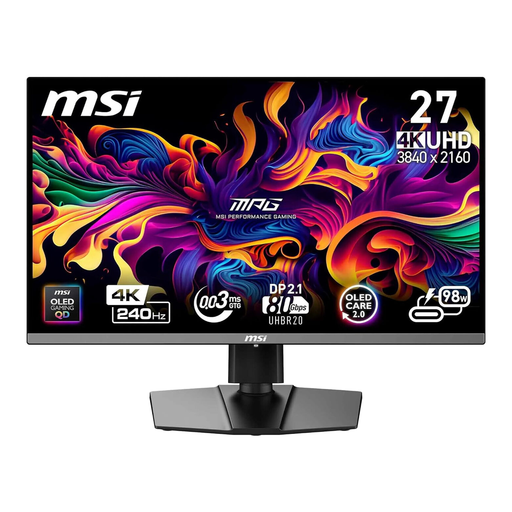
MSI MPG 272URXDE, 26.5-inch 4K QD-OLED monitor
The 4K resolution fits the monitor category you’re looking for. For black-and-white prints, check calibratability and profiling separately for your workflow.
QD-OLED; 4K UHD; 240 Hz; USB-C with 98 W Power Delivery.
View at Joybuy
 No image available
MSI MPG 322URXDE, 32-inch 4K QD-OLED monitor
This model may be worth considering for a shared workstation where you switch between computers; check that the switching and connections work with your devices.
QD-OLED; 4K UHD at 3840 × 2160 pixels; 240 Hz; USB-C with 98 W Power Delivery.
For print-critical tones, check that calibration and the monitor profile suit your planned output process too.
View at Joybuy
 No image available
KTC M27P6, 27-inch 4K Mini-LED monitor
The product name lists KVM, which may be useful for a shared desk; check that the connections and switching process suit your computers.
Mini-LED; 4K at 160 Hz or FHD at 320 Hz; USB-C with 65 W Power Delivery; KVM; stand with tilt, swivel and height adjustment.
A KVM listing doesn’t remove the need to check that the connections and input devices you require are supported.
View at Joybuy
Frequently asked questions
Is a black-and-white mode enough for print-ready portraits?
No. A black-and-white mode alone doesn’t prove that the display is suitable for printing. Also check calibration, the monitor profile and the conditions of your planned output process.
What should I check when connecting two computers?
As well as the video inputs, check specifically for KVM and the USB upstream connections you need. A USB-C port alone doesn’t confirm that you can switch a mouse and keyboard between two computers. PRAD recommends considering a built-in KVM switch if you connect two computers.
How can I keep the display consistent at a shared desk?
Calibrate and profile the screen for the working environment, taking brightness, gamma and white point into account. Adobe recommends stable lighting conditions for calibration, so factor in any changes to ambient light when setting up your screen.
What rights do I have when buying a monitor online in Germany?
Under EU rules, consumers buying from a business seller generally have a statutory guarantee of at least two years from receipt of the goods. Online purchases also usually come with a 14-day right to cancel; the Verbraucherzentrale explains the conditions that apply. The right to cancel and the statutory guarantee are separate rights.
Do rules for display screen workstations also apply to a private shared desk?
The German Technical Rules for Workplaces (ASR A6), issued by the Federal Institute for Occupational Safety and Health (BAuA), set out requirements for display screen workstations in workplaces and for teleworking within their scope. Private use outside these workplaces is exempt; what matters is how the desk is actually set up and used.


