What should you look for when buying?
The Federal Institute for Occupational Safety and Health recommends being able to control the amount of daylight according to the task. So consider your specific window-side workspace before comparing brightness or colour specifications.
| What matters when buying |
What to look for |
Who should pay particular attention |
| Reflections and readability |
Window angle and shading; anti-glare screen and typical SDR brightness for the exact model. |
If you view references in changing daylight and want to reduce reflections. Around 36% of consumers put readability by a window first. |
| Colour reproduction |
Colour mode suited to your intended output; calibration and profiles for your planned workflow. |
If you need to assess colours for a specific digital or print purpose. Around 29% of consumers prioritise a suitable colour workflow. |
| 4K detail and workspace |
Native resolution of the complete model; preferred scaling and available desk space. |
If you want to see fine image detail and keep several work windows in view at once. Around 21% of consumers prioritise detailed viewing. |
| Connections and positioning |
Video output and cable; required USB-C charging power and stand adjustments. |
If you’re connecting a laptop and want to position the screen to suit your workspace. Around 14% of consumers prioritise connections and positioning. |
Joybuy products for reference graphics by a bright window
This product selection focuses on anti-glare 4K monitors for digital references, as well as models with laptop connectivity and adjustable positioning.
 No image available
TCL 32x3A 32-inch OLED monitor
The anti-glare screen mentioned in the product name is a useful feature for a bright reference workspace, but it can’t guarantee a reflection-free view at every window.
4K UHD with 3840 × 2160 pixels; OLED+; 240 Hz at 4K and 480 Hz at FHD; 1,300 nits; anti-glare screen.
View product
 No image available
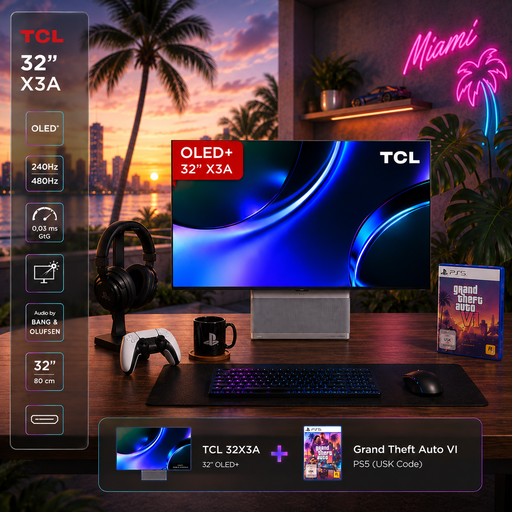
TCL 32X3A OLED+ gaming bundle with GTA 6
The anti-glare screen mentioned in the product name may be worth considering for a bright workspace; actual readability also depends on positioning.
4K UHD with 3840 × 2160 pixels; OLED+; 240 Hz at 4K and 480 Hz at FHD; 1,300 nits; anti-glare screen.
View product
 No image available
INNOCN CB27U1 27-inch 4K UHD monitor
For laptop workspaces, the stated USB-C charging power and height adjustment are useful features to consider. Check that your laptop and cable support the video output you need.
3840 × 2160 pixels; IPS; 120 Hz; NON-GLARE screen; USB-C with 90 W Power Delivery; height-adjustable stand.
View product
 No image available
MSI MPG 322URXDE QD-OLED monitor
If you want to connect a laptop, compare the stated charging power with your device’s requirements and check the screen position in your window-side workspace.
32 inches; 4K UHD with 3840 × 2160 pixels; 240 Hz; USB-C with 98 W Power Delivery; anti-glare screen; height-adjustable stand.
View product
 No image available
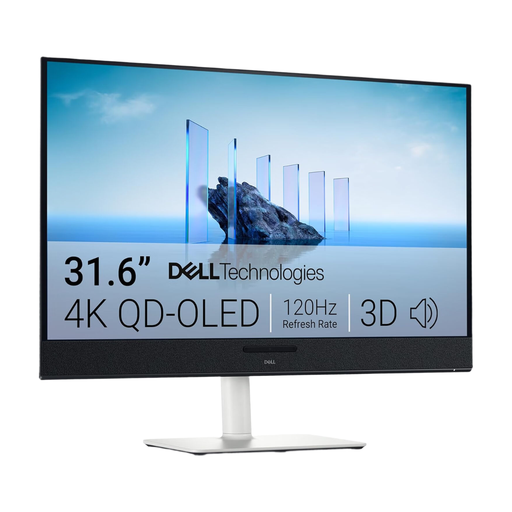
Dell Plus S3225QC 31.6-inch QD-OLED monitor
The listed adjustment options can help you position the screen by a window. Before buying, check that the connections are compatible with your computer.
80.3 cm (31.6 inches); 3840 × 2160 pixels; 4K Ultra HD; QD-OLED; matte screen; USB-C with 90 W Power Delivery; height, tilt, swivel and pivot adjustable stand.
View product
Frequently asked questions
Is a high brightness rating enough if the window is reflected on the screen?
No. A high brightness rating alone won’t solve the problem. First check the monitor’s position and whether you can control the daylight. Then compare the screen finish and typical brightness; peak HDR brightness is not the same as typical brightness.
How can I keep reference colours consistent in changing daylight?
Choose a colour mode suited to your intended output and use a calibration and profiling process for colour-critical work. EIZO notes that the white point of light from a window changes throughout the day; monitor settings can’t control this ambient light.
What should I check if I want to connect my laptop with a USB-C cable?
Check that your laptop and cable support the video signal, and that the specific monitor provides enough power to charge your laptop. ASUS lists 96 W for the PA279CRV and BenQ lists 90 W Power Delivery for the SW272U.
What information can help me compare power consumption?
Compare the EU energy label figures for the specific models on a like-for-like basis. The label for covered electronic displays includes efficiency and consumption information; actual costs also depend on how long you use the monitor and your electricity tariff.
Who should I contact if a newly purchased monitor is faulty?
For a consumer purchase in Germany, statutory consumer rights against the seller are separate from a voluntary manufacturer’s warranty. The Verbraucherzentrale generally describes a two-year legal guarantee from delivery. For purchase contracts from 31 July 2026, it also explains additional rules that apply if you choose a repair when a product is faulty.
Is there a minimum brightness required for every home monitor setup?
The rules for screen-based work do not establish a general minimum brightness that applies to all private buyers and window-side workspaces. ASR A6 sets out requirements for workplaces within its scope; positioning and glare should be assessed separately for each workspace.


