For product photos destined mainly for online use, a suitable sRGB workflow, a monitor profile and the right export settings matter more than the largest advertised colour gamut. If you also work for print, Adobe RGB coverage and hardware calibration may be more important. Adobe describes sRGB as a suitable colour space for many web images, while EIZO and BenQ list Adobe RGB coverage and hardware calibration for certain models. Also check your room lighting and connections: monitor specifications alone cannot guarantee a consistent appearance on other screens or in print.
Who is this monitor comparison for?
Online shop photo editors
If you mainly assess product colours for online listings, a controlled sRGB and export workflow is more important than the biggest possible gamut figures. Adobe describes sRGB as a suitable colour space for many images displayed online.
Web and print designers
If you also use product photos in print, a wider colour gamut, calibration and soft-proofing conditions may all be important when choosing a monitor. Adobe explains how colour management helps adapt images to devices with a limited colour range, such as four-colour printing presses.
Home workers using a laptop
If you edit images and do other work at the same desk, you’ll need to balance your colour workflow, lighting, desk space and laptop connectivity. Check that the monitor’s connections and charging power are suitable for your laptop.
What should you look for when choosing?
First decide whether your product photos will be used mainly online or also in print. Then check calibration, your workspace lighting and your laptop connections.
| Buying priority |
What to look for |
Who it matters to |
| Assessing online shop colours |
Check for an sRGB mode and monitor profiling; choose the right colour profile when exporting. |
If I mainly display product photos online, I want to assess them for digital output. Around 36% of consumers prioritise colour matching for the web. |
| Editing for web and print |
Check the Adobe RGB specification and hardware calibration; include the print profile and proofing conditions in your workflow. |
If the same photos will also be printed, I need a workflow that takes print output into account. Around 29% of consumers prioritise matching for both web and print. |
| Calibrating at your desk |
Check the calibration features and any measuring equipment you’ll need; take the lighting in your intended workspace into account. |
If the room lighting varies, I want to assess colours under my actual working conditions. Around 21% of consumers pay particular attention to calibration and workspace lighting. |
| Connecting a laptop |
Check that the 4K resolution, video input, USB-C or Thunderbolt features and stated charging power are compatible with your laptop. |
If the monitor is also my laptop workstation, its video signal and power supply need to work with my device. Around 14% of consumers prioritise laptop connectivity. |
Common pitfalls
-
Assuming the widest colour gamut automatically means the best colour matching for online shops
Colour gamut coverage alone doesn’t tell you how a profiled display will show product colours or how an exported file will look on other devices.
Decide where the images will be used, then check the sRGB mode, monitor profile and export profile together.
-
Assuming factory settings or calibration will solve every colour problem
Lighting conditions affect the calibration target. According to EIZO, calibration can’t simply fix a limited colour gamut or an uneven display.
Check the recommended calibration process and the lighting at your workstation. Depending on your workflow, you may need a suitable measuring device.
-
Assuming USB-C guarantees a one-cable setup
Video transmission and power delivery depend on the features of the monitor, laptop and cable you use.
Before planning a one-cable workstation, compare the documented connections and stated charging power with your laptop’s requirements.
Key brands at a glance
EIZO
The ColorEdge CS2740 range is designed for a 4K photography workflow, with sRGB, Adobe RGB and hardware calibration.
- EIZO lists colour space presets, uniformity correction and USB-C with up to 60 W power delivery for the CS2740.
- These are the manufacturer’s specifications, not independent measurements. Whether the charging power is enough depends on your laptop.
BenQ
The PhotoVue SW272U range is aimed at photographers, while the DesignVue PD2706U is positioned as a 4K work monitor with sRGB and P3 specifications.
- BenQ lists 99% Adobe RGB, hardware calibration and 90 W USB-C Power Delivery for the SW272U. For the PD2706U, BenQ lists 100% sRGB and 95% P3.
- Colour gamut figures are not independent measurements, and the calibration features of the two models are not directly comparable.
ASUS
The ProArt PA279CRV is a 27-inch 4K model with stated sRGB, Adobe RGB and DCI-P3 coverage.
- ASUS lists 100% sRGB, as well as 99% Adobe RGB and 99% DCI-P3, for this model.
- Advertised colour gamut coverage doesn’t prove how accurate an individual unit will be in your workspace, or whether it will match a later print.
Dell
The UltraSharp U2725QE is positioned as a 27-inch 4K monitor with a Thunderbolt hub for a versatile laptop workstation.
- Dell lists IPS Black, 120 Hz and power delivery through the hub for this model.
- Hub features and refresh rate alone don’t establish whether a monitor is suitable as a colour-critical print reference.
LG
The UltraFine 27UP850K-W is a 27-inch 4K IPS model with USB-C and an adjustable stand.
- LG typically lists 95% DCI-P3 and hardware calibration through LG Calibration Studio for this model.
- A DCI-P3 specification doesn’t confirm Adobe RGB coverage or a match with a later print.
Joybuy products for product photography
This selection includes 4K monitors for sRGB-focused online shop editing, as well as a model listing both sRGB and Adobe RGB coverage for web and print output.
 No image available
Portable 23.8-inch 4K monitor with 100% sRGB
An option for product photos intended for digital use if you’re looking for a portable screen with stated sRGB coverage.
3840 × 2160 pixels, 60 Hz and 100% sRGB according to the product name. Built-in stand, plus USB-C and Mini HDMI inputs.
Joybuy
 No image available
MSI PRO MP273UPDE E6 27-inch 4K UHD monitor
For digital product photography, the stated sRGB preset is worth checking. Make sure it suits your colour workflow and export requirements.
IPS panel, 10-bit colour depth and sRGB preset according to the product description. HDMI and DisplayPort inputs, plus a height-adjustable stand that tilts, swivels and pivots.
Joybuy
 No image available
Samsung M8 M80F (2025), 32-inch 4K UHD monitor
An option for digital product photography if you also want to connect your laptop via USB-C with stated charging power.
VA panel and 60 Hz according to the product name. The product description lists 99% sRGB, 10-bit colour depth and USB-C with 65 W Power Delivery; the stand adjusts for height and tilt.
The product description notes that static images displayed for long periods may cause temporary image retention.
Joybuy
 No image available
INNOCN CB27U1, 27-inch 4K UHD monitor
The product specifications list sRGB and Adobe RGB coverage. Check that these colour spaces suit your web and print profiles.
IPS panel, 3840 × 2160 pixels and 120 Hz according to the product name. The product description lists 100% sRGB, 99% Adobe RGB and USB-C with 90 W Power Delivery; the stand is height-adjustable.
Joybuy
 No image available
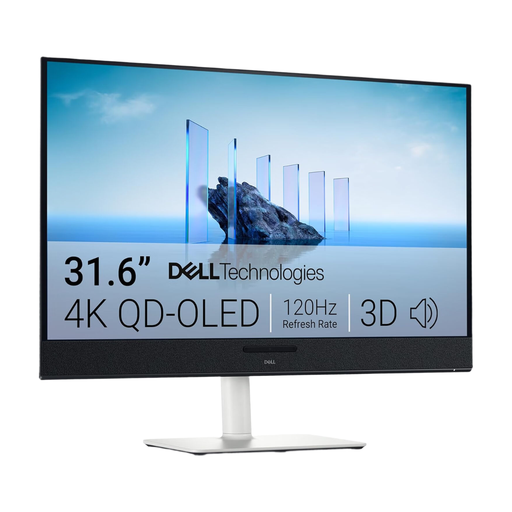
Dell Plus S3225QC, 31.6-inch 4K UHD monitor
For a laptop workstation, the stated USB-C charging power is a useful connection specification. It doesn’t, on its own, indicate whether the monitor suits a particular colour workflow.
QD-OLED panel and 3840 × 2160 pixels according to the product name. The product description lists 99% DCI-P3, USB-C with 90 W Power Delivery, and a height-adjustable stand that tilts, swivels and pivots.
Joybuy
Frequently asked questions
Will a monitor’s advertised wide colour gamut ensure accurate colours for my online shop?
No. Set up your colour workflow for digital output and check the monitor and export profiles together. Adobe describes converting to sRGB when exporting for the web; a calibrated monitor can’t guarantee the same appearance on other devices.
What should I set up first after installing my monitor at home?
First check the lighting where you edit and choose a colour target that suits your intended output. Then calibrate or profile the screen using the appropriate workflow. Calibration can’t add missing colour gamut or correct an uneven display.
What extra costs and consumer rights should I consider when buying?
Check whether your calibration workflow requires a separate measuring device. For a consumer purchase, your statutory rights against the seller are distinct from a voluntary manufacturer’s warranty; check the terms of each separately. The Verbraucherzentrale explains the difference.
What energy label applies to monitors in Germany?
Electronic displays covered by EU rules carry an energy label on a scale from A to G. The European Commission explains the labelling requirements for covered displays, including computer monitors. The label doesn’t indicate a screen’s suitability for colour-critical work.


