What should you look for when buying?
First, check your camera preview and the software effects available. Then choose a screen size, setup and connections to suit your shared space and the computers you actually use.
| What you need |
What to check before buying |
Who will find this most useful? |
| Hide the background on camera |
Check the preview and available video effects in your conferencing software. Microsoft Support notes that effects may not necessarily hide confidential content. |
If my main aim is to hide the room behind me on video calls, I’ll check the software effects first. Around 33% of consumers prioritise hiding their camera background. |
| Switch between computers at a shared desk |
For both laptops, check video output, charging requirements and USB ports, and whether a KVM switch is clearly specified. |
If I use two computers and shared peripherals, I want to minimise plugging and unplugging. Around 27% of consumers prioritise switching between computers and peripherals. |
| Make text and windows easy to read |
Confirm that the exact model has 3840 × 2160 pixels, then check scaling and readability from your intended seating distance. |
If I use several windows side by side, I need a display that’s easy to read from where I sit. Around 20% of consumers prioritise readable text and workspace. |
| Manage reflections and positioning |
Check the screen finish, height and tilt adjustments, and whether the stand or mount suits your actual desk. An anti-glare finish is no substitute for positioning the monitor properly. |
In bright light or if seating positions change, I want to adjust the screen and reduce distracting reflections. Around 20% of consumers prioritise flexible positioning with minimal reflections. |
Brands to consider
These details relate to the specific model ranges mentioned and aren’t general statements about every product from each brand.
ASUS
The ProArt PA279CRV is a 27-inch 4K option for a workspace where desk space matters, including for image editing.
- ASUS Germany lists an anti-glare IPS panel, height adjustment, USB-C and 96 W Power Delivery for this model.
- This doesn’t confirm that the PA279CRV has a KVM switch; these features aren’t representative of all ASUS monitors.
Dell
The UltraSharp U2725QE is a 27-inch 4K option with a Thunderbolt hub for compatible laptops.
- Dell lists a height-adjustable, anti-glare screen and power delivery of up to 140 W EPR for this model.
- The power available in practice depends on the connected device. The hub label alone doesn’t mean the monitor has a KVM switch.
LG
The UltraFine 27UP850K-W is a 27-inch 4K IPS option with USB-C and an adjustable stand.
- LG lists a resolution of 3840 × 2160 pixels, along with height, swivel and tilt adjustment for this model.
- Claims about colour performance are based on manufacturer information. A KVM switch isn’t confirmed for this model.
BenQ
The RD320UA is a larger 31.5-inch 4K option if you need a flexible arm and KVM.
- BenQ lists a Nano Matte finish, KVM, 90 W USB-C Power Delivery and an arm for this model.
- Check that the arm mount and space requirements suit your desk. These features apply to the RD320UA, not to all BenQ products.
Lenovo
The ThinkVision P27u-20 is another 27-inch 4K docking option if your computer is compatible with Thunderbolt accessories.
- Lenovo lists an IPS display, factory-calibrated colour and an included Thunderbolt 4 cable.
- The listed features don’t confirm that the monitor has a KVM switch. Check the specific model for the switching features you need.
4K monitors for different desks
This selection includes 4K monitors from 23.8 to 32 inches to suit different amounts of desk space. The video effects in your conferencing software are still what hide your camera background.
 No image available
Portable 23.8-inch 4K monitor
The smaller screen size may suit a shared workspace with limited desk space.
23.8 inches; 3840 × 2160 pixels; 60 Hz; USB-C and Mini HDMI inputs; integrated stand.
View at Joybuy
 No image available
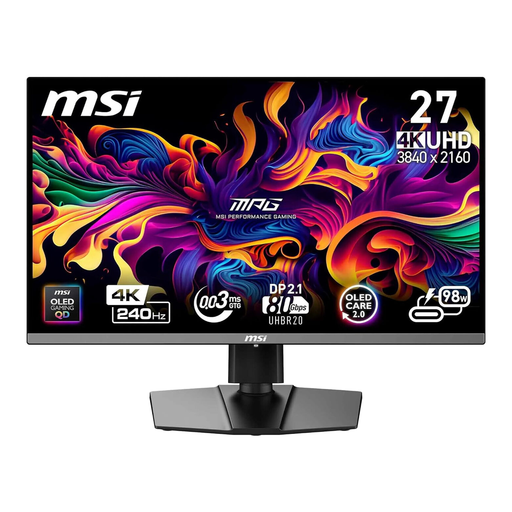
MSI MPG 272URXDE, 26.5-inch 4K QD-OLED gaming monitor
The 26.5-inch size is an option if you’re looking for a 4K display for a shared workspace.
26.5 inches; 4K UHD; QD-OLED; 240 Hz; USB-C with 98 W Power Delivery.
View at Joybuy
 No image available
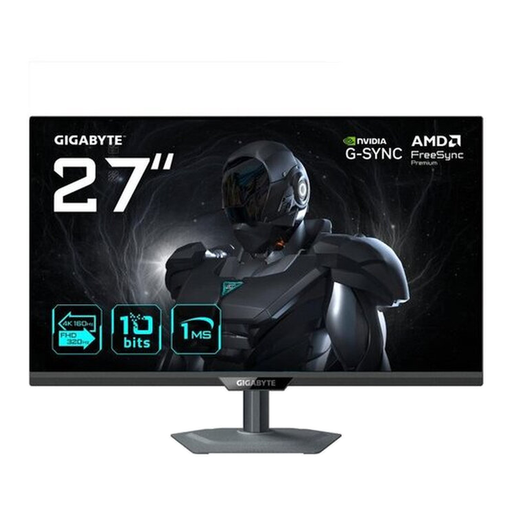
GIGABYTE G27UP, 27-inch 4K UHD IPS monitor
The 27-inch size may suit a desk with limited space; check how it will fit in your shared workspace.
27 inches; 3840 × 2160 pixels; IPS; 144 Hz.
View at Joybuy
 No image available
ASUS ROG Swift OLED PG32UCDMR, 32-inch 4K OLED gaming monitor
The larger screen size may suit a shared desk with enough room.
32 inches; 3840 × 2160 pixels; 240 Hz; USB-C with 90 W Power Delivery; USB hub.
If sharing input devices is important, check before buying whether this specific model has a KVM switch for the job.
View at Joybuy
 No image available
INNOCN CB27U1, 27-inch 4K UHD IPS monitor
The 27-inch screen and height adjustment are useful features for a shared workspace.
27 inches; 3840 × 2160 pixels; IPS; 120 Hz; USB-C with 90 W Power Delivery.
The product description doesn’t list a KVM switch. You’ll need another solution if you want to share a keyboard and mouse between computers.
View at Joybuy
Frequently asked questions
Will a 4K monitor mask a busy room behind me on a video call?
No. In Microsoft Teams, blur and background replacement are set up as video effects, as Microsoft Support explains. Check the preview, and don’t rely on the effect alone to hide confidential information.
How should I position a screen at a shared workspace?
Position the screen and lighting to avoid distracting glare and reflections, and adjust the height and tilt to suit each person. Germany’s ASR A6, issued by the Federal Institute for Occupational Safety and Health, applies to workplaces and teleworking spaces within its scope; it doesn’t apply universally to every home desk.
Is USB-C enough for two laptops to share the same keyboard and mouse?
No, not automatically. For the specific monitor, check video transmission, power delivery, USB upstream ports and whether a KVM switch is clearly specified. Also check the ports on both laptops.
What are my rights when buying a monitor online in Germany?
For a qualifying distance purchase by a consumer, you generally have a 14-day right to cancel from the date of delivery, as explained by Your Europe. Faulty goods are covered by a statutory guarantee against the seller for at least two years. This is separate from any voluntary manufacturer’s warranty.
Where can I compare monitor energy consumption?
The EU energy label and public EPREL database provide information for specific electronic display models. The European Commission recommends comparing entries for the exact model identifier rather than using figures for other variants.


