Laptop users with few available sockets
You want to connect your laptop for both video and power through the monitor, wherever possible. What matters is your computer’s video output and the charging power it needs.


First, check whether your laptop can output a 4K image through the port you plan to use, and whether the monitor provides enough power to charge it. Only then can the connection replace your separate laptop charger at your desk. For checking seams, you’ll also need a 4K view that suits your working distance and the right colour mode for your project. A monitor makes inspection easier, but it won’t correct UVs or textures: Blender describes these steps as part of the texturing workflow.
You want to connect your laptop for both video and power through the monitor, wherever possible. What matters is your computer’s video output and the charging power it needs.
You compare the UV view with the 3D result to assess fine transitions. What you see on the monitor and the actual correction of UVs or textures are separate tasks, as the Blender Foundation also explains in its workflow documentation.
You’re not just checking whether a seam is visible, but also assessing colour gradients in the colour mode specified for your project. That means choosing the right colour mode and, where necessary, using a suitable calibration workflow.
If sockets are in short supply, first check your laptop’s video output, the cable and the charging power it needs. Then choose a screen size and colour features to suit the way you inspect seams.
| What you need | What to check before buying | Who it matters most to |
|---|---|---|
| Spot fine seams | Native resolution and screen size; check your typical UV and 3D views on your own computer. | If I want to compare transitions in the UV view and on the model, a clear, practical view of fine detail matters. Around 34% of consumers put the visibility of fine details first. |
| Power your laptop through the monitor | Compare your laptop’s video output, a suitable cable and its charging requirements with the specifications of the specific monitor. | If there are few free sockets, I only want to leave my separate laptop charger at home if the connection and power output are actually suitable. Around 33% of consumers prioritise saving a socket. |
| Assess colour transitions | Check your project’s colour space and the monitor’s intended colour mode; factor in a calibration workflow for critical colour decisions. | If colour differences at a seam matter to my project, I need a suitable colour mode. Around 20% of consumers prioritise assessing colour transitions. |
| Set up your workspace | Consider the stand’s dimensions and height adjustment, as well as the connections you need. | If space is limited or I want easy access to connections, a practical setup without unnecessary extras matters. Around 13% of consumers prioritise straightforward setup and use. |
USB-C features and charging power vary between models. BenQ lists 90 W Power Delivery and DisplayPort Alt Mode for the PD2706U, ASUS lists 96 W for the PA279CRV, and EIZO lists power delivery of up to 60 W for the CS2740. Whether that’s enough for your laptop depends on its port and power requirements.
Compare your video output, cable and charging requirements with the specifications of the specific monitor.
If the charging power isn’t enough, you’ll still need your separate laptop charger at your desk.
The Blender Foundation describes marking and adjusting seams, along with UV editing, as steps in the texturing workflow. A monitor displays your work, but it won’t make these corrections for you.
Consider your monitor choice and troubleshooting separately, and check a familiar UV and 3D view.
Correcting UVs or textures may involve extra work.
Model-specific colour features and manufacturer specifications don’t automatically determine how you should assess a particular transition in your project.
Choose a colour mode to suit your output requirements, and factor in a suitable calibration workflow for critical colour decisions.
The DesignVue PD2706U is designed for 27-inch 4K graphics work, with USB-C charging and KVM.
The ProArt PA279CRV is a 4K creative monitor with USB-C and an adjustable stand.
The ColorEdge CS2740 is a 4K graphics monitor designed for a calibratable colour workflow.
The S2725QC is a 27-inch 4K USB-C model, while the U2725QE is a standalone UltraSharp Thunderbolt hub monitor.
The 27UP850K-W is a 27-inch 4K IPS monitor with USB-C and an adjustable stand.
The Joybuy products below are 4K monitors suited to viewing fine detail. Check the charging power and laptop compatibility against the specifications for each model.
 No image available
A compact 4K view could be a good option for checking fine image details.
The product title lists UHD, 60 Hz, 100% sRGB, USB-C and Mini HDMI inputs, plus a built-in stand. It doesn’t specify USB-C charging power.
 No image available
The listed 4K resolution is a good starting point for viewing fine detail at high resolution.
The product specifications list a 60 Hz IPS panel, 3840 × 2160 pixels, 10-bit colour depth and a stand with height adjustment, tilt, swivel and pivot.
 No image available
The USB-C power output listed in the product title could be useful for laptop users. Check it against your device’s requirements and port.
Specifications include 3840 × 2160 pixels, IPS, 120 Hz, USB-C with 90 W Power Delivery and height adjustment.
 No image available
If you’re looking for a 4K view and a USB-C connection with a specified charging output, compare the listed figures with your laptop’s requirements.
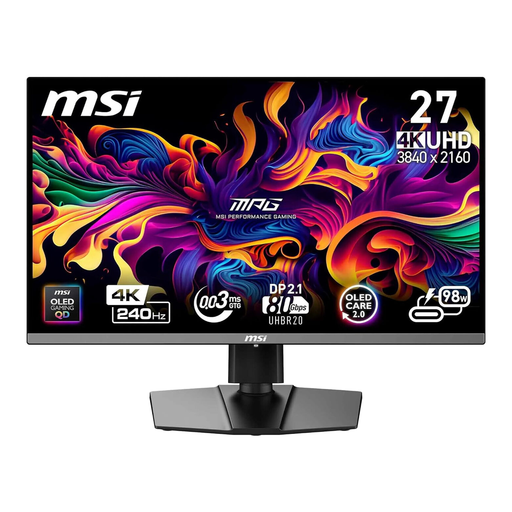
The product title lists 240 Hz and USB-C with 98 W Power Delivery; the product description lists QD-OLED and 99% DCI-P3 colour gamut coverage.
 No image available
The listed USB-C charging power could be useful for a workspace with few sockets, provided it matches your laptop’s power requirements.
The product title lists 3840 × 2160 pixels and USB-C with 98 W Power Delivery. The product description lists QD-OLED, 10-bit colour depth, 99% DCI-P3 and an ergonomic stand with a KVM switch.
No. A USB-C port alone doesn’t guarantee video output or enough charging power. Compare your laptop’s video output, cable and power requirements with the features of the specific monitor. BenQ lists DisplayPort Alt Mode, data and 90 W Power Delivery for the PD2706U.
No. The Blender Foundation describes seam and UV editing as part of the workflow. The ‘Bleed Seam’ function extends colour beyond UV island borders to help prevent certain visible artefacts; the screen itself doesn’t make these corrections.
First, check the space available and adjust the height to suit you. Then select the colour mode specified for your project. A familiar UV and 3D view can help you assess how the display looks for your work. Dimensions and adjustment options vary by model.