What should you look for when buying?
First, check for reflections at the intended location. Then decide on your target colour space, before comparing screen size, scaling and connections with your workflow.
| Consideration |
What to check when buying |
Who should consider it? |
| Reflections by a window |
Compare the anti-glare finish, typical brightness rather than the HDR peak, and possible screen positioning. |
If you assess fine lines in changing daylight, you’ll want a view with as little distraction as possible. Around 36% of consumers rank reflection control as their top buying consideration. |
| Colour space for your output |
Set your target colour space and choose the appropriate colour mode; factor in the calibration process you’ll need. |
What matters is whether the vector colours suit the intended screen or print colour space. Around 29% of consumers put accurate colour reproduction first. |
| Workspace and detail |
Compare a typical document at your preferred scaling on 27- and 32-inch screens; factor in desk space and the stand. |
If you check outlines alongside toolbars, you’ll need enough drawing space while keeping everything easy to read. Around 21% of consumers prioritise workspace and detail checking. |
| Laptop connectivity |
Check video output, charging requirements, the USB devices you need and the ports on the specific monitor, one by one. |
If you want to connect the display signal, charging and peripherals through your monitor, your laptop and its connection must support the features you need. Around 14% of consumers put laptop connectivity first. |
Joybuy products for this use
This selection includes 27- and 32-inch 4K monitors for checking vector graphics, including models whose product descriptions mention anti-glare features.
 No image available
TCL 32x3A 32-inch OLED monitor, 4K UHD
The 32-inch screen may suit you if you want to view your design and toolbars on a larger display.
The product title lists 4K UHD at 3840 × 2160 pixels, OLED+ and an anti-glare display.
View at Joybuy
 No image available
Samsung ViewFinity S7 S70H, 27-inch 4K UHD IPS monitor
The 27-inch size may suit you if you’re looking for a more compact 4K display for checking outlines.
The product title lists an IPS display and 4K UHD.
View at Joybuy
 No image available
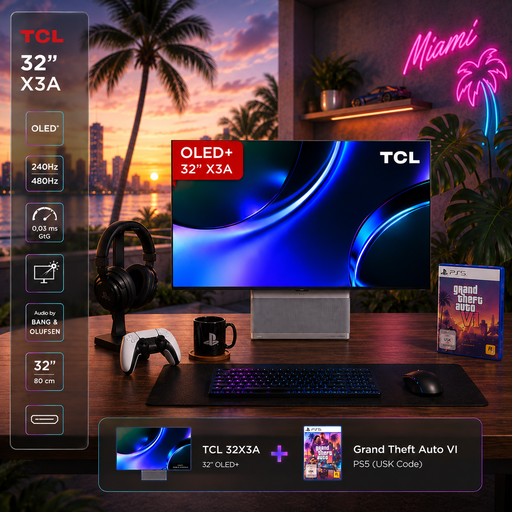
TCL 32X3A OLED+ gaming bundle with GTA 6
The 32-inch model may suit you if you want to check your design and toolbars on a larger display.
The product title lists a 4K UHD monitor with 3840 × 2160 pixels and an anti-glare display. This is a bundle.
View at Joybuy
 No image available
CRUA CR320QB, curved 32-inch 4K monitor
The 32-inch screen may suit you if you want more room for your design and toolbars; check that the curved shape works for the way you view your work.
The product title lists a VA display, 3000R curvature, HDR10 and 100% sRGB.
View at Joybuy
 No image available
INNOCN CB27U1, 27-inch 4K UHD monitor
The 27-inch size may suit you if you want to check outlines on a more compact 4K display.
The product title lists an IPS display, 3840 × 2160 pixels, 120 Hz, HDR500, PIP and PBP, plus USB-C with 90 W Power Delivery.
View at Joybuy
Frequently asked questions
Is 400 cd/m² on the specification sheet enough for direct sunlight on the monitor?
You can’t tell from the brightness figure alone. For the BenQ PD3225U, the manufacturer lists a typical brightness of 400 cd/m². Also check reflections where you’ll actually use it, and whether you can position or shade the screen or window appropriately. Glare protection remains important, even with modern display technology.
How do I set up a laptop and monitor for checking graphics?
First, check whether your laptop’s port supports video over USB-C, then compare its charging requirements with the Power Delivery specification for the monitor in question. Next, adjust the screen position, scaling and colour mode to suit your output and workflow. A USB-C connector alone doesn’t confirm that all the features you need are supported.
What should I check for care and ongoing costs?
Follow the manufacturer’s care instructions for the specific display surface, and compare the EU energy label when looking at monitors in Germany. The European Commission includes computer monitors in its product group for energy labelling and uses an efficiency scale from A to G. An efficiency rating alone can’t give you a personal estimate of electricity costs without suitable assumptions about use.
What consumer rights apply when buying online in Germany?
For a typical online purchase by a consumer, you generally have a 14-day right to cancel from the date of delivery; statutory exceptions may apply. If goods are faulty, you also have statutory rights against the seller. A voluntary manufacturer’s guarantee is separate and doesn’t replace these rights.
Does a monitor sold in Germany have to carry an energy label?
The European Commission generally includes computer monitors in EU energy-labelling requirements, while also listing exceptions within the product category. So, check the product information sheet for the specific model and whether the label applies to that exact version.


