SDR video editors
If you mainly assess images for SDR output, look for a monitor mode that matches your output format. Adobe describes Rec.709 as an output option for SDR sequences.


For assessing SDR video, a 4K monitor with a colour mode suited to your output makes sense. For a repeatable colour workflow, you should also check the calibration options. Plan your timeline around your preferred text scaling, check that the video connection and charging power are compatible with your laptop, and, if you need an especially quiet workspace, look for reliable noise data for the exact model.
If you mainly assess images for SDR output, look for a monitor mode that matches your output format. Adobe describes Rec.709 as an output option for SDR sequences.
If you want to work with the preview, editing tracks and panels all at once, check how easy they are to read at your preferred text scaling. ASUS and EIZO offer 4K models for different workflows.
For long editing sessions, desk space and screen position matter. If noise is a particular concern, check the noise level of the exact model separately rather than trying to infer it from other specifications.
Start by deciding on your output format and preferred timeline layout. Then check the specific model against your workspace, noise requirements and laptop connections.
| Buying consideration | What to check before buying | Who this matters most to |
|---|---|---|
| Colour mode for output | Check the intended SDR or HDR output colour space and make sure the exact model has a suitable mode. | If I’m assessing SDR footage for Rec.709, the colour mode needs to match my sequence. Around 29% of consumers put a suitable colour mode first. |
| Space and timeline readability | Compare the screen size, native resolution of 3840 × 2160 pixels, stand dimensions and window layout at your preferred scaling. | If I want to read the preview, tracks and panels at the same time, usable desk space matters. Around 23% of consumers prioritise space and timeline readability. |
| Noise and positioning | Look for reliable noise data or a credible test of the exact model, and check that the stand and screen position suit your workspace. | If I work in a quiet room, I want to know the noise level of the specific monitor and position it appropriately. Around 18% of consumers put quiet operation and positioning first. |
| Video connection and charging power | Check your computer’s video output, cable and charging requirements against the specifications for the exact monitor model. | If I connect my editing laptop to the monitor, the video signal and power supply need to be compatible. For around 18% of consumers, the laptop connection is their main buying consideration. |
| HDR or calibration workflow | Start by clarifying your output format. For colour-critical work, check which features can actually be calibrated; an HDR label alone won’t answer that. | If I’m assessing HDR or need repeatable colour settings, the monitor needs to suit that specific workflow. Around 12% of consumers put an advanced HDR or calibration workflow first. |
An HDR label doesn’t automatically tell you whether a monitor suits your output format and the type of assessment you want to carry out. Adobe describes different colour settings and output options for SDR and HDR sequences.
First, decide on your HDR output format, then check the monitor features you need for it separately.
ASUS points out that high-contrast still images displayed for long periods can cause image retention on OLED screens.
Consider the image quality you want alongside how much static content your interface displays, and check the protection features and warranty terms for the exact model.
Checking the protection features and warranty terms can take extra time when choosing and setting up your monitor.
Charging power varies between specific models. Your laptop port and cable also need to support the video signal.
Check your laptop’s video output, cable and charging requirements against the monitor’s specifications.
Depending on the combination, you may still need a separate power adapter or a compatible cable.
Resolution, colour space and ergonomic specifications don’t tell you how noisy a monitor will be in a quiet workspace.
Look for reliable noise data or a credible test of the exact model, and check the applicable returns policy before buying.
The PD2705U is a 27-inch 4K example with a Rec.709 mode for SDR workflows.
The ProArt PA279CRV combines 4K resolution with colour presets and an adjustable stand.
The ColorEdge CS2740 is a 4K option for workflows that include hardware calibration.
The UltraSharp U2725QE is a 27-inch 4K option for workspaces where a hub and connectivity matter.
The 27UP850K-W is a 27-inch 4K IPS example with USB-C and an adjustable stand.
The Modern MD272UPHGDE is a documented 4K option for workspaces with KVM and laptop requirements.
The Joybuy models below are 4K monitor options for assessing a video-editing timeline. If you choose an OLED model, consider how you’ll use it with static timeline elements.
 No image available
For a 4K timeline on a 27-inch monitor; check that your laptop and cable support video and charging over USB-C.
3840 × 2160 pixels, IPS, 120 Hz and USB-C with 90 W Power Delivery.
 No image available
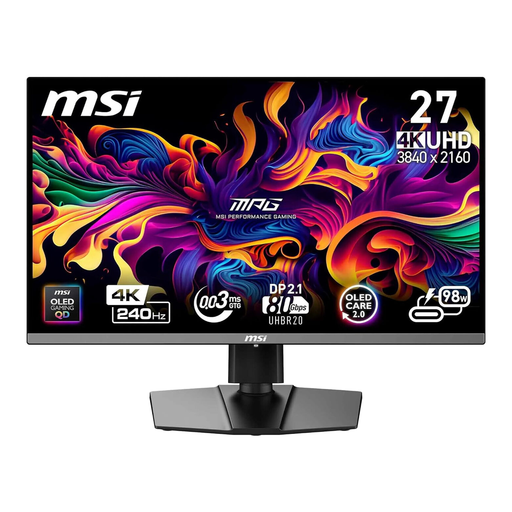
A QD-OLED option for 4K viewing; during long sessions, remember to consider static, high-contrast timeline elements.
4K UHD, QD-OLED, 240 Hz, 16:9 and USB-C with 98 W Power Delivery.
 No image available
The 32-inch version gives you a larger screen for your 4K timeline; check that it fits your desk.
3840 × 2160 pixels, QD-OLED, 240 Hz, height-adjustable stand and USB-C with 98 W Power Delivery.
 No image available
For 4K OLED previewing; ASUS notes that high-contrast content displayed for long periods can cause image retention on OLED screens. Check the protection features of the specific model.
3840 × 2160 pixels, QD-OLED, 240 Hz, USB-C with 90 W Power Delivery and USB hub.
No, a colour-space figure alone isn’t enough. Adobe describes Rec.709 as an SDR output option; check that your monitor has a suitable mode and, for colour-critical work, consider your calibration workflow. A manufacturer’s coverage figure doesn’t measure your individual unit.
Only if your laptop port, cable, video signal and charging power are all compatible. BenQ lists DisplayPort Alt Mode and 65 W Power Delivery for the PD2705U; ASUS lists 96 W Power Delivery for the PA279CRV.
According to ASUS, high-contrast elements displayed for long periods can cause image retention. Check the protection features and warranty terms for the specific OLED model rather than assuming that information from one manufacturer applies to other models.
Verbraucherzentrale distinguishes between your statutory rights against the seller and a voluntary guarantee. Online purchases generally come with a 14-day right to cancel, subject to the applicable conditions in each case. Umweltbundesamt explains that old electrical equipment must be collected separately from unsorted household waste.