Arranging frames on a small desk
If you want to see the preview, frames and tools at the same time, you’ll need to balance comfortable scaling with the space available on your desk.


A 27-inch 4K monitor can work well for arranging animation frames, provided there’s room for the preview, frames and panels at a comfortable scaling size, and the stand fits on your desk. Choose colour modes to suit your output format, and only consider USB-C power delivery or extra connectivity features if they work with your colour workflow and laptop.
If you want to see the preview, frames and tools at the same time, you’ll need to balance comfortable scaling with the space available on your desk.
If you’re checking animation colours for a particular display or video colour space, your display and project settings should match that output format.
If you often reconnect your laptop, check that the monitor supports video and power delivery in a way that suits your needs, and that its adjustment options work for your workspace.
First, check your usual software layout at a comfortable scaling size, then measure the space available on your desk. Finally, make sure the colour modes and connections suit your output format and laptop.
| What to consider | What to look for | Who is it important to? |
|---|---|---|
| Workspace | Test your layout at a scaling size that’s comfortable to read. Compare the screen size and resolution of the specific model. | If I want to see frames, the preview and tools at the same time, the scaling needs to remain comfortable to read. Around 26% of consumers would prioritise arranging these elements clearly. |
| Colours for output | Check the intended output colour space and the appropriate monitor mode. Manufacturer figures are no substitute for measuring the specific device. | If my animation is intended for a particular display or video colour space, I want to be able to choose the right mode. Around 21% of consumers would put matching the output format first. |
| Desk space and ergonomics | Measure your desk’s width and depth, allowing space for a keyboard or drawing device. Compare the stand’s dimensions and adjustment range. | If desk space in my student room is limited, I want to be able to set up and adjust the monitor without losing room for input devices. Around 21% of consumers would prioritise desk space and adjustability. |
| Laptop connection | Check whether your laptop’s port supports video output, whether the cable and charging power are suitable, and which accessories are included. | If I regularly connect my laptop, I want a suitable connection that can handle both the picture and power delivery. Around 16% of consumers would make a suitable laptop connection their top buying priority. |
| Total cost | Compare the features you’ll actually use, and check the EU energy label or EPREL entry for specific models. | If I’m working to a limited student budget, I want to weigh up the features I need and power consumption together. Around 16% of consumers would prioritise total cost over extra features. |
Scaling for comfortably readable text and larger controls can mean fewer panels are visible at once than the resolution might initially suggest.
Before deciding based on the pixel count, test your usual layout with scaling that’s comfortable for you to read.
A monitor’s colour gamut alone doesn’t determine how source material is edited and output.
Make sure your project, output and monitor settings work together, and check whether you really need additional colour modes.
Your laptop’s port must support video output, and the cable and power supply must be suitable for the specific monitor and laptop.
Before buying, check your laptop’s port, charging requirements, monitor specifications and included cables against each other.
The DesignVue PD2706U is a 27-inch 4K option with sRGB, Rec.709 and animation modes listed.
The ProArt PA279CRV is aimed at buyers who need the listed Adobe RGB and DCI-P3 modes as well as sRGB on a 27-inch 4K monitor.
The UltraFine 27UP850K-W is a 27-inch 4K option with USB-C and an adjustable stand.
The VP2756-4K is another 27-inch 4K option, with a focus on sRGB colour gamut coverage that the manufacturer describes as complete.
The UltraSharp U2725QE is a 27-inch 4K option focused on a Thunderbolt hub and flexible connectivity.
The following Joybuy models offer a 27-inch 4K workspace, with dual-mode or USB-C features available on some models. For your animation workflow, also check the scaling, desk space required and colour gamut you need.
 No image available
For a 27-inch UHD workspace; check whether the stated dual-mode feature also suits your other display requirements.
The product title lists Mini LED, Rapid IPS, 160 Hz at 4K and 320 Hz at FHD.
 No image available
For a 27-inch 4K workspace if you’re considering an IPS monitor as part of your desk setup.
The product title lists 4K UHD and IPS.
 No image available
If you’re considering a 27-inch 4K workspace and a USB-C connection, check your laptop’s video output and charging requirements.
The product title lists 3840 × 2160, 120 Hz, USB-C with 90 W Power Delivery, and PIP and PBP.
 No image available
For a 27-inch 4K workspace; check that the extra USB-C and KVM features suit the devices you want to connect.
The product title lists 160 Hz at 4K and 320 Hz at FHD, as well as USB-C with 65 W Power Delivery.
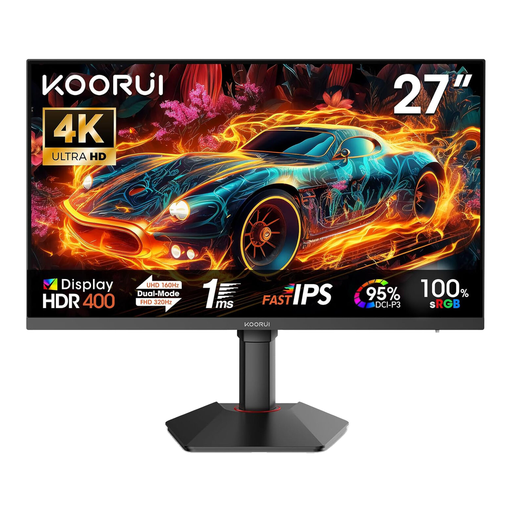 No image available
If you’re looking for a 27-inch 4K workspace, check that the dual-mode specifications and listed connections suit the way you’ll use it.
The product title lists 3840 × 2160 at 160 Hz and FHD at 320 Hz, as well as Fast IPS, HDMI 2.1 and DP 1.4.
No. In Windows, you can change the scaling for text and apps. Try the setting with your animation software: larger controls take up more of the visible workspace. Microsoft explains the scaling options in its Windows help.
Only if the laptop port you’re using supports video output, the cable is suitable and the specific monitor’s power delivery meets your laptop’s needs. BenQ lists 90 W Power Delivery and DisplayPort Alt Mode for the PD2706U; ASUS lists 96 W Power Delivery for the PA279CRV. These manufacturer specifications don’t confirm compatibility with your laptop.
Set the colour space for your source, editing and output to suit the project, then choose an appropriate monitor mode. Adobe explains these separate steps for Premiere; a colour gamut coverage figure alone isn’t a substitute.
The EU energy label also applies to computer monitors. The European Commission points to model-specific information on the label and in EPREL. Compare the specific variant rather than just the brand.
Your statutory rights against the seller for faulty goods are separate from any voluntary guarantee. For ordinary goods, Section 438 of the German Civil Code (BGB) generally provides for the relevant claims to become time-barred after two years from delivery. A standard distance-selling contract generally includes a right to cancel; exceptions are set out in Section 312g BGB.