Which buying criteria matter?
Start by checking how easy your plans are to read at your intended scaling. Then check your computer connections and how you’ll position the screen for shared use. Colour modes and running costs matter if they’re relevant to your workflow.
| Buying priority |
What to check before buying |
Who is this important to? |
| Reading plans side by side |
Compare your drawings at your intended scaling and viewing distance. Check whether Picture-by-Picture is compatible with your video sources if you need it. |
When I’m checking two plans at once, dimensions and lines need to remain clear at my chosen scaling. Around 36% of consumers put plan readability first. |
| Switching between computers and peripherals |
Check the video outputs, USB connections and power requirements of every computer against the specifications of the specific model. Check which KVM and USB upstream connections you need. |
When several people connect their computers at one desk, I want to be able to share the keyboard and mouse as easily as possible. Around 29% of consumers put switching between computers first. |
| Positioning the screen for shared use |
Measure the desk space, depth and room to swivel the screen. Check the height and tilt adjustment, and make sure the edge of your desk is suitable if you’re using a clamp-mounted arm. |
When we’re looking at the same screen from different seating positions, it needs to be easy to adjust the display to suit us. Around 21% of consumers put adjustability first. |
| Balancing colour needs and ongoing costs |
Decide whether you need to assess lines or colours for a particular output process. Compare suitable colour modes and the EU energy label for the specific models. |
When I’m assessing colour designs, suitable display modes and energy use in my intended working conditions matter to me. Around 14% of consumers prioritise colour and ongoing costs. |
Joybuy products for comparing plans
The Joybuy products below are large-screen 4K monitors. Choose one based on your desk space, the connections you need and the features that suit your shared plan-comparison work.
 No image available
TCL 32X3A 32-inch OLED monitor
The stated 32-inch screen size could be useful for viewing plans side by side. Check how easy your files are to read at your intended scaling.
32 inches; 3840 × 2160; OLED+; 240 Hz, or 480 Hz at FHD; anti-glare display.
View at Joybuy
 No image available
CRUA CR320QB 32-inch curved 4K monitor
The stated 32-inch screen size provides plenty of physical display space. Check how the curved screen works for you from your usual seating position.
32 inches; curved; 3000R; VA; 3840 × 2160; HDR10; 100% sRGB.
View at Joybuy
 No image available
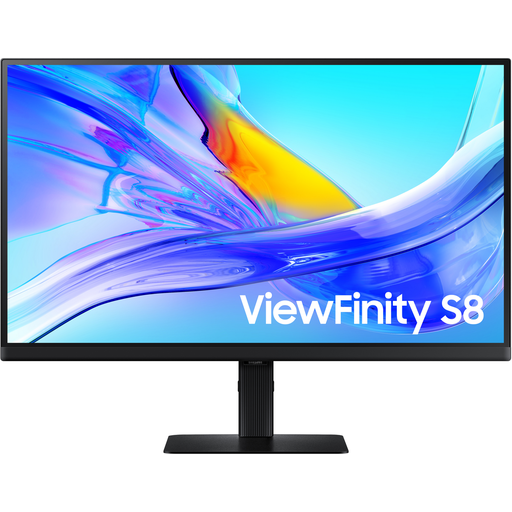
Samsung ViewFinity S8 S80UD 37-inch 4K UHD business monitor
The stated 37-inch screen size could be useful for comparing two plans. Check that the monitor and viewing distance work at your shared desk before buying.
37 inches; 4K UHD; VA; USB-C with 90 W Power Delivery; HDR10; 60 Hz. Check USB-C compatibility and the power requirements of your computers.
View at Joybuy
 No image available
MSI MPG 322URXDE QD-OLED 32-inch 4K monitor
The 32-inch 4K specification gives you an idea of the available screen space. Test how easy your drawings are to read at your preferred scaling.
32 inches; 3840 × 2160; QD-OLED; 240 Hz; USB-C with 98 W Power Delivery; height-adjustable stand. Check the connections and charging requirements of your computers.
View at Joybuy
 No image available
GIGABYTE MO32U24 OLED 32-inch 4K monitor
The stated 32-inch 4K screen could work well for two plans. Check how easy they are to read and position at your workstation.
32 inches; 3840 × 2160; flat screen; height-adjustable, tiltable, swivel and pivot. HDMI, DisplayPort and USB are listed in the product name.
View at Joybuy
Frequently asked questions
Is 4K alone enough to make dimensions on two plans easy to read?
No. 4K alone doesn’t tell you whether dimensions will be clear at your chosen scaling and viewing distance. Try your actual files side by side. At the same resolution, a 31.5-inch model offers more physical screen space than a 27-inch model, but it also takes up more room.
Can I connect two laptops with just one USB-C cable per person?
That depends on the ports on your laptops and the specific monitor. Check video transmission over USB-C or Thunderbolt, the power output you need and the USB upstream connections required for KVM. A listed KVM switch doesn’t guarantee that both computers can be fully connected with just one cable each.
How should I position the screen at a shared workstation?
Adjust the height, tilt and position to suit the actual seating positions, and check for distracting reflections. Follow the cleaning guidance for the specific device. If you’re using a clamp-mounted arm, make sure it’s suitable for the desk edge too. If the desk is a workplace display screen workstation, you’ll need to take the relevant health and safety requirements into account. The Federal Institute for Occupational Safety and Health sets out requirements for their respective areas of application in ASR A6.
How do I compare power consumption and what happens if a product is faulty?
Compare the energy consumption figures on the EU energy label for the specific devices. To work out your actual electricity costs, you’ll also need to know how long you use them and your electricity price. If a product is faulty, distinguish your statutory rights against the seller from any voluntary guarantee. Verbraucherzentrale explains that guarantee terms can provide additional benefits.
Which product and disposal information should I look out for?
For its market surveillance of electrical and electronic products, the Federal Network Agency lists requirements including correct CE marking, identifiable manufacturer details and German instructions with the necessary usage and safety warnings. Old monitors should go to a separate collection point for waste electrical and electronic equipment; the Federal Environment Agency advises that they must be collected separately.


