
Lieferung heute & morgen

Qualitätsgarantie

Willkommens-Angebote freischalten: KOSTENLOSE Lieferung | Bis zu 80 % RABATT | Kostenlose 30-Tage-JoyPlus-Testphase
App herunterladen
A 4K OLED gaming monitor combines a resolution of 3,840 × 2,160 pixels with self-emissive pixels. This delivers deep blacks, high contrast and fast pixel transitions. For PC and console gamers, that sounds straightforward at first. In practice, however, unclear manufacturer specifications, missing ports or an unsuitable viewing distance can quickly lead to a poor purchase.
This guide explains which specifications really matter when comparing models, and which OLED gaming monitor suits different usage profiles.
A stated response time of 0.03 ms describes how quickly a pixel can change its state. On its own, though, it doesn't tell you how smooth a game will look. The refresh rate is also crucial for that.
A 240 Hz gaming monitor can display up to 240 frames per second. However, this assumes your graphics card and the game can actually deliver that frame rate at 4K. For consoles, 120 Hz is often the relevant figure, depending on the model and game. So a 240 Hz monitor isn't automatically the right choice for every system.
DisplayHDR True Black 400 refers to the reproduction of dark areas and the HDR classification, not a permanently available peak brightness in every scene. OLED panels can achieve significantly higher peak values in small bright areas, while large bright areas are limited differently.
So pay attention to the combination of HDR certification, peak brightness, colour gamut coverage and the supported HDR formats. Individual brightness figures alone are not a complete quality criterion.
Static elements like taskbars, channel logos or persistent in-game HUDs can put more strain on OLED panels. Modern devices offer features such as pixel refresh, automatic dimming, logo detection or a proximity sensor. These measures can help with panel maintenance, but they don't replace sensible usage.
If you use the monitor for many hours with the same desktop elements, you should keep the protection features enabled and not interrupt the automatic maintenance cycle.
A 4K UHD monitor delivers a high pixel density on 27 or 32 inches. A 27-inch model feels particularly compact and detailed at the same resolution. A 32-inch gaming monitor, on the other hand, offers more screen real estate for games, editing software and multiple windows.
For your desk, consider the footprint, the depth of the stand and your viewing distance. Also check whether the stand is height-adjustable or supports a VESA mount of 100 × 100 mm.
An HDMI 2.1 monitor is relevant for modern consoles and graphics cards. HDMI 2.1 can transmit 4K at high frame rates with variable refresh, provided the source device and cable are also compatible.
DisplayPort 2.1 offers additional bandwidth headroom for compatible graphics cards. With DisplayPort 1.4, you may encounter limitations depending on frame rate, colour depth and compression. So check not just the connector type, but also the version.
A USB-C monitor with Power Delivery can carry video signal, data and power over a single cable. The charging power ranges from 15 to 98 watts depending on the model. For a laptop with higher power demands, you should verify the actual Power Delivery output.
Technologies like G-SYNC compatible monitor, VESA Adaptive-Sync or AMD FreeSync Premium Pro match the display output to your graphics card's frame rate. This can reduce visible screen tearing. Compatibility depends on your graphics card, driver, port and enabled settings.
For workstations with multiple computers, a KVM switch monitor is very handy. It lets you control connected computers using a shared keyboard and mouse. Content creators should also check colour gamut coverage, 10-bit colour depth and ergonomic adjustment options.
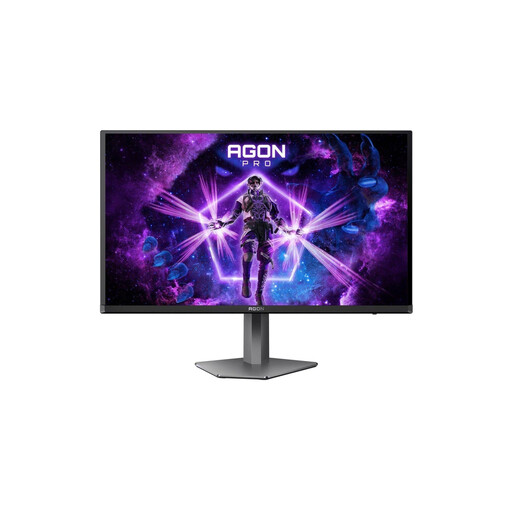
Why this product fits the profile: The 26.7-inch format takes up relatively little space and combines 4K resolution with 240 Hz, 0.03 ms GtG and USB-C with 65 W Power Delivery.
The specifications for 240 Hz, HDMI 2.1, DisplayPort 2.1 and KVM are clearly stated. DisplayHDR True Black 400 and OLED protection features make technical assessment easier.
4K, 240 Hz, 0.03 ms GtG, HDMI 2.1, USB-C with 65 W and integrated KVM switch.
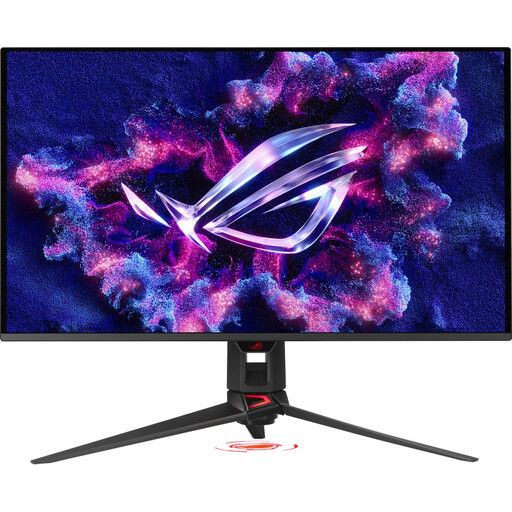
Why this product fits the profile: The 31.5-inch QD-OLED panel is aimed at users who want a large workspace and gaming area with high colour gamut coverage and flexible connectivity.
The ports include two HDMI 2.1, DisplayPort 2.1a and USB-C with 90 W. ASUS OLED Care Pro offers pixel refresh and a proximity sensor, among other features.
QD-OLED, 3,840 × 2,160 pixels, 240 Hz, 0.03 ms GtG, DisplayHDR True Black 400 and 90 W USB-C.
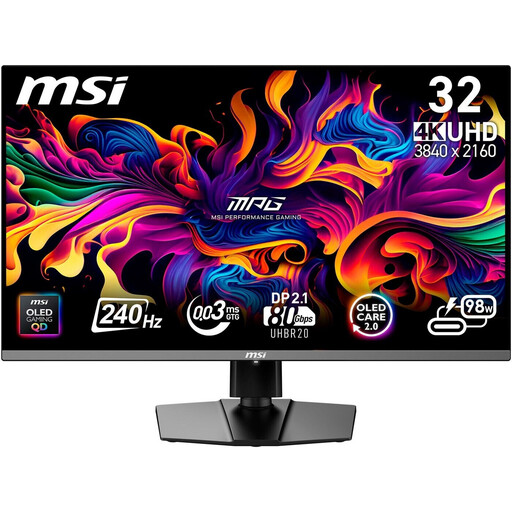
Why this product fits the profile: This model combines gaming features with USB-C, KVM, PiP/PbP and an ergonomic stand. That makes it suitable for switching between work and gaming devices.
OLED Care 2.0, pixel refresh and a graphene heatsink address panel maintenance. The port selection is designed for PC, console and laptop.
DisplayPort 2.1a, HDMI 2.1, USB-C with 98 W Power Delivery, KVM, 240 Hz and 0.03 ms GtG.
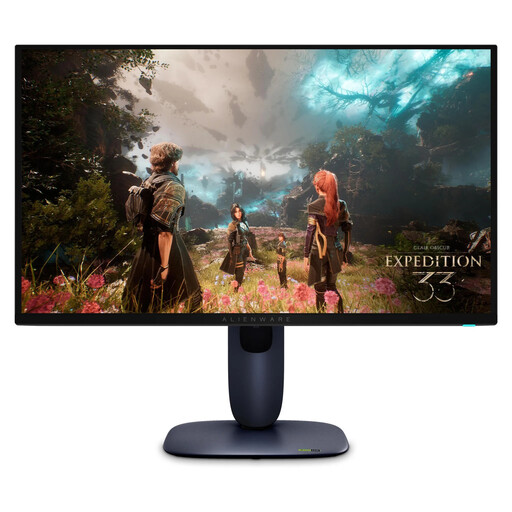
Why this product fits the profile: The compact panel offers 240 Hz, HDMI 2.1 and variable refresh for PC and current consoles. The fully adjustable stand supports ergonomic positioning.
G-SYNC compatibility, AMD FreeSync Premium Pro and VESA Adaptive-Sync are explicitly stated. Dolby Vision and DisplayHDR True Black 400 round out the HDR features.
166 PPI, 4K resolution, 240 Hz, 0.03 ms GtG, 99% DCI-P3 and HDMI 2.1.
We've put together a complete, regularly updated list of products that fully meet these strict selection criteria and the safety regulations in force in the EU.
Yes, provided the monitor has HDMI 2.1 and the console supports the desired resolution and frame rate. For many current consoles, 4K at 120 Hz is a relevant target. You should check VRR, ALLM and the respective HDMI bandwidth before buying.
Enable the built-in OLED protection features, let pixel refresh cycles complete fully and avoid permanently static image content at high brightness. Only clean the surface according to the manufacturer's instructions and don't press on the panel.
Power consumption depends on brightness, HDR usage, frame rate and screen size. The energy efficiency class and the stated consumption in kWh per 1,000 hours provide a useful comparison value. Your individual electricity tariff also affects the running costs.