
Lieferung heute & morgen

Qualitätsgarantie

Willkommens-Angebote freischalten: KOSTENLOSE Lieferung | Bis zu 80 % RABATT | Kostenlose 30-Tage-JoyPlus-Testphase
App herunterladen
A movie night on a giant screen that fills your entire field of view—what was once reserved for cinemas is now possible in your own living room. A 4K projector transforms any wall into an impressive home cinema. However, the selection of models, technologies, and features can be overwhelming. This guide will help you understand the technical specifications and find a device that meets your needs for image quality, flexibility, and ease of use.
To make an informed decision, a few technical features are crucial. Instead of being swayed by marketing jargon, focus on the following three aspects.
A projector's brightness, measured in ANSI lumens, is one of the most important factors. It determines how well the image is visible in different lighting conditions.
The contrast ratio describes the relationship between the brightest white and the deepest black. A higher contrast ratio provides more depth and detail, especially in dark movie scenes.
Resolution indicates how many picture elements (pixels) make up the image. Here are the most common standards:
Modern projectors are much more than just playback devices. A smart projector with an integrated operating system (like Android TV or Google TV) offers direct access to streaming services.
Here, we introduce three models that stand out for their specific features and use cases.
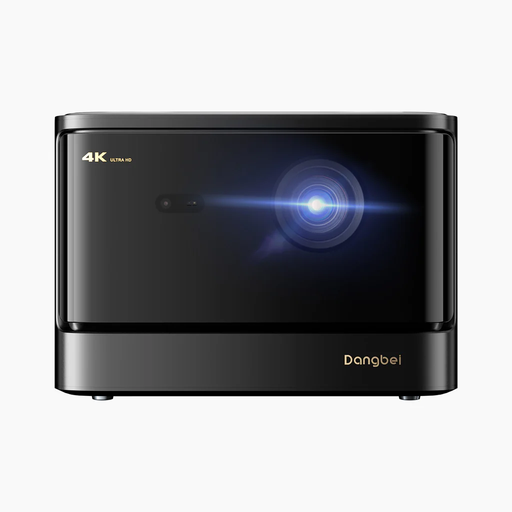
Why this model stands out: The Dangbei DBOX02 combines a high brightness of 2450 ISO lumens with long-lasting laser technology and an official Netflix license. This makes it a powerful yet convenient solution for the modern home cinema.
Advantages:
Who is this model for? This device is aimed at demanding film and series enthusiasts who seek uncompromising image quality and brightness and appreciate the convenience of a fully integrated smart system.
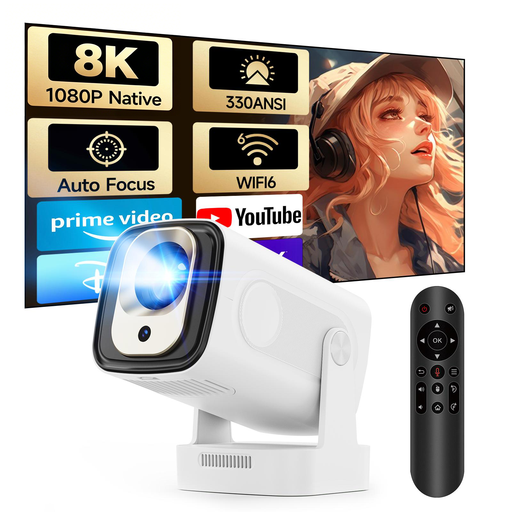
Why this model stands out: The MAGCUBIC HY310 is an extremely compact and portable projector that, despite its small size, offers smart features like auto-focus and an Android operating system. It's a flexible solution for spontaneous movie nights.
Advantages:
Who is this model for? Ideal for beginners, families, or users looking for a flexible mini projector for different rooms, the garden, or for travel. It serves as a practical second option alongside a stationary home cinema projector.
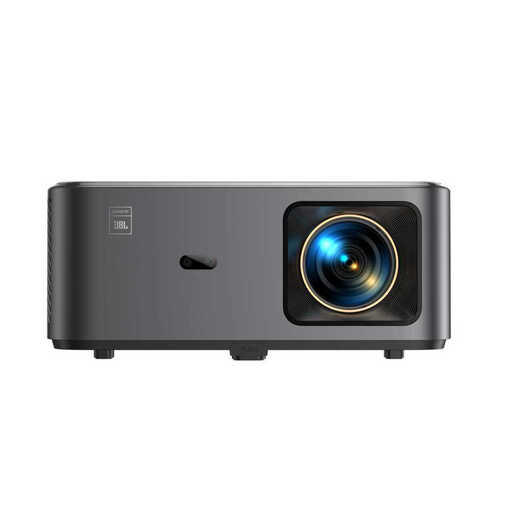
Why this model stands out: The Yaber K2s integrates Google TV and delivers impressive sound thanks to a collaboration with JBL. The combination of an extensive app library, powerful audio, and modern connectivity options like Wi-Fi 6 makes it an all-in-one entertainment system.
Advantages:
Who is this model for? Perfect for users looking for a hassle-free, all-in-one solution. Those who value a huge selection of apps and above-average integrated sound will find this a fitting device for movie nights, gaming, or even as an outdoor projector.
The models presented here cover a range of needs. However, if you want to compare other devices or are looking for specific features, you're sure to find the right model in our wider selection.
? Explore Our Entire Selection of 4K Home Projectors Here
1. What is the difference between a 4K projector and a Full HD projector? A 4K projector has a resolution of 3840 x 2160 pixels, while a Full HD projector displays 1920 x 1080 pixels. The result is an image that is four times sharper and more detailed with 4K, which is especially noticeable on screens over 100 inches.
2. How many lumens does a projector need for a living room? For a living room that cannot be completely darkened, a brightness of at least 2,000 ANSI lumens is recommended. This ensures the image remains vibrant and clearly visible even with ambient light. In a dedicated, dark home cinema room, 1,500 ANSI lumens may be sufficient.
3. Can you watch Netflix on a projector? Yes, many modern smart projectors have integrated operating systems like Android TV or Google TV, which allow direct access to the Netflix app. Look for models designated as "officially licensed" for Netflix to ensure smooth, high-quality playback. Alternatively, any projector with an HDMI port can play Netflix via an external streaming stick (e.g., Fire TV Stick, Chromecast).