
Lieferung heute & morgen

Qualitätsgarantie

Willkommens-Angebote freischalten: KOSTENLOSE Lieferung | Bis zu 80 % RABATT | Kostenlose 30-Tage-JoyPlus-Testphase
App herunterladen
A 5-in-1 robot building kit with remote control combines building, driving and simple programming features. For parents, grandparents and other family members, it may sound like a versatile gift. In practice, however, these sets can vary considerably in the number of parts, controls, age recommendation and maintenance requirements.
If you focus only on the number of features or eye-catching packaging, you may miss important details. The following points will help you choose the right STEM learning toy for children and avoid common buying mistakes.
The “5-in-1” label simply means that you can build several models. What matters is whether the instructions are easy to follow, whether parts can be reused and whether rebuilding the models is realistic for the child’s age. With a 604-piece construction set, it’s also worth checking whether spare parts or clearly organised components are included.
A standard 2.4 GHz remote control works differently from a robot building kit with app control. Using the app requires a compatible smartphone, a suitable app and often a Bluetooth or Wi-Fi connection. Before you buy, check:
A robot with LED lights can make it more appealing to play with, but it can’t make up for unstable construction. For a remote-controlled model, durable clip or screw connections, protected electronics and a suitable surface matter more than light effects alone. Small or sharp-edged parts should also be kept away from younger children unless they’re supervised.
The manufacturer’s age recommendation is a guide, not a guarantee that the set will be easy to build. A remote-control building kit for children aged 6 and over may require adult help, depending on the child’s motor skills and building experience. Check:
For children who enjoy building, a multi-part kit is usually more engaging than a ready-made remote-controlled toy. A pre-assembled robot with remote control may be a better choice for beginners.
For rechargeable models, check the battery type, charging time and stated play time. The HOGOKIDS set’s product details specify a 300-mAh lithium battery, an estimated play time of around 15 minutes on a full charge, and a 7.4-volt motor. These figures come from the product description and shouldn’t be taken as a guaranteed run time in all conditions.
Also worth checking:
Electronic components must not be immersed in water. Before each use, check the casing, connections and wheels or tracks for damage.
For toys sold in the German market, clear manufacturer and importer details, warnings and easy-to-understand instructions are important factors to consider. Look for the CE marking and information about relevant toy safety requirements, such as the EN 71 series of standards. A marking alone doesn’t replace checking that the product is suitable for the child’s age and intended use.

Why it suits this profile: This set combines 604 parts with five possible models, including a robot, tank, stunt vehicle and tracked vehicle. Remote control and app control offer different ways to get started.
The range of models is clearly described. The product details also specify the battery, control options and recommended age.
604 parts, five model variations, 2.4 GHz remote control, app modes and LED lighting, according to the product description.
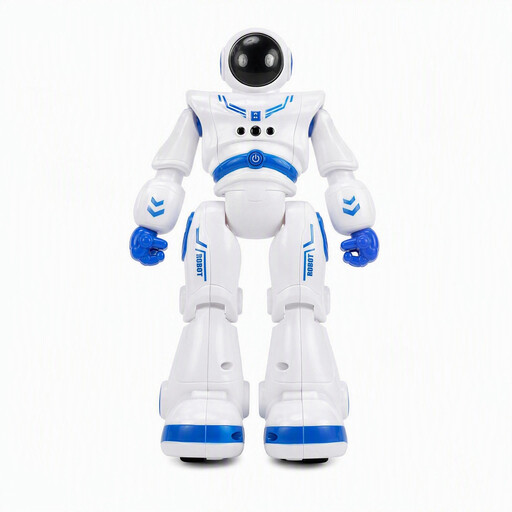
Why it suits this profile: This ready-made robot is designed for children aged 6 and over who want to get straight into its movement, light and sound features without first building a complex model.
The product description specifies remote control, gesture control and rechargeable battery power, as well as clear safety advice for use on flat surfaces.
Two control options, built-in light and sound features, and a rechargeable battery, according to the product details.
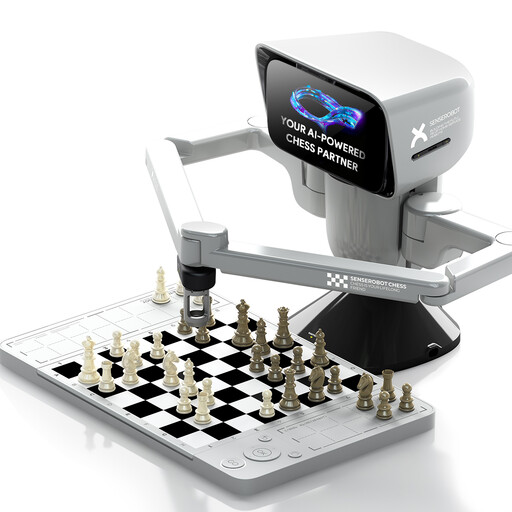
Why it suits this profile: This electronic chess set is for users looking for robotics, app connectivity and a structured strategy game rather than a traditional building kit.
Its purpose is clearly defined: this is an electronic chessboard with a robotic arm and app connectivity, not a multi-model building set.
App connectivity, a portable chess set and a robotic arm are listed in the product name.
We’ve put together a complete, regularly updated list of products that meet these strict selection criteria and fully comply with the safety regulations in force in the EU.
First, build the model by following the instructions and charge the battery. Then install the app specified by the manufacturer and connect it by following the steps provided. An adult should help children with the initial build, pairing and charging.
Run time depends on factors such as motor load, surface, driving style and battery condition. The HOGOKIDS set is listed as offering around 15 minutes of play time on a full charge, according to the product description. Treat this as a guide. If the toy will be used regularly, allow time for charging and store it properly.
That depends on the build and the user interface. Simple pre-set movements may be suitable for younger children, while open-ended programming may require more support. Check the age recommendation, instructions and reading level required. Small parts and electronic components should only be used with appropriate supervision.