
Lieferung heute & morgen

Qualitätsgarantie

Willkommens-Angebote freischalten: KOSTENLOSE Lieferung | Bis zu 80 % RABATT | Kostenlose 30-Tage-JoyPlus-Testphase
App herunterladen
A 60% gaming keyboard saves space, can make mouse movement easier on small desks and is suitable for gaming, streaming or use on the go. However, its compact design requires an important adjustment: the function keys, arrow keys and number pad are often accessible only via the Fn key. Focusing solely on high polling rates or RGB lighting can therefore mean overlooking crucial details.
A classic 61-key keyboard generally has the letter row, number keys and modifier keys, but omits the number pad and separate F keys. Arrow keys may be integrated as Fn combinations. Other models retain dedicated arrow keys despite their compact design.
You should therefore check the following before buying:
A US-layout gaming keyboard has, among other things, a different arrangement of Y and Z, as well as different special characters. For German users who regularly write or programme, a QWERTZ-DE layout may be more practical.
An 8000 Hz polling rate describes how often the keyboard reports its inputs to the computer. This technical specification may be useful for rapid inputs, but it requires the keyboard, USB port and software to support the setting. In normal office use, the difference compared with lower polling rates is not relevant to every user.
Rapid Trigger should not be mistaken for a blanket performance guarantee either. With compatible Hall-Effect or Magnetic Switches, actuation can be configured according to key movement. The important points are whether the keyboard actually offers an adjustable actuation point and which software is required for this.
On a mechanical gaming keyboard, hot-swap usually allows compatible switches to be changed without soldering. However, different requirements apply to a Hall-Effect keyboard. Magnetic-switch keyboards require suitable magnetic switches and are not automatically compatible with conventional 3- or 5-pin mechanical switches.
This is particularly important for the AULA WIN60HE: according to the product information provided, it is designed exclusively for Hall-Effect Magnetic Switches. Installing conventional mechanical switches may damage the sockets.
For FPS players who want to work with very short actuation distances, adjustable Hall-Effect switches are worth considering. Frequent typists should also take actuation noise, key profile and typing feel into account.
A wired gaming keyboard does not require a battery and transmits inputs directly via USB. This is practical for stationary PC setups, tournaments and users with a permanent desk space. A detachable USB-C cable makes transport and replacement easier.
When it comes to compatibility, specific details are more important than general marketing claims. Depending on the product, the models listed support Windows, Mac, Linux, PS4 or Xbox One. However, features such as RGB control, macros or profiles may still depend on particular operating systems or the manufacturer’s software. If you use a Mac, you should therefore check whether the special keys and configuration software are fully supported.
An RGB keyboard generally offers several colours, brightness levels and lighting modes. RGB is primarily a convenience and design feature. Connection, layout and key mechanism should carry more weight in your buying decision.
Water resistance should be assessed carefully. The MageGee TS91 is listed as having an IPX4 certification for the PCB; according to the product information, the USB port and other components are not fully waterproof. Any liquid should therefore be removed immediately, and the device should be disconnected from the power supply before cleaning. For Hall-Effect models, avoiding moisture and cleaning only with a dry cloth is expressly recommended.

Why this product suits this profile: This compact keyboard is aimed at users who want to combine RGB lighting, 61 keys and a wired connection in a straightforward package.
The product details specify a membrane design with a mechanical typing feel. Buyers should therefore not expect traditional mechanical switch technology.
RGB modes, brightness and speed adjustment, plus an IPX4 rating for the PCB; the USB port is not covered by this rating.
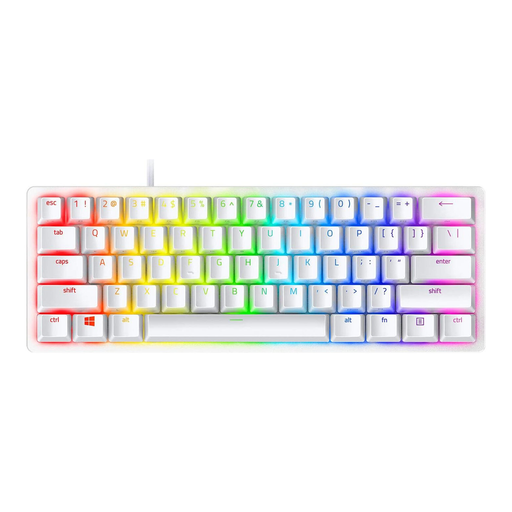
Why this product suits this profile: For users looking for a branded solution with linear optical switches, Doubleshot PBT keycaps and a detachable USB-C cable.
The specification explicitly states 61 keys, a QWERTY US layout and a detachable cable. This makes the layout and portability clear before purchase.
Linear optical switches, Doubleshot PBT keycaps, built-in memory profiles and RGB lighting.

Why this product suits this profile: For FPS players and users who want to make targeted use of an adjustable actuation point, Rapid Trigger, Hall-Effect technology and a high polling rate.
The information clearly limits switch compatibility to magnetic Hall-Effect switches. Conventional 3- or 5-pin switches are not supported.
Magnetic Switch hot-swap, adjustable actuation point, Rapid Trigger mode, 8000 Hz polling rate and RGB lighting.
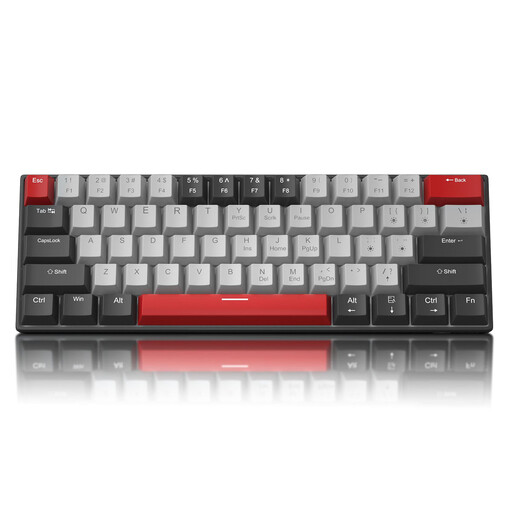
Why this product suits this profile: This keyboard is an appealing choice for users who prefer a US layout, a detachable USB-C cable and several lighting modes without additional software.
The product data explicitly lists 61 keys, a QWERTY US layout, N-key rollover and the required switch type.
Detachable USB-C cable, 19 lighting modes, N-key rollover and either blue or red switches, depending on the version.
We have put together a complete, regularly updated list of products that fully meet these strict selection criteria and the safety regulations applicable in the EU.
Yes, provided you are comfortable with Fn combinations and the layout you choose. Missing arrow and function keys may take some getting used to when writing, programming or working with spreadsheets. If you frequently use the number pad, you should choose a larger format.
On a standard mechanical gaming keyboard, an input is typically triggered at a fixed mechanical contact point. On supported Magnetic Switches, Rapid Trigger can control resetting and reactivation according to key movement. Its practical benefits depend on the game, settings and how quickly you get used to it.
Its lifespan depends on the switch technology, keycaps, cable, usage and care. A dry, dust-free environment, carefully unplugging the USB connector and regular cleaning with a soft, dry cloth can reduce wear. If a fault occurs, you should not modify internal components yourself; the safety information and warranty terms for the product in question take precedence.