
Lieferung heute & morgen

Qualitätsgarantie

Willkommens-Angebote freischalten: KOSTENLOSE Lieferung | Bis zu 80 % RABATT | Kostenlose 30-Tage-JoyPlus-Testphase
App herunterladen
A 60% mechanical gaming keyboard saves space, but moves many functions to the Fn layer. For FPS players, the extra room beside the keyboard can be useful, while prolific typists have to manage without arrow keys, function keys or a German layout. Before buying, it is therefore worth taking a close look at the layout, switch technology and connection.
A classic 60% keyboard usually has 61 keys and does away with the arrow keys and separate function-key row. A 65% gaming keyboard often adds arrow keys and several navigation keys. Some 68-key models are nevertheless described as 60% or 65% keyboards.
If you regularly use the arrow keys in games or need them for navigation while working, do not rely solely on the percentage designation. Check the actual key layout and product images as well.
Figures such as 8,000 Hz sound convincing at first. The polling rate describes how often the keyboard reports its inputs to the computer per second. Whether this value is noticeable in everyday use depends on factors including the game, system, USB connection and software.
For many users, a stable wired connection, N-key rollover and anti-ghosting are more important. These features help the keyboard register several keys pressed at the same time correctly. A higher polling rate cannot replace well-tuned switches or good keyboard software.
Some compact models use membrane or hybrid technology designed to feel mechanical. This may be sufficient for budget-conscious buyers, but it does not offer the same replacement and customisation options as a genuine mechanical keyboard.
Look for a clear specification of the switch type. Terms such as hot-swap, linear switches or Hall-effect sensors should be described clearly in the technical specifications.
For users in Germany, a QWERTZ gaming keyboard is usually the most straightforward choice. With a US layout, Z and Y are in different positions, while special characters and the Enter key also differ. This can often be adapted for gaming, but is less convenient when typing German texts.
Before buying, check:
If arrow keys and a compact design are equally important, a 65% keyboard may be a better fit than a strictly configured 60% model.
Linear red switches have a smooth key travel without a tactile click point. They are often chosen for fast inputs and may sound quieter when typing than clicky blue switches. Actual noise levels also depend on the keycaps, case and dampening.
A Hall-effect keyboard, or a gaming keyboard with magnetic switches, detects key position using magnetic sensors. With compatible software, this often allows the actuation point to be configured more precisely. This technology should not be confused with conventional mechanical 3- or 5-pin switches.
Rapid Trigger can control a key’s actuation and reset depending on its movement. This is particularly interesting for FPS players. For normal office and everyday use, however, the feature is not essential.
A wired gaming keyboard does not need charging and provides a direct USB connection. A detachable USB-C cable makes transport and replacement easier. With RGB models, check whether the lighting can only be controlled using key combinations or also via software.
A hot-swap keyboard allows compatible switches to be replaced without soldering. However, this does not mean that every switch will automatically fit. Hall-effect models usually have their own compatibility limitations. Before buying, you should also check information about replacement parts, keycap profile and software support.

Why this product suits this profile: This model is aimed at users looking for a small RGB keyboard for PC, Mac or console, while keeping the footprint to a minimum.
The description clearly specifies the 61-key layout and wired operation. The IPX4 rating applies to the circuit board, not the USB connection or the device as a whole.
61 keys, RGB lighting and compatibility with multiple platforms in a compact design.

Why this product suits this profile: The 65% design combines a German QWERTZ layout with arrow keys and a mechanical hot-swap platform.
The product data clearly specifies the layout, switch type, connection and detachable secondary functions. This makes it easier to compare the model with your actual workspace.
CHERRY MX2A RED Switches, hot-swap function, per-key RGB, N-key rollover and two-layer dampening.
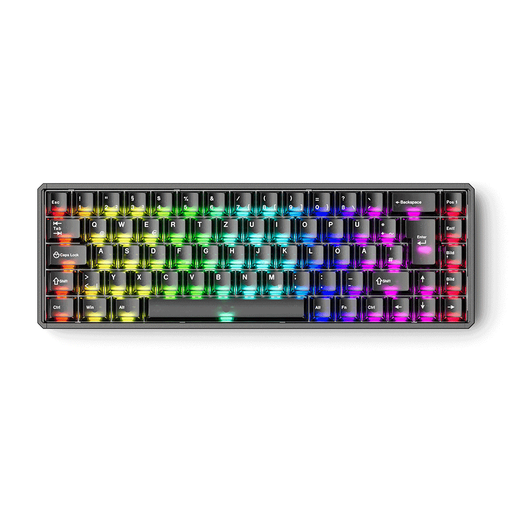
Why this product suits this profile: For FPS players and users who want to configure the actuation point and Rapid Trigger in detail, this 68-key model offers a Hall-effect platform with an ISO-DE-QWERTZ layout.
The specifications clearly distinguish between supported magnetic switches and unsupported mechanical switches. The high precision rating also requires calibration and suitable switches.
ISO-DE, adjustable actuation, Rapid Trigger, 8,000 Hz polling rate, RGB and aluminium case.
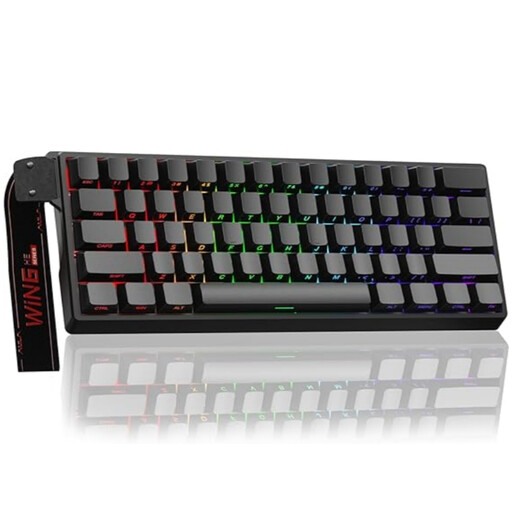
Why this product suits this profile: This model is designed around a compact 60% format, magnetic switches and adjustable actuation.
The safety information makes clear that only Hall-effect magnetic switches are compatible. Standard mechanical switches must not be used.
60% design, hot-swap for compatible magnetic switches, Rapid Trigger mode, RGB and 8,000 Hz polling rate.
We have put together a complete, regularly updated list of products that fully meet these strict selection criteria and the safety regulations applicable in the EU.
Yes, provided you are comfortable using Fn combinations for the arrow and function keys. Its compact width leaves more room beside the keyboard for mouse movements. For users who frequently need arrow or navigation keys in games, a 65% version may be more practical.
Its lifespan depends on the switches, keycaps, cable and how it is used. The CHERRY XTRFY model specifies a lifespan of over 100 million keystrokes for its CHERRY MX2A RED Switches. Manufacturer figures like these are guidelines, not a guarantee of the lifespan of the keyboard as a whole.
A wired RGB keyboard receives its power via USB. Actual consumption depends on the brightness and effects of the lighting, as well as the electronics. If you want to reduce power usage, you can switch off the lighting or lower its brightness. With this type of connection, there is no separate battery to charge.