
Lieferung heute & morgen

Qualitätsgarantie

Willkommens-Angebote freischalten: KOSTENLOSE Lieferung | Bis zu 80 % RABATT | Kostenlose 30-Tage-JoyPlus-Testphase
App herunterladen
A 60% gaming keyboard with Hall-Effect switches saves space on your desk and can be configured flexibly thanks to adjustable actuation points and Rapid Trigger. For competitive gamers, esports players and tech enthusiasts, this might initially sound like a clear-cut purchase decision. In practice, however, features, compatibility and operation differ significantly.
If you only focus on terms like "8K" or "magnetic", you can easily overlook important details. The following points will help you interpret technical specifications correctly and avoid unnecessary buying mistakes.
An 8000 Hz polling rate describes how often the keyboard reports its status to the computer. It is a technical measurement, but on its own it does not guarantee a noticeably lower input delay. The USB connection, firmware, operating system and the specific game all influence signal processing.
When making your choice, you should therefore consider the polling rate together with the wired connection, software support and configuration options.
On a classic mechanical gaming keyboard, a key press is normally detected via physical contact. Magnetic Hall-Effect switches, on the other hand, work with sensors that detect the position of the stem. This makes functions such as an adjustable actuation point or Rapid Trigger possible.
This technology is not automatically compatible with every switch socket. With the AULA WIN60HE, the manufacturer's specifications explicitly state that only magnetic Hall-Effect switches may be used. Conventional 3-pin or 5-pin switches may be unsuitable for this model.
A compact gaming keyboard often omits separate function keys, a number pad and sometimes even dedicated arrow keys. This frees up more space for your mouse, but may require some adjustment for office applications or everyday navigation.
Before buying, you should check:
An adjustable actuation point determines at which key position a signal is triggered. A low value can favour fast inputs, while a higher value can reduce accidental actuations when typing. The actual setting should suit the game, your finger placement and your personal input control.
The specification "0.01 mm" or "0.1 mm" describes the resolution or the adjustable range of the respective system. It should not be equated with a blanket guarantee of faster reactions.
A Rapid Trigger keyboard can reset the signal as soon as a key begins its upward movement, without the key having to return fully to its starting position. This can be useful for repeated movements in games. The function must be activated in the software and set up sensibly.
For normal typing, Rapid Trigger is not essential. A very sensitive configuration can even lead to unintended inputs when writing longer texts.
A hot-swap keyboard allows you to replace compatible switches without soldering. However, what matters is whether these are mechanical or magnetic switches. A socket for standard switches is not automatically suitable for Hall-Effect switches.
For every model, you should therefore check the following details in the product data sheet:
RGB lighting is primarily a customisation feature. With an RGB gaming keyboard, you should also check brightness levels, lighting profiles and whether settings can be saved.
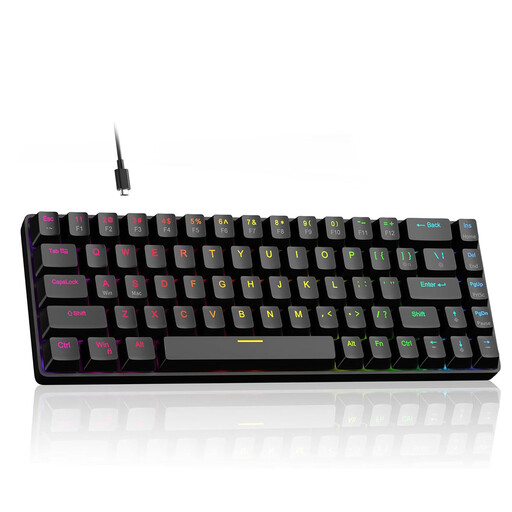
Why this product suits the profile: This model combines a 60% format with magnetic switches, RGB lighting and support for Windows PCs and Macs. Arrow keys are integrated despite the compact design.
The product specifications state the adjustable actuation point range of 0.1 to 4.0 mm as well as hot-swap support. Nevertheless, check which switches are actually compatible before installation.
8000 Hz polling rate, Rapid Trigger, adjustable actuation point and integrated arrow keys in a compact, wired design.

Why this product suits the profile: This keyboard is aimed at users who want to combine Hall-Effect features, a near-60% layout and RGB lighting in an eye-catching design.
The product name explicitly mentions Hall-Effect magnetic switches, Rapid Trigger and an adjustable actuation point. Before buying, check whether the US layout matches your requirements.
An actuation point adjustment down to 0.01 mm, Rapid Trigger and an 8000 Hz polling rate are specified.

Why this product suits the profile: For heavy users looking for a wired Hall-Effect keyboard with hot-swap functionality, Rapid Trigger and compact RGB features.
The safety instructions explicitly state exclusive compatibility with magnetic Hall-Effect switches. Liquids, harsh cleaning agents and pressure on the USB-C port should be avoided.
Magnetic switches, hot-swap function, Rapid Trigger mode, 8000 Hz polling rate and 60% form factor.
We have compiled a complete, regularly updated list of products that fully meet these strict selection criteria and the safety regulations in force in the EU.
Hall-Effect keyboards should be operated in a dry, low-dust environment. For cleaning, a soft, dry cloth or carefully used compressed air is suitable. Liquids can damage sensors and the circuit board. Additionally, the USB-C cable should not be permanently kinked or placed under tension.
After setup, a step-by-step approach is recommended:
That depends on your personal workflow. For gaming and saving desk space, the format is practical. If you frequently use function keys, navigation keys or a number pad, you may need Fn combinations or an additional keyboard.
Rapid Trigger can detect the reset of a key during its upward movement. This is particularly interesting for repeated movements. However, it does not replace a suitable setting and does not automatically improve every gaming situation.
Not generally. Hall-Effect keyboards require compatible magnetic switches and matching sensors. Before buying and before any replacement, you must check the manufacturer's specifications regarding socket, switch type and software.