
Lieferung heute & morgen

Qualitätsgarantie

Willkommens-Angebote freischalten: KOSTENLOSE Lieferung | Bis zu 80 % RABATT | Kostenlose 30-Tage-JoyPlus-Testphase
App herunterladen
By the Joybuy Product Recommendation Officer, July 28, 2026
The search for a 65% ISO-DE mechanical keyboard is a specific one. It suggests you know exactly what you want: a compact layout that drops the function row but keeps the arrow keys, all with a German (QWERTZ) keymap. However, this niche is filled with pitfalls that often lead to disappointment and unnecessary expense. Many models advertised online don't live up to their promises, especially regarding layout and wireless performance. This guide is designed to help you identify the crucial features and make an informed decision.
Before we get to our recommendations, it's important to understand the most common issues you can encounter when choosing a compact mechanical keyboard.
To avoid these traps, you should carefully examine three technical aspects. These determine the functionality, durability, and overall user experience of your keyboard.
A 65% keyboard is a compromise between compactness and functionality. Compared to a standard (100%) keyboard, it lacks the number pad, the function row (F1-F12), and the navigation cluster (Insert, Home, etc.). Crucially, however, unlike even smaller 60% keyboards, it retains dedicated arrow keys. This makes it an excellent choice for users who want to save desk space but can't give up arrow key navigation.
The ability to customise is a primary reason for buying a mechanical keyboard. Two terms are central here:
A modern wireless mechanical keyboard should be flexible. So-called "tri-mode" models offer three connection types:
Based on the criteria above, we have identified models that are a great fit for specific user groups.
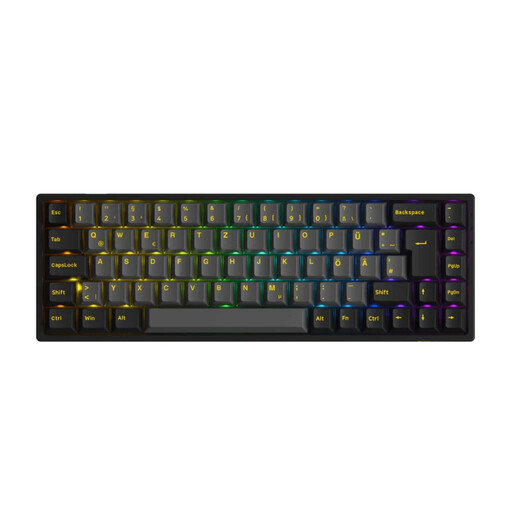
Why This Fits Their Persona: Ideal for users who value a clean desk setup and want a high-performance, compact keyboard for gaming, programming, and daily typing. The 65% format saves space without sacrificing essential arrow keys.
This model features a true ISO-DE layout, tri-mode connectivity including low-latency 2.4 GHz for gaming, and 5-pin hot-swap sockets for maximum switch compatibility.
Durable PBT double-shot keycaps and the factory-installed Akko V3 Cream Yellow Pro Switches (linear) provide a premium typing experience right out of the box. The package also includes tools and a dust cover.
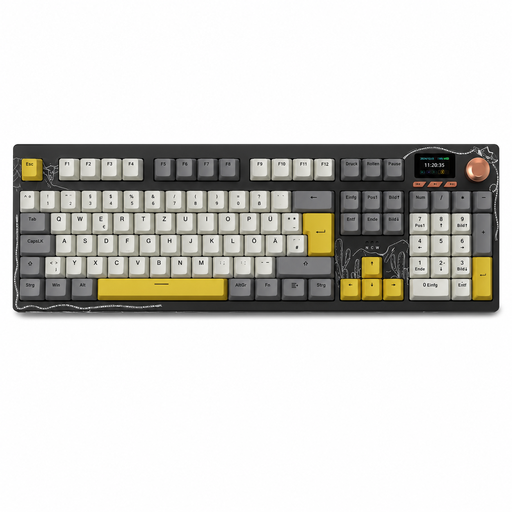
Why This Fits Their Persona: An alternative for home office or professional users who want the feel of a mechanical keyboard but cannot give up a full-size number pad for their work (e.g., data entry, spreadsheets).
This model offers a full German QWERTZ layout in a 100% format, thus avoiding any compromises on key count. It also features flexible tri-mode connectivity and is hot-swappable.
An integrated 1.14-inch TFT colour screen and a multi-function rotary knob offer advanced controls for volume and other functions directly on the keyboard. The large 10,000 mAh battery ensures long battery life.
A good keyboard is just one part of an optimised workspace. The right cables and peripherals also contribute to a clean and functional setup.
A complete setup often requires specific connectivity solutions. Explore our range of cables to connect all your devices reliably.
1. What is the exact difference between ISO-DE and ANSI? The ISO-DE layout is the German standard. It is characterised by a tall, two-row Enter key, a short left Shift key, and dedicated keys for umlauts (?, ?, ?). The American ANSI layout has a wide, single-row Enter key and a long left Shift key. The special characters are arranged differently, which makes typing in German more difficult.
2. How long does the battery of a wireless mechanical keyboard last? Battery life depends heavily on the battery capacity (measured in mAh) and the use of the RGB keyboard lighting. Models like the Akko 3068B Plus with a 1800 mAh battery can last for several weeks with the backlighting off. With lighting enabled, the runtime is reduced to a few days to a week, depending on brightness and effects.
3. Are hot-swap keyboards suitable for beginners? Yes, absolutely. The hot-swap feature is ideal for beginners who want to try out the feel of different switches without having to deal with soldering. The replacement process is straightforward and only requires a small tool, which is usually included. It's an easy way to customise the keyboard to your personal preferences or to replace a faulty switch.