
Lieferung heute & morgen

Qualitätsgarantie

Willkommens-Angebote freischalten: KOSTENLOSE Lieferung | Bis zu 80 % RABATT | Kostenlose 30-Tage-JoyPlus-Testphase
App herunterladen
For professionals, students, and digital nomads, a dead laptop battery is more than just an inconvenience—it's a productivity dead-end. A high-performance 65W power bank seems like the obvious solution, but the market is flooded with products whose marketing promises often fall short in practice. Inaccurate power ratings or a lack of safety features can lead not only to frustration but also to damage to expensive devices.
This guide will help you understand the critical technical features and avoid common purchasing pitfalls. This ensures your investment pays off and your devices are reliably powered on the go.
Before you make a purchase, you should be aware of the most common issues found in subpar products.
To make an informed decision, focus on the following three technical specifications. These determine the performance, safety, and real-world usability of a power bank.
The 65W rating is crucial for charging modern laptops like MacBooks or Dell XPS models. This output allows you to efficiently charge the battery even while using the device. It's essential to look for the Power Delivery 3.0 (PD 3.0) specification. This protocol ensures that the power bank and your device safely negotiate the optimal charging power. A simple fast-charging power bank without the PD standard is unsuitable for laptops.
Capacity determines how many times you can charge your devices. A 20000mAh power bank offers a good balance of portability and power, typically enough for one full charge of most ultrabooks. A more accurate metric for comparison is watt-hours (Wh), as it already accounts for voltage. A 20,000mAh power bank typically has around 74 Wh (20,000 mAh * 3.7V / 1000). This is a critical value, as most airlines impose a 100 Wh limit for batteries in carry-on luggage.
A modern power bank for multiple devices should be versatile. Ideally, it will have:
Instead of making a one-size-fits-all recommendation, we have selected products for specific use cases based on the criteria above.
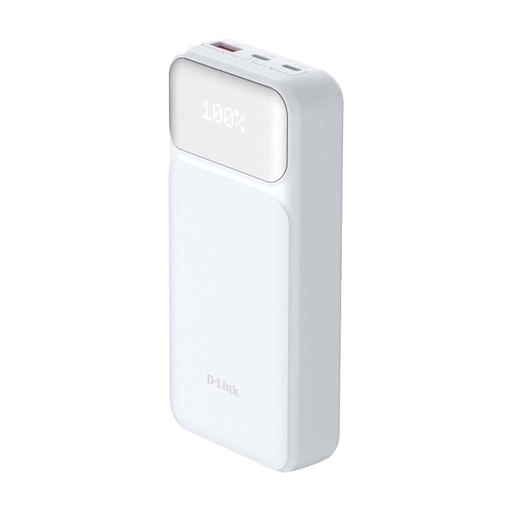
Why This Fits Their Persona: Ideal for commuters and business travellers who need a single, reliable power source for their laptop, tablet, and smartphone to stay productive all day. The D-Link power bank is compact enough for a briefcase but powerful enough for demanding devices.
Delivers a stable 65W via USB-C PD 3.0, preventing unstable charging cycles. Integrated protection against over-voltage and overheating ensures device safety.
Charges up to three devices simultaneously. The integrated LED display shows the battery status precisely, so there are no unpleasant surprises.

Why This Fits Their Persona: For users who build a full-fledged workspace from anywhere. A portable monitor doubles their screen real estate and boosts productivity. Such a setup requires a stable, external power source that goes beyond what's needed for just charging a phone.
The trap is buying accessories without considering the power requirements. This setup makes the need for a true laptop power bank obvious, as the laptop's internal battery alone isn't enough to run both devices for long.
Offers 2K resolution and a high refresh rate for smooth work or gaming in a portable format. Can be powered via USB-C.

Why This Fits Their Persona: For anyone who wants to transport all their tech gear—laptop, tablet, accessories, and power bank—safely, stylishly, and in an organised manner. The integrated USB port is specifically designed for use with a power bank.
It avoids the inconvenience of owning a powerful power bank but having to awkwardly store it in your bag. A dedicated compartment protects the power bank, and the external port allows for charging without opening the bag.
Convertible 3-in-1 design (tote, backpack, shoulder bag) with a padded laptop compartment and water-resistant material for optimal protection.
We've compiled a complete, up-to-date list of products that fully meet these strict selection criteria and safety regulations.
No. Modern devices that support USB Power Delivery (PD) actively communicate with the charger. The smartphone only requests the amount of power it can safely handle. A 65W power bank will only charge a smartphone that supports 18W charging at 18W, for example.
This depends on your laptop's battery capacity, which is measured in watt-hours (Wh). A 20000mAh power bank (approx. 74 Wh) can fully charge a MacBook Air (approx. 50 Wh) about 1 to 1.2 times, factoring in energy conversion losses. For a larger laptop like a Dell XPS 15 (approx. 86 Wh), the capacity is enough for a charge of about 70-80%.
Yes, as a rule, they are allowed. Airlines don't limit batteries based on their power output (watts) but on their capacity in watt-hours (Wh). The international limit is typically 100 Wh per battery. A 20000mAh / 74Wh power bank is well below this limit and can be carried in your hand luggage. Placing it in checked baggage is prohibited.