
Lieferung heute & morgen

Qualitätsgarantie

Willkommens-Angebote freischalten: KOSTENLOSE Lieferung | Bis zu 80 % RABATT | Kostenlose 30-Tage-JoyPlus-Testphase
App herunterladen
The search for the right mechanical keyboard can be complex. The 75% form factor, in particular, is enjoying growing popularity as it offers a sweet spot between compactness and functionality. However, the market is flooded with models whose marketing promises often obscure more than they clarify. As your Joybuy Product Recommendation Officer, I'll help you identify the crucial features and avoid common purchasing pitfalls so you can make an informed decision for your setup.
Before we dive into the technical details, it's important to be aware of the most common issues that can arise when choosing a new keyboard.
To avoid making a poor choice, you should check three core technical features. These define the functionality, durability, and typing feel of your future keyboard.
A compact mechanical keyboard in a 75% format is the ideal solution for anyone who wants to save desk space without sacrificing essential keys. Unlike smaller 60% or 65% layouts, a 75% keyboard offers:
Del, Page Up/Down, and Home/End.This layout arranges the key clusters more closely together to further reduce the width of a Tenkeyless (TKL) keyboard, while preserving almost all of its functionality.
A hot-swap keyboard allows you to change the mechanical switches without soldering. This offers two key advantages:
For a more refined user experience, two other features are important:
An RGB gaming keyboard also offers the ability to customise the lighting, which is particularly relevant for the aesthetics of your setup.
Based on the criteria mentioned, we have identified a few models that are suitable for different requirements and budgets.
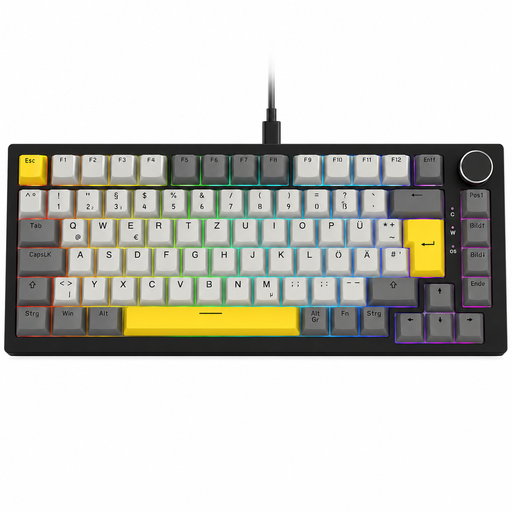
Why This Fits Their Persona: This model is aimed at users who know exactly what they want. It combines all the sought-after premium features into a package optimised for both intense gaming and productive work.
The AJAZZ AK820 is explicitly offered with a German QWERTZ layout and features the functional 75% form factor. This directly bypasses the two most common purchasing pitfalls.
The combination of a Gasket Mount for a soft typing feel, full hot-swap capability, and a practical volume knob offers a high degree of comfort and customisation.
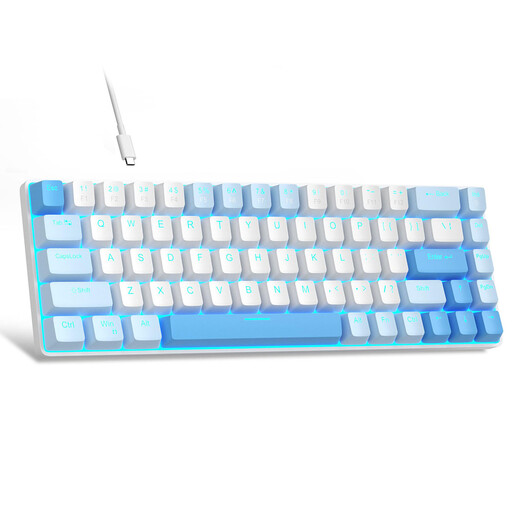
Why This Fits Their Persona: Ideal for users looking to enter the world of mechanical keyboards who prioritise maximum desk space and a very accessible price point.
This model is a conscious choice for an ultra-compact 60% form factor. It's important to know that it has a QWERTY layout and lacks dedicated arrow keys—a trade-off for the price.
The main advantage lies in its very accessible price and extremely small footprint. The linear red switches provide a smooth typing feel that is well-suited for gaming.
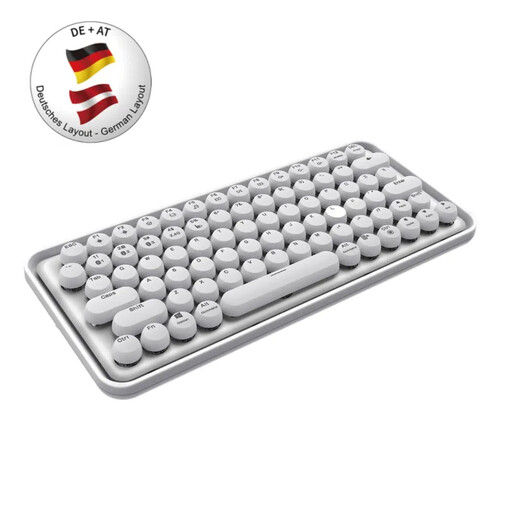
Why This Fits Their Persona: For users who prioritise aesthetics, a clean desk setup, and flexible use with multiple devices (PC, laptop, tablet). Its unique design stands out from typical gaming keyboards.
This model offers a correct QWERTZ layout and a compact, functional design that is well-suited for productivity, avoiding the most common purchasing pitfalls.
Its strength lies in its wireless multi-device connectivity (Bluetooth 3.0/5.0 & 2.4GHz) and rechargeable battery. The quiet typing feel is also a benefit in office environments.
We have compiled a complete, up-to-date list of products that fully meet these strict selection criteria and local regulations.
A Tenkeyless (TKL) keyboard, also known as an 80% keyboard, is essentially a full-size keyboard without the number pad. The navigation cluster (arrow keys, Del, Home, etc.) remains as a separate block. A 75% keyboard compresses this layout further by tucking the arrow keys and some navigation keys directly under the Enter key and minimising the space between key clusters. This makes it narrower than a TKL keyboard.
Most mechanical switches are rated for a lifespan of 50 to 100 million keystrokes, which translates to many years of normal use. On a hot-swap keyboard, replacement is very simple: using a special tool (a switch puller), which is often included, you can pull out the old switch and press a new compatible switch (3-pin or 5-pin) into the socket. No technical expertise or soldering is required.
Many RGB gaming keyboards allow for basic adjustments to lighting effects, brightness, and speed directly via key combinations (usually with the FN key). For advanced configurations, such as programming individual key colours or syncing with games, manufacturers typically provide optional software. However, the basic functions of the keyboard are always usable without any software.