
Lieferung heute & morgen

Qualitätsgarantie

Willkommens-Angebote freischalten: KOSTENLOSE Lieferung | Bis zu 80 % RABATT | Kostenlose 30-Tage-JoyPlus-Testphase
App herunterladen
A 75% mechanical keyboard combines a compact footprint with the essential keys that are often missing from smaller 60% models. Arrow keys, function keys and selected navigation keys are retained, while the separate number pad is omitted. This frees up more space for your mouse and makes it ideal for gaming, office work and everyday typing.
However, there are typical pitfalls when buying one: an attractive case doesn't tell you much about the layout, connectivity or maintainability. Three points deserve particular attention.
A QWERTZ keyboard is designed for the German layout. The positions and legends of Z, Y, umlauts and special characters are tailored to German use. A QWERTY US keyboard can be connected to Windows or macOS, but the keycap legends won't automatically match the system setting you've chosen.
If you type a lot in German, you should check the specific layout designation and keycap legends before buying. US layouts are common on gaming models, whereas a QWERTZ keyboard can make entering German special characters easier in everyday use.
A wireless mechanical keyboard can use Bluetooth, 2.4 GHz wireless, or both. Bluetooth is handy for tablets, smartphones and multiple office devices. For a gaming PC, a 2.4 GHz connection or the wired USB-C mode is often preferred.
A tri-mode keyboard combines USB-C, Bluetooth and 2.4 GHz. Before you buy, check whether a receiver is included, how many devices can be stored, and whether the lighting significantly reduces battery life. With wired models, there's no need to charge, but your freedom of movement is limited.
Terms like Gasket Mount, RGB or "Gaming" don't automatically describe quality. With a Gasket Mount keyboard, the actual construction matters: the damping material, plate, PCB and stabilisers all influence the sound and key feel. A Hot-Swap keyboard should also state whether it supports 3-pin or 5-pin switches.
Likewise, RGB lighting isn't the same as individually programmable lighting. Pay attention to the number of effects, brightness control, and whether software or only key combinations are available.
A 75% keyboard has around 81 to 84 keys, depending on the model. So the name doesn't always mean an identical number of keys. Compare the dimensions with your desk and check whether the function keys are arranged in a separate row.
Different modifier keys may be required for Windows and macOS. If you're using it with an iPad, Android tablet or smartphone, it's also crucial whether Bluetooth is supported. A compact form factor saves space, but doesn't replace an ergonomic check: height, tilt feet and a suitable wrist rest can affect your daily comfort.
Linear switches offer a smooth key travel with no tactile bump. Tactile switches provide a noticeable feedback when actuated. Clicky switches also produce a distinct audible click and aren't always suitable for shared offices.
With hot-swap sockets, you can replace compatible switches without soldering. This is handy if you want to change the desired key feel later on. When swapping, the pins must be aligned straight and inserted carefully, as the sockets can be delicate.
A Hall Effect keyboard detects the position of magnetic switches. Depending on the model, you can configure the actuation point and reset point. A Rapid Trigger keyboard can reset a key as soon as it moves upwards even slightly. These features are aimed primarily at FPS and esports players who prefer quick direction changes.
Technical specifications such as polling rate, actuation range and software support should be stated clearly. A high number alone doesn't guarantee suitable use. For office work and general typing, layout, switch feel and noise are often more important than an especially short actuation distance.

Why this product suits the profile: The wired model offers a German 82-key layout, USB-C connection and a volume control for gaming and office work.
The QWERTZ designation reduces the risk of an unsuitable US layout. The wired connection requires neither a battery nor a wireless receiver.
According to product specifications: hot-swap for compatible 3-pin switches, Gasket Mount construction, RGB lighting and 82 keys.
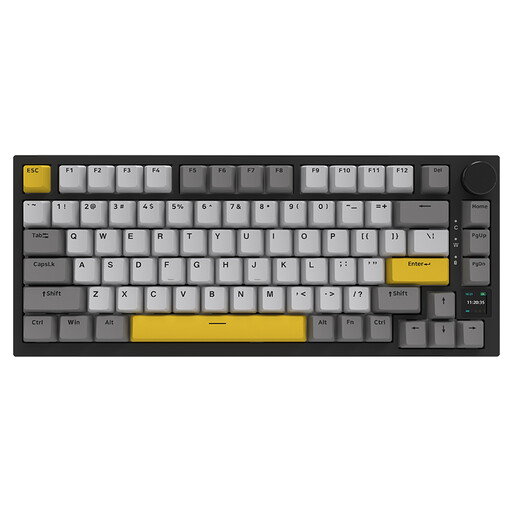
Why this product suits the profile: The combination of USB-C, Bluetooth and 2.4 GHz wireless is designed for switching between PC, laptop and other devices.
The three connection types mean you're not reliant on a single wireless technology. Hot-swap and Gasket Mount are explicitly listed.
According to product specifications: TFT colour display, 4,000 mAh battery, RGB lighting and volume control.
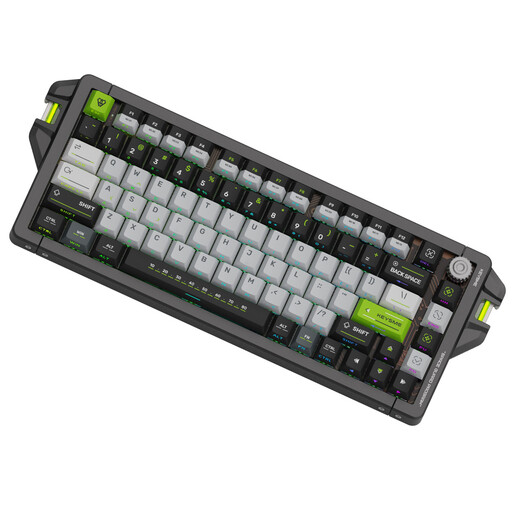
Why this product suits the profile: According to the specifications, this model is aimed at users looking for Rapid Trigger, Hall Effect switches and configurable actuation parameters for FPS games.
The technical values are stated concretely: wired 8,000 Hz polling rate and an adjustable actuation range of 0.1 to 4.0 mm.
According to product specifications: magnetic Gateron switches, Rapid Trigger, SOCD functions, CNC aluminium case and PBT keycaps.
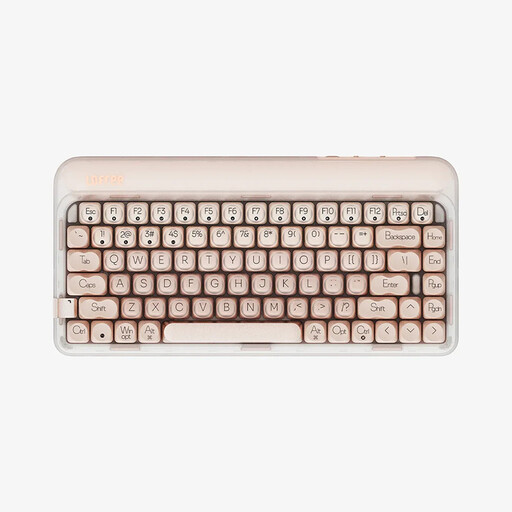
Why this product suits the profile: The 84-key model supports Windows, macOS, iOS, iPadOS and Android, making it suitable for switching between work and gaming devices.
USB-C, Bluetooth 5.3 and 2.4 GHz are available to choose from. Hot-swap and Gasket Mount are also mentioned in the product specifications.
According to product specifications: 4,000 mAh battery, 1,000 Hz polling rate, linear Gateron switches and warm white LED lighting.
We've put together a complete, regularly updated list of products that fully meet these strict selection criteria and the safety regulations in force in the EU.
The term describes a compact layout without a separate number pad. Arrow keys, function keys and some navigation keys are usually retained. Depending on the model, the keyboard has around 81 to 84 keys.
Yes, provided the layout matches your language and the chosen switch suits your personal typing style. For German text, a QWERTZ keyboard is usually more straightforward. For longer typing sessions, you should also consider the case height, tilt angle and noise level.
The lifespan depends on the switches, hot-swap sockets, keycaps, cable and daily use. Manufacturer specifications often state a certain number of actuations, but this doesn't guarantee every individual component. Regular cleaning, dry storage and careful switch swapping can help extend its useful life.