
Lieferung heute & morgen

Qualitätsgarantie

Willkommens-Angebote freischalten: KOSTENLOSE Lieferung | Bis zu 80 % RABATT | Kostenlose 30-Tage-JoyPlus-Testphase
App herunterladen
For many users, a 75% mechanical keyboard represents the perfect balance: it's significantly more compact than a full-size keyboard, yet it retains essential keys like the function row and arrow keys. This frees up more desk space without compromising on productivity.
This article serves as your guide. We'll introduce various models and their features to provide you with a solid basis for an informed decision. Our focus is on objective specifications and use cases, helping you find the right keyboard for your needs—whether for gaming, programming, or daily office use.
The selection of models is vast, and the technical details can seem complex at first glance. The following points will help you identify the features that are most relevant to you.
The way the circuit board (PCB) is mounted inside the case has a significant impact on the typing feel and acoustics. A gasket-mount keyboard is a popular option in this regard. In this design, the PCB is "sandwiched" between silicone or Poron gaskets, which isolates it from the case. The result is often a more cushioned, softer typing feel and a deeper sound profile. Other mounting styles, like tray mount or top mount, are typically more rigid and produce more direct feedback.
The ability to customise is a key advantage of mechanical keyboards.
Consider how and where you plan to use the keyboard. Wired models offer a latency-free, stable connection, making them a solid choice for desktop setups and competitive gaming. Wireless models with Bluetooth or 2.4 GHz technology provide more flexibility and a cleaner, clutter-free look. Also, pay attention to compatibility with your operating system. Many modern keyboards, including those featured here, work seamlessly with both Windows and macOS, making them a great option as a mechanical keyboard for Mac.
Based on the criteria above, we have curated a selection of keyboards that cater to different needs and budgets.
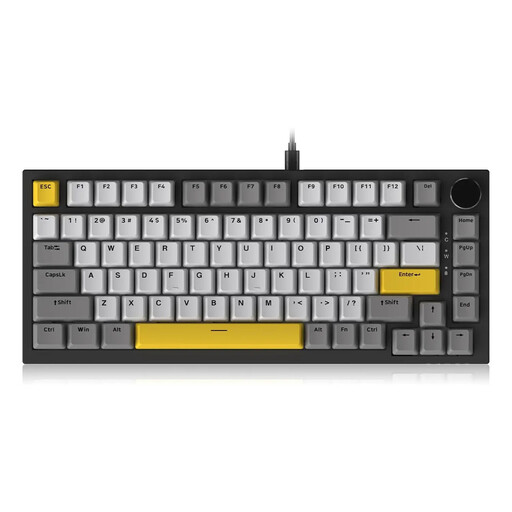
Why It Stands Out: The AJAZZ AK820 combines sought-after enthusiast features, like a gasket-mount structure and multi-layer foam dampening, into a wired package. The CNC-machined rotary knob for volume control is a practical detail for everyday use.
Pros:
Who Is It For? Users looking for a premium typing experience and modern features for a desktop workstation or gaming setup, who can forego wireless connectivity.
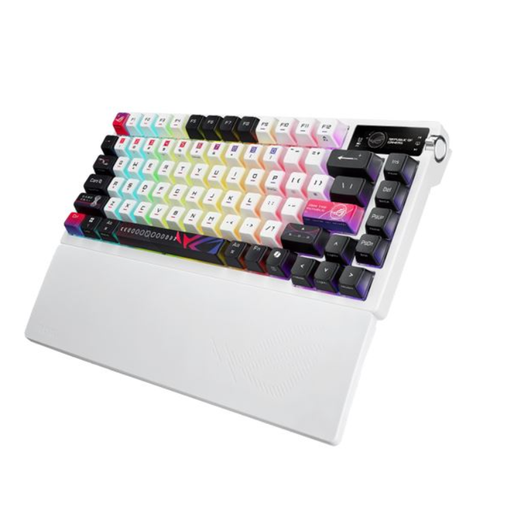
Why It Stands Out: The ASUS ROG Azoth is a premium 75% gaming keyboard designed for performance and versatility. With its tri-mode connectivity, integrated OLED display, and robust construction, it targets demanding power users.
Pros:
Who Is It For? For gamers and power users who need maximum connectivity flexibility, premium build quality, and advanced features like the OLED display for system monitoring and control.
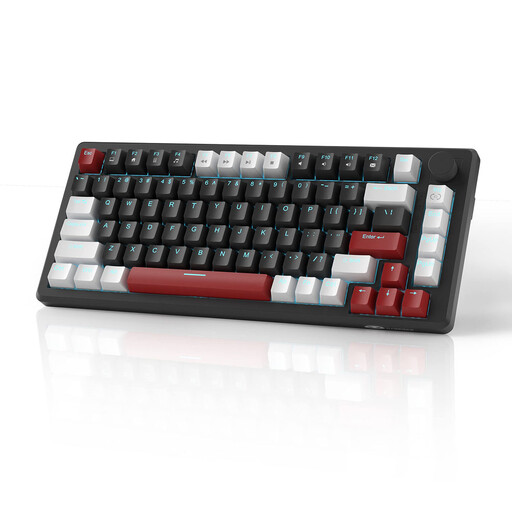
Why It Stands Out: The MageGee STAR75 is an accessible, wired keyboard that combines the essential features of a compact mechanical keyboard with a practical control element. Its multi-function knob controls either volume or lighting.
Pros:
Who Is It For? For newcomers to the world of mechanical keyboards or budget-conscious users looking for a functional 75% layout with a convenient rotary knob for daily use.
A clean, minimalist design is in high demand for many setups. If you have a preference for a high-contrast aesthetic, you might find the perfect model in our collection.
Explore our selection of Black and White Keyboards for more options to match your desk.
A 75% keyboard is a compact mechanical keyboard that omits the number pad compared to a full-size layout. However, unlike even smaller 60% or 65% form factors, it retains the dedicated function row (F1-F12) and arrow keys. This makes it an excellent compromise between space-saving and functionality.
Yes, many gamers prefer this layout. It creates more room for wide mouse sweeps, which is especially advantageous in fast-paced FPS games. At the same time, essential keys like the F-row remain directly accessible for macros or in-game commands without needing to use a secondary function layer (Fn layer).
A hot-swap keyboard has special sockets on the PCB that allow you to change the mechanical switches without soldering. This simplifies maintenance and gives enthusiasts the freedom to customise the typing feel and sound profile of their keyboard by swapping in different switch types (e.g., linear, tactile, or clicky).