
Lieferung heute & morgen

Qualitätsgarantie

Willkommens-Angebote freischalten: KOSTENLOSE Lieferung | Bis zu 80 % RABATT | Kostenlose 30-Tage-JoyPlus-Testphase
App herunterladen
Finding the right 75% mechanical gaming keyboard can quickly become overwhelming. Manufacturers advertise with numerous technical terms, but not all of them live up to their claims. This guide will help you identify the crucial features and avoid common purchasing traps, so you can make an informed decision.
Before we dive into the important parameters, you should be aware of three common marketing pitfalls that often lead to poor purchasing decisions.
To find a great 75% QWERTZ mechanical gaming keyboard, focus on the following three objective criteria.
A compact mechanical keyboard in the 75% format offers an ideal compromise. Unlike even smaller 60% keyboards, you retain:
At the same time, the number pad is omitted, creating more desk space for mouse movement—a crucial advantage in fast-paced games. Ensure the layout is explicitly listed as a German QWERTZ layout.
The mechanical switches define the typing feel and response time. For gaming, linear switches are a popular choice because they provide a smooth, resistance-free keystroke all the way down.
A true hot-swap keyboard is a future-proof investment. It allows you to easily replace faulty switches or completely change the typing feel by installing different switch types. Check the specifications for support of both 3-pin and 5-pin switches to ensure maximum flexibility.
The way the circuit board (PCB) is mounted in the case has a huge impact on sound and feel.
Here are some models that, based on objective criteria, are suitable for different user profiles.

Why This Fits Their Persona: This model is ideal for users seeking a balanced keyboard for both gaming and productive work. The linear Sea Salt switches enable rapid input, while the practical volume knob simplifies media control in daily use.
The product description clearly specifies the gasket-mount structure and hot-swap capability for 3-pin switches, avoiding vague marketing promises.
Combines a Gasket Mount for a dampened typing feel with a dedicated volume knob in a compact 75% QWERTZ format.
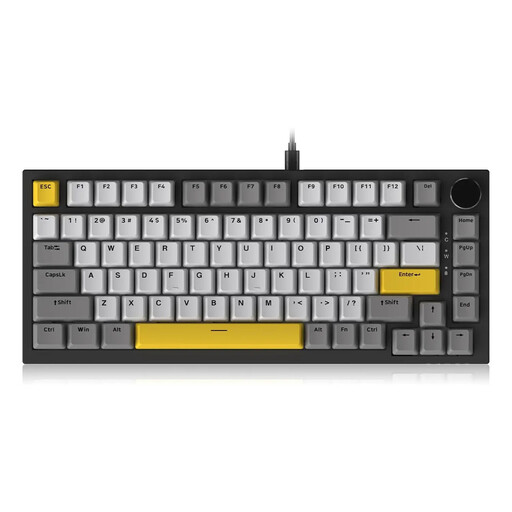
Why This Fits Their Persona: For users who prefer a noticeable actuation point when typing, without the loud click of Blue switches. Brown switches provide tactile feedback that can enhance typing accuracy.
This model uses the same solid foundation (Gasket Mount, Hot-Swap, CNC knob) and offers a clear alternative in switches, rather than confusing the user with ambiguous terms.
The hot-swap capability for 3/5-pin switches offers maximum flexibility to customize the typing feel later on. The tactile feedback is advantageous for writing tasks.

Why This Fits Their Persona: For gamers where every inch of desk space counts. The 60% format is extremely compact, offers maximum room for the mouse, and is ideal for on-the-go use. The QWERTZ layout ensures compatibility for German users.
This model is not a 75% layout but is transparently positioned as an alternative for users with specific space requirements. It makes it clear that the size advantage comes at the cost of dedicated arrow and F-keys.
Extremely compact form factor for maximum mouse freedom. Razer's optical switches offer high durability and fast actuation, according to the manufacturer.
We have compiled a complete, real-time updated list of products that fully meet these strict selection criteria and German regulations.
A TKL (Tenkeyless) keyboard is essentially a full-size keyboard without the number pad. It has a standard navigation cluster (with Insert, Home, etc.) and more space between the key blocks. A 75% keyboard is even more compact, as it pushes the keys closer together and usually arranges the navigation cluster vertically to save space.
Most mechanical switches are rated for 50 million or more keystrokes. With a hot-swap keyboard, you can replace the switches yourself. You only need a special tool (a switch puller), which is often included. The process requires no soldering and is straightforward even for beginners.
Not necessarily. Many keyboards, including the AJAZZ AK820, allow you to control basic RGB lighting effects and brightness directly via key combinations (e.g., with the Fn key). Software is only needed if you want to program complex macros or customize each key's color value individually.