
Lieferung heute & morgen

Qualitätsgarantie

Willkommens-Angebote freischalten: KOSTENLOSE Lieferung | Bis zu 80 % RABATT | Kostenlose 30-Tage-JoyPlus-Testphase
App herunterladen
Finding the right 75% mechanical gaming keyboard can quickly become a complex task. The market is flooded with technical jargon and marketing promises that often confuse more than they clarify. Many users invest in a model that looks impressive on paper but fails to meet expectations in practice. This guide focuses on the key features that define a high-quality 75% QWERTZ mechanical gaming keyboard and helps you avoid common purchasing pitfalls.
Before we dive into recommended features, it's important to understand the three most common issues that can lead to a bad purchase:
To make an informed decision, you should examine three core technical aspects. These define the performance, feel, and longevity of your future keyboard.
A compact mechanical keyboard in a 75% layout offers a thoughtful compromise between a small footprint and functionality. Unlike even smaller 60% or 65% keyboards, you retain a full function row (F1-F12) as well as dedicated arrow and navigation keys (like Home, End, PgUp/Dn). Compared to a Tenkeyless (TKL) keyboard, the block between the main keys and the number pad is eliminated, moving the keys closer together. The result is more desk space for your mouse—a significant advantage for low-DPI gaming—without sacrificing essential keys for productivity apps.
A gasket mount keyboard refers to a specific construction where the PCB (Printed Circuit Board) and its attached plate are not screwed directly into the case. Instead, the assembly is "sandwiched" between gaskets made of silicone or Poron.
The choice of switches has a major impact on the typing experience. A keyboard with linear switches is characterised by a smooth, resistance-free keystroke from top to bottom. There is no noticeable "bump" (tactile feedback) or clicking sound.
Hot-swap capability is a critical factor for future-proofing. It allows you to easily pull out the switches with a tool and replace them with other compatible models. This lets you customise the typing feel, replace faulty switches, or even mix and match switch types for different keys (e.g., linear switches for WASD, tactile for others).
Here are some recommendations tailored to specific user profiles that incorporate the quality features mentioned above.
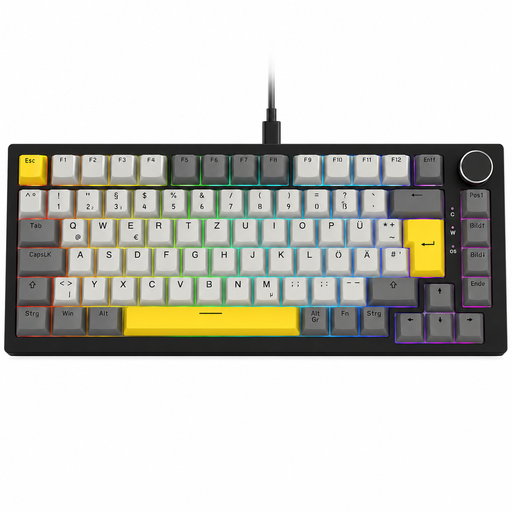
Why This Fits Their Persona: Ideal for users who want a single keyboard for fast-paced gaming sessions and extensive typing. The practical volume knob and dynamic RGB lighting flexibly adapt to any use case.
This model offers a true gasket-mount structure combined with five-layer sound dampening. The result is a noticeably softer and quieter typing experience that goes beyond a mere marketing buzzword.
The combination of gasket mount, hot-swap for 3-pin switches, and a dedicated rotary knob offers a feature set rarely found in this price range. The linear Sea Salt switches are a great middle ground for gaming and typing.
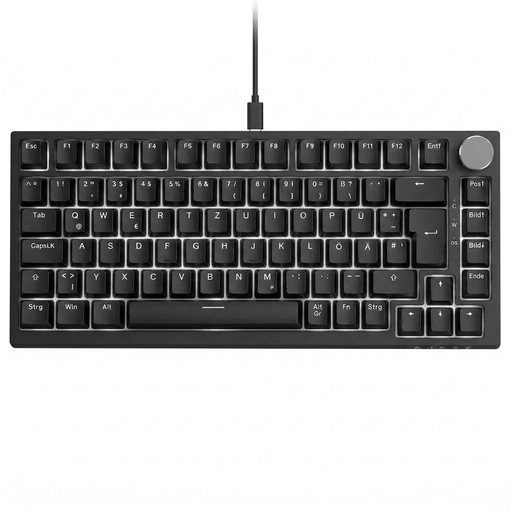
Why This Fits Their Persona: Perfect for gamers who prioritise maximum responsiveness. The light, linear red switches enable rapid, repeated inputs. The single-colour white backlighting ensures a distraction-free, focused gaming environment.
This version makes a clear statement: performance through proven linear red switches. The hot-swap capability also provides an exit strategy if preferences change, preventing you from being permanently locked into one switch type.
Equipped with mechanical red switches, it delivers a light and responsive typing feel. The gasket-mount construction ensures a pleasant, muted keystroke sound even during intense gaming sessions.
If you want to explore more models selected based on objective criteria like layout, switch type, and build, you'll find a curated selection here.
A 75% keyboard is more compact than a TKL (Tenkeyless) keyboard because it eliminates the empty space between key clusters, yet unlike a 60% keyboard, it retains the crucial F-key row and arrow keys. This makes it an ideal middle ground for users who both game and work, all while saving as much desk space as possible.
Maintenance is straightforward. Clean the surface and the gaps between keys regularly with a soft brush or compressed air. With a hot-swap keyboard, you have the added benefit of being able to remove the switches to clean the PCB underneath. Only pull the switches out vertically with the designated tool (switch puller) to avoid damaging the pins or the hot-swap sockets.
That depends on personal preference. Many heavy typists prefer tactile switches for the noticeable feedback, which confirms actuation and can reduce errors. Linear switches might feel a bit "mushy" for typing at first. However, many users quickly get used to them and appreciate the lower actuation force and quiet operation, which can reduce finger fatigue during long typing sessions. A hot-swap keyboard gives you the flexibility to try them out and switch if needed.