
Lieferung heute & morgen

Qualitätsgarantie

Willkommens-Angebote freischalten: KOSTENLOSE Lieferung | Bis zu 80 % RABATT | Kostenlose 30-Tage-JoyPlus-Testphase
App herunterladen
For competitive PC gamers, especially in fast-paced FPS and battle royale titles, peripheral response time can mean the difference between victory and defeat. An 8K gaming mouse with an extremely high polling rate of 8000 Hz promises to reduce input lag to a bare minimum. This article serves as a guide, focusing on technical features to provide you with a solid basis for choosing the right mouse.
The search for the right mouse goes beyond mere specifications. Three core aspects are crucial for a high-performance esports mouse.
The polling rate, measured in Hertz (Hz), indicates how often the mouse reports its position to the computer. While 1000 Hz was long the standard, a gaming mouse with a high polling rate of 8000 Hz offers eight times more frequent data transmission. This means position data is updated every 0.125 milliseconds instead of every millisecond. The result is visibly smoother cursor movement and theoretically lower click latency. However, note that an 8K polling rate places higher demands on your system's CPU.
In esports, the trend has shifted towards the ultra-lightweight gaming mouse. Models under 60 grams allow for faster and less fatiguing movements, which is advantageous during long gaming sessions and for quick "flick shots." Equally important is an ergonomic gaming mouse whose shape fits your hand size and grip style (Palm, Claw, or Fingertip Grip). A good fit promotes precision and prevents fatigue.
The sensor is the heart of any gaming mouse. Modern high-end sensors like the Pixart 3395 offer high precision and flawless tracking with no acceleration or smoothing. A wireless gaming mouse provides maximum freedom of movement without cable drag. Current 2.4 GHz wireless technologies ensure a stable and latency-free connection that is on par with that of wired mice.
Based on the criteria above, we have compiled a selection of models that are well-suited for demanding gamers due to their technical features.
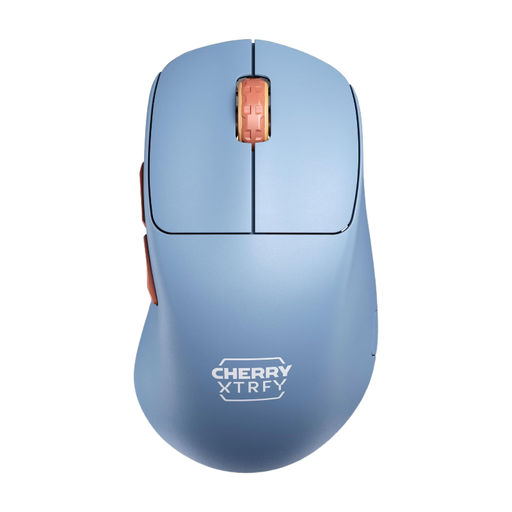
Why It Stands Out The CHERRY XTRFY M64 Wireless is distinguished by its unique ergonomic design with an extremely low front. This construction allows the fingers to be positioned closer to the mousepad, offering enhanced control and precision during rapid aiming movements. At just 53 grams, it is an exceptionally lightweight gaming mouse.
Pros
Who Is It For? This model is ideal for right-handed users seeking an extremely lightweight and ergonomically designed mouse who value maximum control and a driver-free configuration. It is a great choice for gamers who prioritise ergonomics and weight.
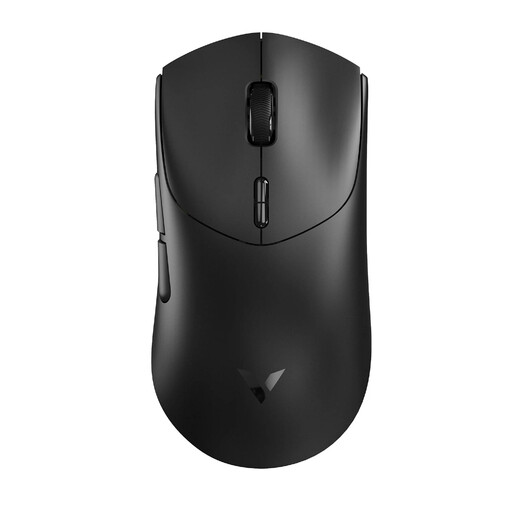
Why It Stands Out The RAPOO VT7 is one of the few mice on the market that natively supports a true 8K wireless polling rate without relying on additional dongles or software algorithms. Despite this advanced technology, it weighs only 53 grams and offers an exceptionally long battery life.
Pros
Who Is It For? The RAPOO VT7 is aimed at tech-savvy competitive players who seek the lowest possible latency from a wireless 8K mouse, without compromising on weight or battery life.
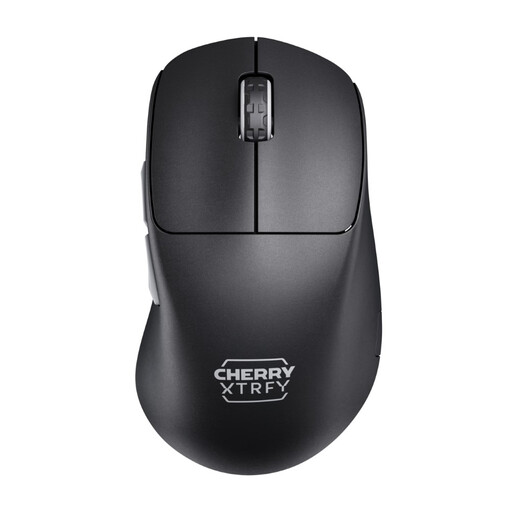
Why It Stands Out The M64 Pro combines the innovative ergonomics of the M64 series with a powerful 8K polling rate. It offers the same low front for maximum control but significantly boosts responsiveness with 8000 Hz technology. At 55 grams, it remains extremely lightweight.
Pros
Who Is It For? This model is the top choice for esports professionals and ambitious gamers who appreciate the ergonomic advantages of the M64 shape and want to leverage the maximum possible technical responsiveness of an 8K gaming mouse.
If the featured models don't exactly meet your requirements or if you are looking for other alternatives, you can find a wider selection in our category. Discover more models and find the right lightweight mouse with side buttons for your setup.
1. Do you need a special monitor for an 8K gaming mouse? No, a special monitor is not a prerequisite. However, the benefit of smoother cursor movement is most noticeable on monitors with a high refresh rate (144 Hz, 240 Hz, or higher), as the visual representation aligns with the mouse's high polling rate.
2. Does an 8K mouse use more system resources? Yes, an 8000 Hz polling rate puts more strain on the computer's CPU than the 1000 Hz standard. Modern mid- to high-end gaming PCs can typically handle this without issue. However, on older or less powerful systems, it could potentially impact in-game performance.
3. What is the difference between a 1K and an 8K polling rate? The polling rate indicates how many times per second the mouse reports its position to the computer. 1K (1000 Hz) means 1,000 reports per second (an interval of 1 ms). An 8K mouse (8000 Hz) reports its position 8,000 times per second (an interval of 0.125 ms). This results in lower input lag and smoother cursor movement.