Selecting a gaming monitor involves balancing technical specifications tailored to your individual use case. An MSI 27-inch WQHD Gaming Monitor represents a popular configuration that strikes a balance between screen size, resolution density, and hardware performance demands. This article analyses the key parameters relevant to choosing such a model and presents a selection of devices with different technological focuses.
Buyer's Guide: Decisive Technical Parameters
When evaluating a monitor for gaming applications, several key metrics are of central importance. The combination of these factors determines the device's suitability for specific game genres and user preferences.
Resolution and Screen Size: The WQHD Standard
The WQHD resolution (Wide Quad High Definition), corresponding to 2560 x 1440 pixels, offers a pixel density of approximately 109 ppi (pixels per inch) on a 27-inch screen. This results in a sharper, more detailed image compared to Full HD (1920 x 1080) on the same surface area, without placing as much strain on the graphics card as a 4K resolution (3840 x 2160). A 1440p gaming monitor of this size is therefore often considered a well-balanced compromise for demanding PC gamers.
Panel Technology: IPS vs. VA
Panel technology is crucial for colour reproduction, contrast, and response speed.
- IPS (In-Plane Switching): An IPS monitor is known for its high colour fidelity and wide viewing angles. Modern "Rapid IPS" panels have significantly reduced the historically slower response times, making them a viable option for fast-paced games. They are ideal for users who value vibrant colours and a consistent display from various viewing angles.
- VA (Vertical Alignment): A VA monitor is characterised by a high native contrast ratio, which results in deeper blacks and a more three-dimensional image. This is particularly advantageous in dark game scenes. Models with "Rapid VA" technology also address the issue of response time. A curved gaming monitor often uses VA panels to enhance immersion through its curved field of view.
- Mini-LED: This is an advanced backlighting technology that divides hundreds or thousands of small LEDs into zones. This allows for precise local dimming, which significantly increases contrast and peak brightness, improving HDR (High Dynamic Range) performance.
Refresh Rate and Response Time
- Refresh Rate (Hz): This value indicates how many frames per second the monitor can display. A 180Hz monitor or even a 300Hz monitor provides extremely fluid motion. This reduces motion blur and improves target tracking in fast-paced esports titles.
- Response Time (ms): A low response time, such as a 0.5ms response time (GtG - Grey-to-Grey), minimises "ghosting," where moving objects leave a visible trail.
- Adaptive Sync: Technologies like FreeSync (AMD) or G-Sync Compatibility (NVIDIA) synchronise the monitor's refresh rate with the graphics card's framerate. This prevents screen tearing and ensures a stutter-free gaming experience.
Our Select MSI Monitors
Based on the criteria above, we present three models from the MSI MAG Monitor series, each with a different technological focus.
[€10 off with Code: M10] MSI MAG 274CQFDE 27-Inch WQHD Curved Rapid VA LED 16:9 180 Hz Gaming Monitor
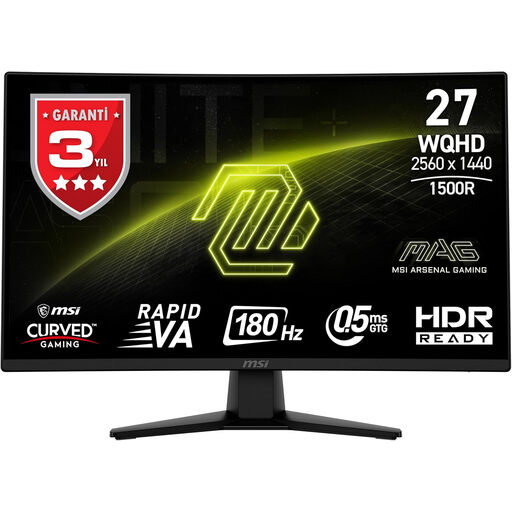
- Why we recommend this product: This model combines the immersive qualities of a curved display with the high contrast of a Rapid VA panel. The 180Hz refresh rate and low 0.5ms (MPRT) response time provide a solid foundation for fluid gameplay in both competitive and atmospheric titles.
- Advantages:
- Panel: Rapid VA with a high contrast ratio (3000:1 as per manufacturer's specification) for deep blacks.
- Design: 1500R curvature for an immersive field of view.
- Performance: 180Hz refresh rate and WQHD resolution.
- Synchronisation: Supports Adaptive Sync to prevent screen tearing.
- Who it's for: Gamers who place a high value on immersion and image depth, and enjoy both story-based single-player titles and fast-paced multiplayer games.
[€10 off with Code: M10] MSI MAG 274QPF X30MV Gaming Monitor 27-Inch WQHD - Rapid VA Mini-LED 2560 x 1440, 300 Hz/0.5 ms
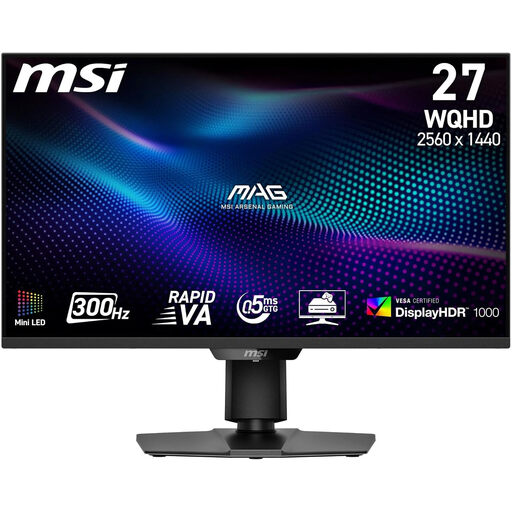
- Why we recommend this product: This model positions itself in the high-end segment by combining an extremely high 300Hz refresh rate with a Mini-LED backlight. Its 1,152 local dimming zones enable outstanding HDR performance (DisplayHDR 1000) and a dynamic contrast that significantly enhances image quality.
- Advantages:
- Panel: Rapid VA with Mini-LED backlight for excellent contrast and brightness.
- Performance: 300Hz refresh rate and 0.5ms response time (GtG) for esports-grade performance.
- Connectivity: HDMI 2.1 port, relevant for current-gen consoles like the PS5 and Xbox Series X.
- HDR: VESA DisplayHDR 1000 certification for an impressive display of high-contrast content.
- Who it's for: Esports enthusiasts and performance-oriented gamers who seek the maximum available refresh rate and demand superior image quality, especially in HDR content.
[€10 off with Code: M10] MSI MAG 274QFDE 27-Inch WQHD Rapid IPS LED 16:9 180 Hz Gaming Monitor
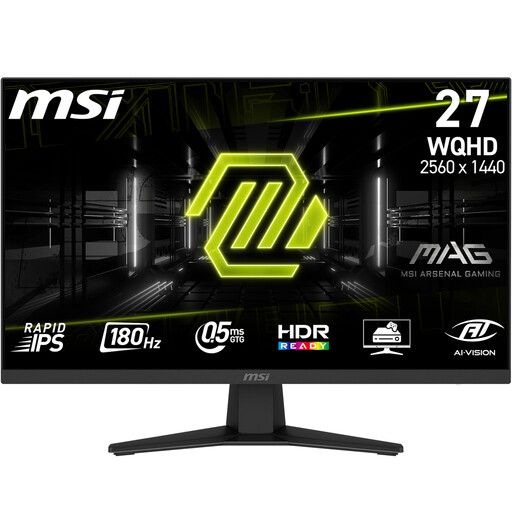
- Why we recommend this product: This model utilises a flat Rapid IPS panel, offering high colour accuracy and wide viewing angles without compromising on speed. It is a versatile device suitable for both colour-rich games and productivity applications.
- Advantages:
- Panel: Rapid IPS for vibrant colours and a consistent display.
- Performance: 180Hz refresh rate and 0.5ms response time (GtG) for responsive gameplay.
- Versatility: Its wide colour gamut coverage also makes the monitor appealing for content creation.
- Design: Flat display with slim bezels, ideal for multi-monitor setups.
- Who it's for: Gamers looking for an all-rounder that combines precise colour reproduction for visually rich games with the speed required for competitive play.
Considering Other Options
The gaming monitor market is dynamic and offers a wide variety of configurations. The models presented here represent specific combinations of panel technology and performance metrics. For a broader overview of different models and specifications, taking a look at the LED Computer Monitors category can be helpful for evaluating further alternatives.
Frequently Asked Questions (FAQ)
1. Is a 27-inch WQHD monitor suitable for the PS5 or Xbox Series X? Yes, a WQHD monitor is an excellent choice. Both consoles support 1440p output at up to 120Hz. A monitor with these specifications, ideally with an HDMI 2.1 port, can fully leverage the consoles' potential for smooth and detailed gameplay.
2. Do I need a powerful graphics card for a 1440p monitor with a high refresh rate? Yes. To take full advantage of a high refresh rate (e.g., 180Hz or more) at WQHD resolution, a modern graphics card from the mid-to-high-end performance tier is required. The exact requirements depend on the games you play and your desired graphics settings.
3. What is the primary difference between an IPS and a VA panel for a gamer? In summary, the main difference lies in the image presentation. A VA panel typically offers deeper blacks and higher contrast, which creates a more atmospheric experience in dark game environments. An IPS panel excels with more accurate colour reproduction and more stable viewing angles, which is an advantage in colourful games and when used for content creation.
Authored by the Joybuy Product Recommendation Officer


