What should you consider when choosing?
First decide whether vocals or guitar sound are your priority, then check that the microphone’s position and connection suit your recording space.
| What you need |
What to check before buying |
Who is this important to? |
| Make vocals stand out from background noise |
Check the pickup pattern and whether you can position the microphone close to the source; make and listen back to a short test recording in your usual recording spot. |
If I want to record vocals despite noticeable noise in my flat, I need to position the microphone correctly and keep a consistent distance. Around 36% of consumers put vocals and background noise first. |
| Capture acoustic guitar effectively |
Compare how the microphone is positioned in relation to the guitar and try different placements; take the room sound into account when listening back. |
If the pick attack and sound of the acoustic guitar matter most to me, I want to try different positions and assess how much room sound is picked up. Around 29% of consumers prioritise guitar sound. |
| Easy connection to a computer |
Check the exact model name, computer connection, cable and monitoring options. |
If I want to record on a computer as easily as possible, the connection needs to suit my device and let me monitor the recording. Around 21% of consumers put an easy computer connection first. |
| Edit vocals and guitar separately |
Check whether a single combined track will do; if not, plan for suitable microphone inputs and separate recording tracks. |
If I want to edit vocals and guitar separately later, I need a recording setup that captures both sources independently. Around 14% of consumers prioritise separate tracks. |
Microphones and kits at Joybuy
The Joybuy options below range from dynamic USB/XLR microphones for vocal recording to USB and mobile recording kits. Check that each one’s connection and intended recording setup suit your acoustic demo.
 No image available
FIFINE AM8 USB/XLR dynamic vocal microphone
For close-miked vocals on a computer or through an XLR recording setup; its directional pickup doesn’t replace a test recording in your actual recording space.
USB-C and XLR connections, headphone socket and monitoring control. An XLR cable is required for the XLR connection and, according to the product description, isn’t included.
View at Joybuy
 No image available
FIFINE K688CT USB/XLR dynamic microphone kit with boom arm
The adjustable boom arm can help you position the microphone for vocal recording; check that the desk clamp suits your desk.
USB-C and XLR connections, headphone socket and boom arm. The XLR cable isn’t included, according to the product description; the clamp is designed for desks less than 2 inches thick.
View at Joybuy
 No image available
USB condenser microphone for PC, 7-piece kit
For recording on a PC if a USB model suits your recording equipment; the product description mentions voice recording and streaming.
USB connection, mute button, headphone socket and Type-C adapter; described as a 7-piece kit.
View at Joybuy
 No image available
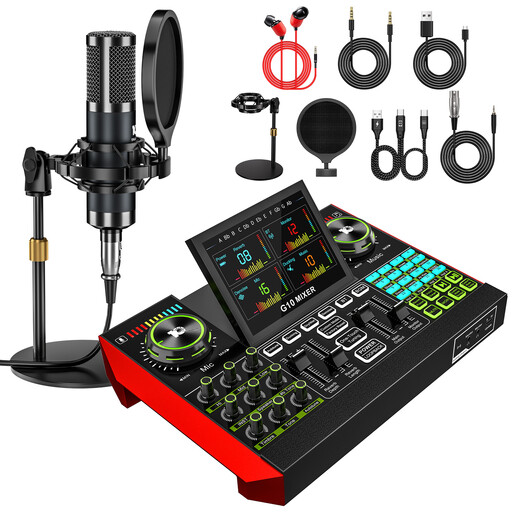
Yinkaer G10-P15 microphone kit with audio mixer and 3.5 mm condenser microphone
The product description lists vocal and computer recording as possible uses; check that the included recording equipment suits your demo.
The kit is described as including a 3.5 mm condenser microphone and an audio mixer.
View at Joybuy
 No image available
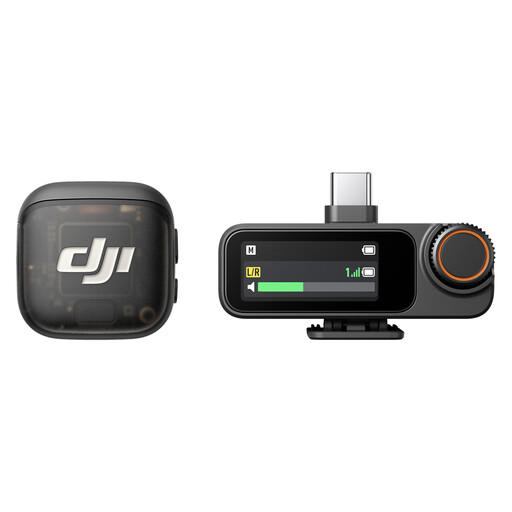
DJI Mic 3 Wireless Microphone (1 Transmitter + 1 Receiver)
This kit is described as being for mobile recording with a phone or camera. Check whether this recording setup suits your acoustic demo.
The product description lists a USB-C phone adapter and built-in 32-bit float recording.
View at Joybuy
Frequently asked questions
Can a cardioid microphone completely eliminate unwanted noise from a flat?
No. A cardioid pickup pattern doesn’t guarantee a noise-free recording. Shure explains that a unidirectional microphone captures sound differently depending on the direction it comes from. Point it towards the sound source you want to record, then listen back to a test recording made in the actual room.
Is a dynamic or condenser microphone better for an acoustic demo?
For close-miked vocals, a dynamic directional microphone can be a sensible starting point. For guitar detail, a condenser microphone can work well if you can control its position and the room sound. Focusrite describes microphone type and position as factors in acoustic guitar recording; this doesn’t amount to a blanket comparison of the sound of every model.
What else do I need for the XLR AT2020?
You’ll need a suitable XLR microphone input with the required power supply, as well as an XLR cable; Audio-Technica says the cable for the AT2020 is sold separately. Don’t confuse this model with the AT2020USB-X, which has a USB-C connection.
How can I check the microphone position before recording?
Make short recordings from different positions and listen back through headphones. Focusrite recommends comparing positions when recording acoustic guitar and points out that a greater distance between the microphone and source can pick up more room sound.
Can I record conversations that the microphone picks up from other people?
Section 201 of the German Criminal Code (StGB) makes it a criminal offence to record another person’s non-public spoken words without authorisation. If the microphone could pick up conversations like these, get the people concerned to agree to the recording beforehand. Whether a particular case meets the legal definition depends on the circumstances of the recording.


