First, choose a microphone based on the background noise at your recording spot, then consider whether vocals, an acoustic instrument or both will take centre stage. A dynamic microphone may be a good option for recording close up, but it won’t block out conversations completely. A condenser microphone could be suitable if a test recording sounds quiet enough at your actual setup. USB makes it easier to connect to a computer, while XLR requires a compatible recording setup; according to the manufacturer, the LEWITT LCT 240 PRO also needs 48 V ± 4 V phantom power.
Who is this selection for?
Recording at a busy desk
If people sometimes talk or work at your shared workspace, a quiet time slot, microphone distance and a test recording can all help you decide. Shure describes dynamic microphones as a possible option for less quiet homes, not as a way to block out conversations completely.
Acoustic musicians focused on instrumental sound
If you want to capture the nuances of an acoustic guitar, you can adjust the microphone position and room setup for a test recording. Shure and LEWITT list acoustic instruments among the sounds their microphones can record; try different positions at your own setup to find what works best.
First-time demo makers without an interface
If you want to start by recording straight to your computer, consider the connection, headphone monitoring and any accessories you may need together. Audio-Technica describes the AT2020USB-X as offering USB-C and direct headphone monitoring; an XLR microphone may require an additional recording device.
What should you look for when buying?
At a shared desk, your recording environment, the sound you want and the connection method all need to work together.
| Consideration |
What to check before buying |
Who is most likely to consider this |
| Background noise and room sound |
Shure lists dynamic microphones as a possible choice for less quiet homes, not as protection from every conversation. Try recording at the time you plan to use the microphone and check whether a close position works for your voice or instrument. |
If someone is talking nearby, I want to record a usable take without relying on complete noise isolation. Consumers whose main concern is background noise are likely to account for around 36% of shoppers in this buying scenario. |
| Guitar and vocal detail |
Try recording your voice and instrument in the position you plan to play in. Shure suggests the area around the 12th fret as a possible starting point for positioning an acoustic guitar; then check the sound at your own setup. |
For my acoustic guitar, the position and sound need to work together, and I want to be able to try it out at my actual recording spot. Consumers who prioritise instrumental detail are likely to account for around 29%. |
| Connection and ease of getting started |
Check whether you can record directly via USB or already have a compatible XLR interface. According to the manufacturer, the LEWITT LCT 240 PRO requires XLR and 48 V ± 4 V phantom power. |
If I want to start recording on my computer without an existing interface, a direct connection is my main priority. Around 21% of consumers are likely to prioritise the connection requirements. |
| Positioning and desk movement |
Compare desk stands and suitable mounts at your intended recording spot. A shock mount can reduce mechanical vibrations, but it won’t block out conversations; RØDE says a shock mount is included with the NT1 5th Generation. |
At a shared desk, I want to adjust the position and listen for movement noise in a test recording before deciding. Consumers whose main concern is a stable setup are likely to account for around 14% of shoppers in this buying scenario. |
Common misconceptions
-
“Dynamic” doesn’t mean conversations disappear completely
Shure describes dynamic microphones as a possible choice for less quiet homes. That doesn’t mean they’ll completely block out other people’s voices at a shared desk.
If possible, plan to record at a quiet time and test your intended microphone position before you start.
Disruptive background noise could mean recording another take and spending more time on your demo.
-
With XLR, you’ll need more than just the microphone
An XLR microphone needs a compatible recording setup. For the LEWITT LCT 240 PRO, the manufacturer specifies XLR and 48 V ± 4 V phantom power.
Before buying, check that your interface, cable and power supply are compatible with your setup.
An XLR setup may require extra audio equipment and a compatible cable.
-
A desk stand won’t automatically protect against vibrations
Audio-Technica lists a desk stand for the AT2020USB-X; according to the manufacturer, a shock mount is optional. The stand alone won’t tell you how much desk movement you’ll hear in a recording.
Test the microphone position at your intended recording spot and check which mount is included.
If your setup needs a different mount, you may need extra space for it.
Microphone brands to consider
Audio-Technica
Audio-Technica describes the AT2020USB-X as a USB-C condenser microphone with a cardioid polar pattern, designed for recording music on a computer.
- According to the manufacturer, it offers direct headphone monitoring, a mix control and a desk stand.
- The shock mount is optional. Try a test recording to check whether your room and desk are quiet enough.
RØDE
RØDE describes the NT1 5th Generation as a condenser microphone with USB-C and XLR connections.
- According to the manufacturer, the stated package includes a shock mount, a pop filter, and USB-C and XLR cables.
- The connection options and accessories won’t eliminate room echo or desk-side conversations; make sure the front of the microphone faces the sound source.
LEWITT
LEWITT describes the LCT 240 PRO as an XLR condenser microphone for vocals and acoustic instruments.
- The manufacturer’s specifications list a cardioid polar pattern, a 3-pin XLR connection and 48 V ± 4 V phantom power.
- You’ll need a compatible XLR recording setup with the required power supply.
Shure
Shure describes dynamic models as a possible option for less quiet homes, and condenser models for vocals or acoustic instruments.
- Its guidance can help you choose between microphone types and recording situations.
- Suitability depends on the specific model and sound source; dynamic microphones won’t block out conversations completely.
Joybuy products
This selection includes dynamic microphones with USB and/or XLR connections, as well as other models for computer or desk setups. Check that the connection, positioning and recording environment suit the take you have planned.
 No image available
FIFINE K688CTW Dynamic Microphone with Boom Arm (XLR/USB)
A possible choice for recording close up if you want to adjust the microphone position using the arm. Shure notes that dynamic microphones don’t block out background noise completely.
Dynamic; XLR/USB; boom arm.
View at Joybuy
 No image available
FIFINE AM8 USB/XLR Dynamic Microphone (Desktop Stand)
Could suit desk-based vocal recording if a desk stand works for your setup; try the position with a test recording.
Dynamic; USB/XLR; headphone connection; desk stand.
View at Joybuy
 No image available
Razer SEIRÉN V3 MINI White USB Microphone
An option if you’re looking for a compact USB microphone for a simple desk setup; test its direction and any background noise at your actual recording spot.
USB; white; tap-to-mute.
View at Joybuy
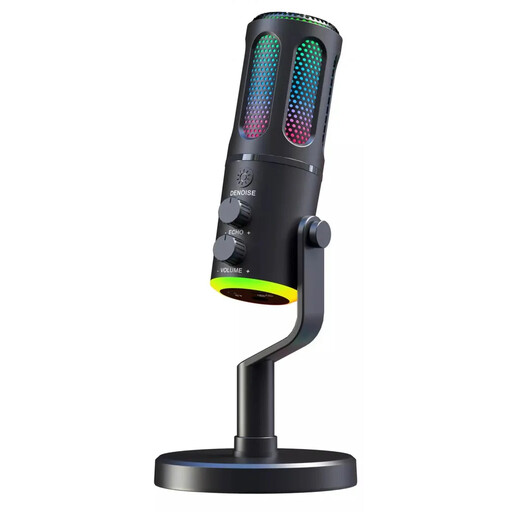 No image available
The G-Lab K-MIC-NEON Wired Cardioid Microphone
Could suit you if you want to position a wired microphone towards the sound source. A cardioid polar pattern doesn’t guarantee that conversations will be blocked out completely.
Wired; cardioid polar pattern; RGB.
View at Joybuy
 No image available
Yinkaer G10-P17 Microphone Kit with Audio Mixer (3.5 mm Condenser Microphone)
For vocals or live music if the audio mixer and 3.5 mm microphone suit your planned setup.
Kit with audio mixer; 3.5 mm condenser microphone; described in the product name as suitable for computers and mobile devices.
View at Joybuy
Frequently asked questions
Where should I start when positioning a microphone for acoustic guitar?
Shure suggests the area around the 12th fret and a distance of roughly 20 cm as a possible starting point. Listen back to a short test recording and move the microphone as needed; the best position depends on the sound you want and your recording space.
Do I need an audio interface for every one of these microphones?
No. Audio-Technica describes the AT2020USB-X as having a USB-C connection for computers; according to the manufacturer, the LEWITT LCT 240 PRO needs an XLR recording setup and 48 V ± 4 V phantom power. RØDE describes the NT1 5th Generation as having USB-C and XLR connections.
How can I reduce the sound of knocks from a shared desk?
Test your setup while the desk is moving as it normally would. A suitable shock mount can reduce mechanical vibrations; Audio-Technica lists one as an optional accessory for the AT2020USB-X, while RØDE includes one in the stated package for the NT1 5th Generation. It won’t replace choosing a quiet time to record.
What should I know about a faulty microphone and a voluntary manufacturer's guarantee?
The Council of the European Union states that faulty goods, or goods that aren’t as advertised, are covered by a legal guarantee for at least two years. A voluntary manufacturer's guarantee is separate; check the guarantor’s terms and conditions for details.
Can I record other people’s conversations during a demo at a shared desk?
Don’t assume you can record private conversations without permission. Section 201 of the German Criminal Code (StGB) makes it a criminal offence to record another person’s non-public spoken words without authorisation. If your recording might pick up conversations, check with the people involved beforehand or choose another time; this is not a blanket ban on recording your own music.


