What should you look for when buying?
First check whether the camera has a removable card. Then consider your destination device and the card formats you need. Only after that, look at which interfaces matter for importing large files.
| What matters |
What to check before buying |
Who should consider this? |
| Camera and card |
Check the storage type used by your specific camera and whether the reader supports microSDHC or microSDXC. |
If I want to read the card directly from my action camera, it needs to be removable and compatible with the reader. Around 36% of consumers put camera and card compatibility first. |
| Copying speed |
Check the card standard and the data interfaces of the reader and destination device separately. |
When transferring large video files, I want to know whether the whole transfer chain supports the card standard, rather than relying on a top speed alone. Around 29% of consumers prioritise importing larger volumes of video. |
| Mobile import |
Check whether the specific reader is compatible with your mobile device’s operating system, port and file access. |
If I want to transfer videos to a smartphone or tablet without using a laptop, the destination device needs to be able to use the reader and access the files. Around 21% of consumers prioritise mobile importing. |
| Additional cards and ports |
Check whether the model has the SD and microSD slots you need, additional ports and support for using multiple cards at the same time. |
If I want to connect different cards or other devices in the same place, extra slots and hub ports are useful. Around 14% of consumers prioritise a wider choice of card slots and ports. |
A guide to relevant brands
The details below apply to the specific model ranges mentioned, not to every product from each brand.
Transcend
The RDC3 is a USB-C multi-card reader for SD and microSD cards.
- Transcend lists USB 3.2 Gen 1 and UHS-I support.
- According to the manufacturer, you can’t insert two cards at once in the RDC3. The interface specification isn’t an independent speed test.
UGREEN
According to UGREEN, the 50706 connects USB-C and USB-A to SD and microSD slots.
- UGREEN lists UHS-I compatibility and advertises simultaneous access to both cards.
- The stated 5 Gbit/s describes the USB interface, not independently measured copying performance.
Lexar
The Professional USB-C Dual-Slot Reader is designed for SD and microSD cards, with UHS-II support.
- Lexar lists backward compatibility with UHS-I and an integrated USB-C cable.
- The advertised speed of up to 312 MB/s is a manufacturer’s maximum under suitable conditions, not a general guarantee of copying speed.
Anker
The Anker 553 USB-C Hub combines card slots with additional ports for your desk.
- As well as SD and microSD slots, Anker lists ports including USB-A and HDMI.
- If you’re only importing cards, the extra ports will go unused; information about this hub can’t be applied to every card reader from the brand.
Joybuy products for importing cards and connecting devices
This selection includes USB-C hubs with card slots and a Quick Reader for the removable microSD card in the Insta360 X5.
 No image available
Acer 7-in-1 USB-C Hub, ODK6V0
A good fit if you want to import SD or TF cards and use additional ports at your desk.
Features listed in the product title: HDMI with 4K@30Hz, 100W PD, 3 × USB 3.0 with 5Gbps, and an SD/TF card reader.
View at Joybuy
 No image available
Insta360 X5 Quick Reader
For importing the removable microSD card from an Insta360 X5 to a smartphone or tablet.
The product description includes the Insta360 app as part of the import process.
View at Joybuy
 No image available
MOKiN USB-C Hub with HDMI, VGA and SD/TF
An option if you want to import SD or TF cards and connect other devices at your desk at the same time.
The title lists HDMI, VGA, 3 × USB 3.0, PD and SD/TF. According to the product description, the hub is designed for laptops with a fully functional USB-C or Thunderbolt 3 port; devices in MHL mode aren’t supported.
View at Joybuy
 No image available
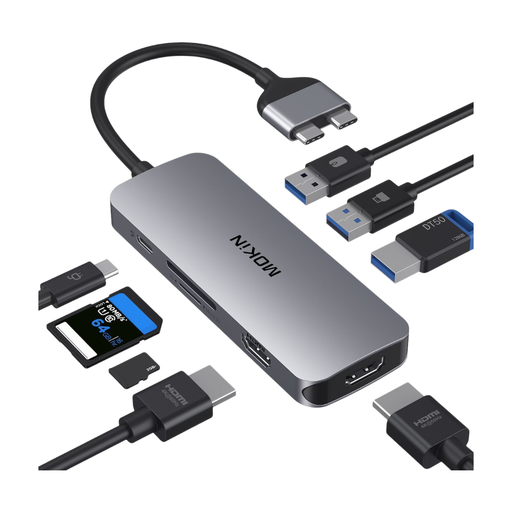
MOKiN USB-C Docking Station with 2 HDMI and SD/TF
A good fit if you want to read SD or TF cards and use additional ports at your desk.
The product title lists 2 × HDMI, 3 × USB 3.0, PD and an SD/TF card reader.
View at Joybuy
 No image available
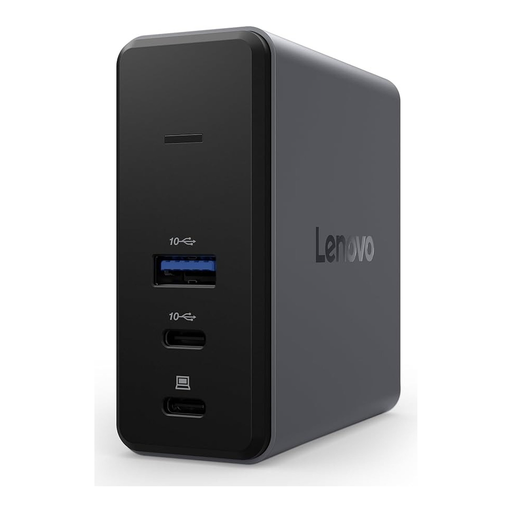
Lenovo X9 Charging GaN Dock, MicroSD
A good option if you want to read a microSD card using a USB Type-C dock and use the dock at home or in the office.
The product title lists USB 3.2 Gen 2 (3.1 Gen 2) Type-C, 60 W, grey and a MicroSD slot.
View at Joybuy
Frequently asked questions
Do I need a microSD card reader for every action camera?
No. First check your specific camera model: Insta360 lists internal storage only, with no card slot, for the GO 3 and GO 3S. If your camera has a removable microSD card, importing from the card is different from connecting the camera directly.
Can a UHS-II reader speed up my imports?
It may do, if the card, reader and rest of the transfer chain all support UHS-II. The SD Association distinguishes between UHS-I and UHS-II; Lexar says its USB-C Dual-Slot Reader supports both standards. However, this doesn’t guarantee a specific time saving.
What should I do with the memory card after copying the files?
Check the copied files on the destination device before deleting the originals. On Windows, Microsoft recommends safely ejecting external storage before disconnecting it to help prevent data loss.
What are my rights if a card reader bought online in Germany is faulty?
Your statutory rights are against the seller and are separate from any voluntary manufacturer’s guarantee. The Verbraucherzentrale also explains that online purchases come with a right to cancel, which generally applies for 14 days after the contract is made or the ordered goods are received; details and exceptions depend on the purchase contract.
Can I put an old card reader in the household bin?
No. The German Environment Agency advises against putting old electrical equipment in household waste. Instead, take it to a recycling centre or an appropriate retailer take-back point, for example.


