If there’s no room for a separate monitor on your desk, consider a hybrid console in tabletop mode or a gaming handheld. The key question is whether the games you want to play are available on that device. If you already have a monitor, a home console could also be suitable, provided there’s enough room for the console, its connections and adequate ventilation. Also check whether your games are digital or on disc, and which console version you need.
Which console is right for you?
Players without room for a monitor
If you want to play action RPGs on a built-in screen or put your console away after a session, tabletop mode or a handheld could be a good fit. Nintendo describes the Switch 2 as offering a tabletop mode with its own screen. For the Steam Deck and other handhelds, check whether the specific game you want to play is compatible.
Players with limited desk space for a monitor
If you already have a monitor, check that your console, cables and the space it needs for ventilation will fit on your desk. Sony recommends leaving at least 10 cm of clearance on every side of the PS5. Microsoft gives the dimensions of the Xbox Series S with 512 GB used for comparison as 6,5 × 15,1 × 27,5 cm.
Players with an existing games library
If you want to keep playing games you already own or have particular action RPGs in mind, the platform, edition and, where relevant, disc drive are key considerations. Nintendo notes that not all older Switch games are fully compatible with the Switch 2, so check each game you want to play individually.
What should you look for when buying?
First, check that the action RPGs you want to play are available on your chosen platform. Then consider desk space, game format and ongoing costs to narrow down the type of device that’s right for you.
| Buying consideration |
What to check before buying |
Who it matters most to |
| Space for the console and screen |
Measure the available desk space, including room for cables. If you’re considering a PS5, bear in mind the ventilation clearances recommended by Sony. |
If there’s no room for a monitor on my desk, I want to play directly on the device. Around 31% of consumers are likely to prioritise space and screen requirements. |
| Availability of the games you want |
Check the platform and edition for each game, as well as handheld compatibility where relevant. |
If the action RPGs I care about most are on a particular platform, I want a console that works with that library. Around 25% of consumers are likely to put the games they want first. |
| Screen and controls |
Assess the screen you’ll actually use, and distinguish its specifications from a game’s performance. |
If readability, screen position and controls matter most to me, I want to assess the device where I plan to use it. Around 19% of consumers are likely to prioritise the display and controls. |
| Digital or physical games |
Check that the discs or game cards you own are compatible with the exact console version you’re considering. |
If I want to play games I already own, or buy future games, on disc, I need a console version with the right disc drive. Around 13% of consumers are likely to prioritise game format. |
| Costs after buying the console |
Factor in the games you want, any online services and the required storage standard. |
If I’m weighing up the cost of games, online features and potential extra storage, I want to keep ongoing expenses in mind. Around 12% of consumers are likely to prioritise these additional costs. |
Common buying pitfalls
-
Comparing the console’s dimensions without checking the space it needs
A home console needs more than just space for the unit itself: you’ll also need room for cables and proper ventilation. Sony recommends leaving at least 10 cm of clearance on every side of the PS5.
Make sure you plan for the complete setup on your desk. If there’s no room for a monitor, consider tabletop or handheld mode instead.
-
Buying a digital console when you own game discs
The Xbox Series S and PS5 Digital Edition don’t have a disc drive, so they can’t read the game discs you already own.
Before buying, check your games and the exact console version. You may need to buy a game again in a format the console can use.
-
Assuming a high refresh rate guarantees a particular frame rate in a game
Screen specifications describe the display, not the frame rate you’ll get in a particular action RPG.
Check performance information for the specific game you want to play, rather than relying on the screen’s refresh rate or resolution alone.
-
Assuming any microSD card will work for Switch 2 storage
Nintendo specifies microSD Express for expanding the Switch 2’s storage. According to Nintendo, other microSD cards can only be used for the stated transfer of screenshots and videos.
Before buying accessories, check the card standard and whether the internal storage will be enough for your games. You may also need a compatible microSD Express card.
Key brands at a glance
Nintendo
The Switch 2 offers tabletop, handheld and TV modes, making it a good option for players who don’t want to keep a monitor set up permanently.
- Nintendo lists a built-in 7,9-inch screen and 256 GB of system storage.
- Not all older Switch games are fully compatible. microSD Express is required to expand storage for games.
Microsoft Xbox
The Xbox Series S is a home console with an all-digital design for use with an existing monitor. The Series X is also available with a disc drive.
- For the Series S with 512 GB used for comparison, Microsoft lists dimensions of 6,5 × 15,1 × 27,5 cm and a gaming resolution of 1440p.
- The Series S has no disc drive. Don’t assume these dimensions and storage specifications apply to other Xbox versions.
Sony PlayStation
PS5 models are home consoles designed to be used with an existing screen. Whether you need a Digital Edition or a version with a disc drive will also depend on your games.
- You can use a PS5 with an existing monitor or TV to play PS5 titles.
- The Digital Edition has no disc drive. Sony recommends keeping the ventilation openings clear and leaving at least 10 cm of clearance on every side.
Valve
The Steam Deck OLED is a handheld PC for compatible Steam games, so it doesn’t need a permanent spot on your desk for a monitor.
- Valve lists a 7,4-inch screen with a resolution of 1280 × 800 pixels for the OLED model.
- Compatibility ratings apply to individual games. Steam lists ELDEN RING as verified for Steam Deck; this doesn’t mean every action RPG is compatible.
ASUS ROG
The ROG Ally X (2024) RC72LA is a Windows handheld for players who want to enjoy PC games on a built-in screen.
- For this version, ASUS lists Windows 11 Home, a 7-inch FHD display with a 120 Hz refresh rate and an 80-Wh battery.
- The display’s refresh rate doesn’t confirm the frame rate of any particular game. These specifications apply to the RC72LA and shouldn’t automatically be assumed to apply to other Ally models.
Joybuy products for a small desk
This selection features hybrid consoles with tabletop or handheld modes for players who don’t need to keep a monitor set up permanently. Before buying, check that the action RPGs you want to play are compatible with the console and edition you’re considering.
 No image available
Nintendo Switch OLED White
Tabletop and handheld modes are worth considering if you want to play without keeping a monitor set up permanently.
7-inch OLED screen, adjustable stand and 64 GB of internal storage.
View at Joybuy
 No image available
Nintendo Switch 2, EU version
Tabletop and handheld modes are an option if you want to play without keeping a monitor set up permanently.
7,9-inch screen, 256 GB of storage and detachable Joy-Con 2 controllers.
View at Joybuy
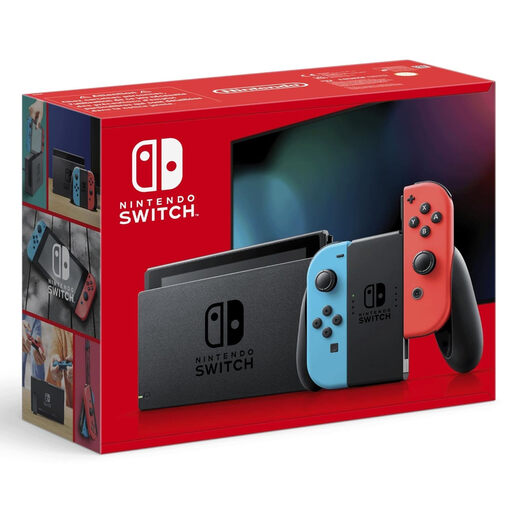 No image available
Nintendo Switch Neon Red/Neon Blue (New Edition)
Tabletop and handheld modes let you play without needing a permanent spot for a monitor. Check that the games you want are compatible.
6,2-inch display, 1280 × 720 pixels and 32 GB of storage.
View at Joybuy
Frequently asked questions
Do I need a monitor to use the Switch 2 in tabletop mode?
No. Nintendo describes tabletop mode as setting the console’s stand on a flat surface and using its built-in screen. To use the Joy-Con 2 controllers, detach them from the console.
How can I set up a PS5 on a cramped desk?
Sony recommends keeping the side and rear ventilation openings clear and leaving at least 10 cm of clearance on every side. A tightly enclosed space isn’t suitable according to this guidance.
Do I automatically need an online subscription to play action RPGs?
Not necessarily. The German Xbox and PlayStation listings for ELDEN RING state that additional subscription requirements apply to online multiplayer. It depends on whether you want to use this feature in the game.
What are my rights if I buy a faulty console in Germany?
Your statutory consumer rights against the seller are separate from a voluntary manufacturer’s warranty. The Verbraucherzentrale generally describes the statutory guarantee as lasting two years from delivery of the goods. Many online purchases of goods also usually come with a 14-day right to cancel.
Can a game without a German age rating be supplied to a minor?
According to the Unterhaltungssoftware Selbstkontrolle, a German age rating is required for a game to be made accessible to minors. Adults can also buy games without a USK rating, but this doesn’t mean that they’re approved for minors. Check the rating for the specific action RPG.


