Players short on desk space
If you want to keep room for your hands, keyboard and mouse while you play, weigh up cable management against the space needed for a wireless receiver.


First, check that the controller works with your console or PC game. Then decide whether you can manage a cable on your small desk. A wired controller saves battery power and avoids the need for a wireless receiver; wireless models keep your desk clear, but may need a receiver or batteries, depending on the model. Special features and connections aren’t automatically interchangeable between PC, PlayStation, Xbox and Nintendo.
If you want to keep room for your hands, keyboard and mouse while you play, weigh up cable management against the space needed for a wireless receiver.
If you use a PC and a console, check the stated device compatibility and connection type. A controller for one platform won’t necessarily work with another.
If you often use the sticks, shoulder buttons or extra mappable buttons, check that they’re easy to reach and supported in your game.
Start by checking platform and game support. Then choose the connection type and controls that suit the actions you use in combat.
| Consideration | What to check before buying | Who is it important to? |
|---|---|---|
| Space and cable management | Check whether you can route the cable from your PC away from your playing area, or whether you have a spare USB port for a wireless receiver. | If I want to keep my desk clear but have room for a receiver, cable management is key; around 34% of consumers prioritise the space a controller takes up. |
| Platform and game | Check the console model, operating system, connection type and support for the specific game. | If I switch between PC and console, I want to be sure the controller and connection will work with my devices; around 33% of consumers prioritise platform compatibility. |
| Buttons and controls | Check where the extra buttons are and whether you can map them for your game. | If I want to reach the controls I use in combat easily, button placement and mapping matter more to me than extra features my game doesn’t use; around 20% of consumers prioritise ease of use. |
| Power and accessories | Check whether the model uses USB power, a built-in rechargeable battery or replaceable batteries, and what accessories you’ll need. | If I want to keep charging, battery changes and extra accessories as simple as possible, I compare the power options; around 13% of consumers focus on this. |
Connection options vary by model. 8BitDo lists 2.4 GHz for Windows and Bluetooth for Android for the Ultimate 2C Wireless. Microsoft describes USB, Bluetooth and Xbox Wireless among the connection options for the Xbox Wireless Controller on PC; the wireless options available also depend on your computer’s hardware.
For the 8BitDo Ultimate 2C Wireless, 2.4 GHz is the stated wireless connection for Windows; Bluetooth is for Android.
Check the connection for your operating system before setting aside space for a receiver.
The 2.4 GHz receiver uses a USB port on your PC.
Sony states that DualSense haptic feedback on PC requires a supported game and a USB connection.
Check that your specific action RPG supports the controller and its features.
Nintendo lists different Pro Controllers for Switch and Switch 2, each with different features. This doesn’t automatically mean they’re compatible with the other console or with PC games.
Check the exact console model and product name. Don’t assume PC support based on a Nintendo product listing.
8BitDo lists 1000 Hz for certain connections under ideal conditions. On its own, this manufacturer’s claim doesn’t prove you’ll notice a difference in your game.
First choose a compatible platform, connection and button layout. Only compare polling rates under the stated conditions for each model.
Depending on the version, the Ultimate 2C range offers a wired or wireless option for specific devices.
The Xbox Wireless Controller is an option if you’re looking for one controller for Xbox and a Windows PC.
The DualSense is relevant for PS5 players and for PC games that support it.
Nintendo offers different Pro Controllers for Switch and Switch 2.
The G7 Pro Tri-Mode is worth considering if you want to use a controller with Xbox and PC and customise its settings.
This selection includes wired and wireless controllers for Windows PCs and Xbox, as well as models for PS5 and Nintendo Switch 2. Before buying, check that the platform and connection suit your game and your desk.
 No image available
A wired option if you’re looking for a controller for Xbox or a Windows PC and can manage a cable on your desk.
The product listing specifies a 3 m USB-C cable and Hall Effect sticks. It also mentions a hair-trigger mode and a 3.5 mm audio socket.
 No image available
A wireless option for PC if you want to keep a controller cable off your desk and have room for a USB receiver.
The product listing specifies 2.4 GHz wireless with a USB receiver, a rechargeable battery and two programmable rear buttons. The battery needs charging for wireless use.
 No image available
An option if you’re looking for a controller for Xbox One, Xbox Series X/S and PC, and want to play wirelessly.
The product listing specifies Xbox Wireless and Bluetooth for PC, and two AA batteries for power. It also lists a hybrid D-pad and a 3.5 mm headset socket.
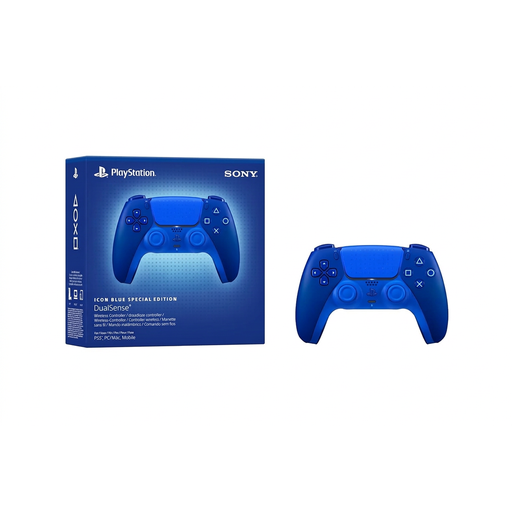 No image available
For PS5 or supported Windows PC games; Bluetooth is listed for a wireless connection.
Haptics and adaptive triggers depend on the game and platform. Sony requires a supported game and a USB connection for haptic feedback on PC. The product listing says a USB cable isn’t included.
 No image available
An option if you’re specifically looking for a controller for Nintendo Switch 2.
The product listing specifies Bluetooth and mappable GL/GR buttons. It’s listed for Nintendo Switch 2.
No, it depends on the model. For the Ultimate 2C Wireless, 8BitDo lists 2.4 GHz with a receiver or a cable for Windows, and Bluetooth for Android. Microsoft lists Bluetooth for compatible Windows devices with the Xbox Wireless Controller.
Sony lists USB-C and Bluetooth for supported Windows PCs. Haptic feedback only works on PC if the game supports it and the controller is connected via USB, so check the details for your game.
Check whether the model uses a built-in rechargeable battery, replaceable batteries or USB power, and what charging accessories it needs. The German Environment Agency generally recommends rechargeable batteries rather than disposable ones when a battery is needed.
If a product is faulty, your statutory consumer rights generally apply against the seller and are separate from any voluntary manufacturer’s guarantee. The Verbraucherzentrale explains that repair or replacement are ways of remedying the fault, and notes that the seller must cover the necessary costs.
No. The German Environment Agency explains that old electrical equipment must be collected separately, for example at local authority collection points or suitable take-back points. Batteries that can be removed easily should be returned separately.