
Lieferung heute & morgen

Qualitätsgarantie

Willkommens-Angebote freischalten: KOSTENLOSE Lieferung | Bis zu 80 % RABATT | Kostenlose 30-Tage-JoyPlus-Testphase
App herunterladen
Whether you need a USB-C hub, USB splitter, garden hose connector or accessories for a pushchair or highchair, adapters and connection accessories solve specific connection problems. But unclear product details can quickly lead to the wrong purchase. What matters isn’t having as many ports as possible or finding the lowest price, but compatibility, capacity and the intended use.
A USB-C plug fits into many devices. That doesn’t automatically mean every port supports video signals, data transfer or charging. Before you buy, check:
The same principle applies to garden accessories: a garden hose connector must match the hose diameter and the connector system you already have. For pushchair and highchair accessories, the exact model name matters more than a general compatibility claim.
A USB splitter with several ports can be useful, but the available power is usually limited by the connected host port or power supply. Connecting several hard drives, cameras or illuminated devices at the same time may cause interruptions.
With a multiport docking station, check each specification separately: data rate, screen resolution, charging power and network speed are different things. A high HDMI resolution, for example, tells you nothing about the performance of the USB ports.
For water pipe couplings, UV resistance, seals and the maximum pressure rating may all be important. Small connecting parts can also pose a choking risk to children. Keep electronic adapters away from moisture and heat, and protect them from strong mechanical stress.
For pushchair and highchair accessories, use only the combinations specified by the manufacturer. Before each use, check that all parts are correctly secured and undamaged.
First, make a note of the ports you have and what you want to use them for. A USB adapter for a mouse needs different features from one intended for external SSDs or memory cards. For example, the Baseus 4-in-1 model has one USB 3.0 port and three USB 2.0 ports. USB 3.0 is specified at up to 5 Gbit/s, while USB 2.0 is specified at up to 480 Mbit/s.
Supported standards are especially important for screens. According to the product details, the Baseus Metal Gleam 11-in-1 Hub has two HDMI ports supporting up to 4K at 30 Hz, plus a VGA port supporting up to 1080p at 60 Hz. VGA is mainly relevant for older monitors and is not interchangeable with HDMI.
A USB-C hub with a Power Delivery port can power a connected laptop or tablet while you use it. The Baseus model is specified as supporting PD power of up to 100 W. However, the power that actually reaches your device may depend on the power supply, cable and device.
Also check that the hub supports the display mode you need. The Wozinsky 14-in-1 model includes HDMI, DisplayPort, USB-A, USB-C, Ethernet and SD and TF card readers, among other connections. The product details list different operating modes for Windows and macOS.
For an under-desk cable tray or cable management chain, check the length and the maximum cable diameter. The “Spine” cable chain is 130 cm long and designed for cable bundles with a diameter of 1 to 6 mm. According to the product description, it can be adjusted to the required length.
For a 2-way or 3-way coupling for garden hoses, the hose size, thread and connector system must all match. A coupling should click fully into place. Check that it is secure after fitting, and don’t use it if it has cracks or visible damage.
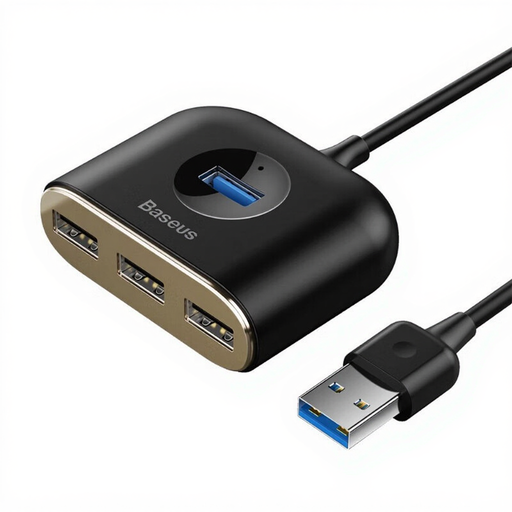
Why this product suits you: This USB splitter turns one USB-A port into four, making it suitable for a keyboard, mouse, USB stick or similar peripherals.
The port configuration is clearly specified: one USB 3.0 port and three USB 2.0 ports. This makes it easier to understand the speed available for each device.
1 m cable, plug-and-play operation and compatibility with Windows, macOS and Linux.

Why this product suits you: For home working, photography and hybrid workspaces, this multiport docking station brings together connections for monitors, networks, memory cards and peripherals.
The individual interfaces and resolutions are listed separately. This makes it easy to check before buying whether you really need HDMI, VGA, Ethernet and a card reader.
Aluminium casing, two HDMI ports, RJ45 Gigabit Ethernet and USB-C PD up to 100 W, according to the product details.
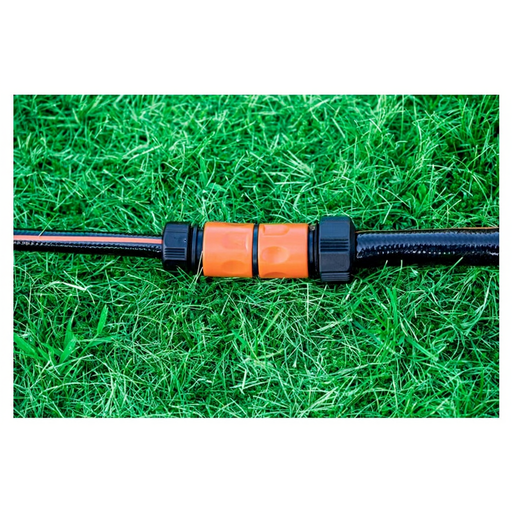
Why this product suits you: This 2-way coupling is designed for garden owners who want to connect two compatible hoses and extend the reach of their watering system.
Before ordering, check that the hose diameter, connector system and water pressure are suitable. The coupling is designed for compatible standard systems.
Compact design, approximately 5.2 cm long, with a stated weight of 20 g.
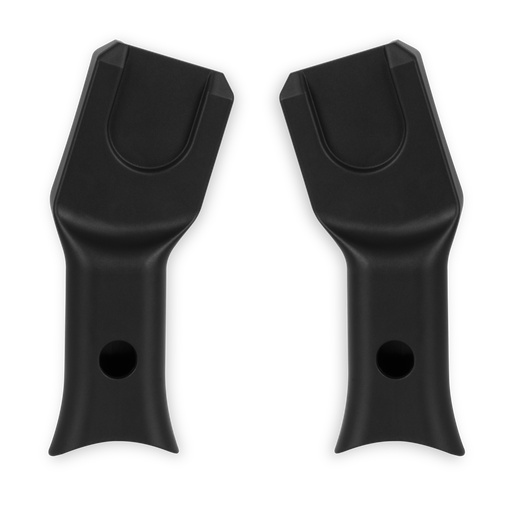
Why this product suits you: This adapter is designed for the CYBEX Eos Lux pushchair and connects its frame to selected infant car seat models from various brands.
Before buying, check the compatibility list against your pushchair and infant car seat models. This adapter is not designed for every pushchair.
Tool-free fitting, according to the product description; supplied as a pair of adapters for the CYBEX EOS LUX and EOS BASIC pushchairs.
We’ve put together a comprehensive, regularly updated list of products that meet these strict selection criteria and fully comply with the safety regulations in force in the EU.
It depends on the computer’s ports and operating system. Check the number of HDMI or DisplayPort outputs, the supported resolution and the available display mode. If you’re using multiple screens, it may also matter whether your device supports MST or another mode.
A USB adapter usually changes the connector type, for example from USB-C to USB-A. A USB splitter provides several sockets from a single port. The terms are sometimes used interchangeably by retailers, so check the actual port configuration and data rate.
Their lifespan depends on the material, UV exposure, moisture, mechanical stress and correct fitting. Check couplings, cable chains and adapters regularly. Don’t continue using parts with cracks, deformation, loose connections or damaged cables.