
Lieferung heute & morgen

Qualitätsgarantie

Willkommens-Angebote freischalten: KOSTENLOSE Lieferung | Bis zu 80 % RABATT | Kostenlose 30-Tage-JoyPlus-Testphase
App herunterladen
A well-equipped home office workspace is the foundation for productive days. A height-adjustable desk is often a central consideration, as it allows you to alternate between sitting and standing. However, the market is crowded, and not every model delivers on its promises. Before you make a decision, it's crucial to understand the common pitfalls that can lead to disappointment and unnecessary expense.
As your Joybuy Product Recommendation Officer, I'm here to help you navigate the options. In this guide, I'll show you what to look for to make an informed choice.
Many models look impressive at first glance, but their weaknesses quickly become apparent in daily use. Pay close attention to these three points to avoid a bad purchase:
To avoid these problems, you should carefully check a few technical specifications before buying. These objective criteria will help you assess a model's quality.
Stability is paramount. A solid steel frame is the foundation. Pay attention to the weight of the frame—a heavier weight often indicates a more robust build. The motor system is also crucial:
A modern control panel offers more than just arrow keys. A desk with a memory function is especially practical. It allows you to save your preferred sitting and standing heights and recall them at the touch of a button. This saves you from daily readjustment. Some models offer additional benefits like an integrated USB-C port for charging devices or a child lock to prevent accidental adjustments.
The size of the desktop must suit your needs. Measure your available space and consider how many devices you need to accommodate. Common dimensions are 140 x 60 cm for compact setups or 160 x 70 cm for more extensive workspaces. The desktop material is usually a high-quality particle board with a durable finish. Look for details like pre-drilled holes for easy assembly and integrated cable grommets to keep things tidy.
Based on these criteria, we have identified a few models suitable for different user profiles.
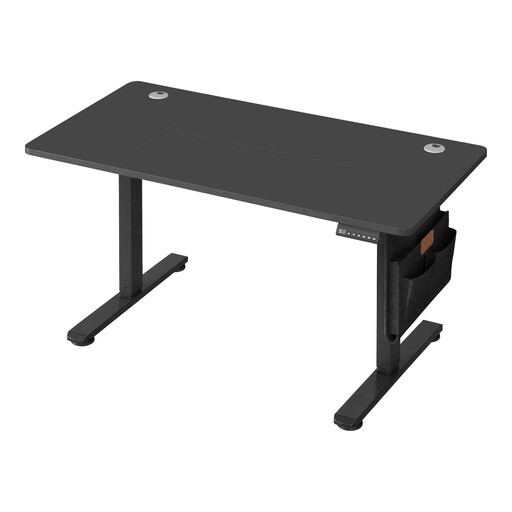
Why This Fits Their Persona: Ideal for students or professionals setting up their first functional home office without breaking the bank. The 140 x 60 cm size is sufficient for most standard applications with a laptop and a single monitor.
Despite its accessible price, this model features a steel frame for solid foundational stability and integrated cable grommets, which counteracts the problem of cable chaos.
Features a memory function and a USB-C port, which are useful features in this price range. The maximum static load capacity is 70 kg, according to the manufacturer.
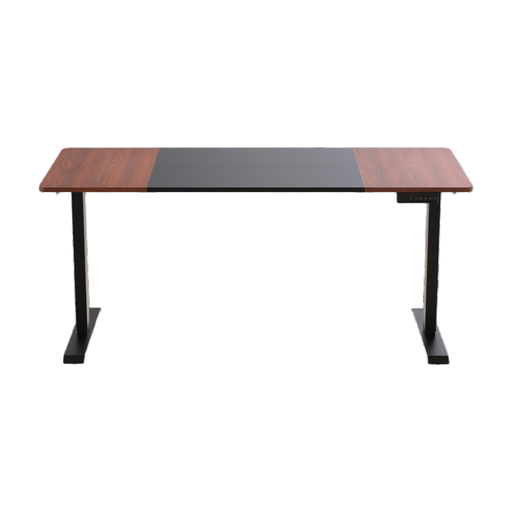
Why This Fits Their Persona: Perfect for power users and freelancers who spend many hours at their desk daily and use a setup with multiple monitors or heavy equipment. The large work surface offers plenty of space for creative and productive work.
The dual-motor system ensures maximum stability, even at full height and under load. It directly addresses the pitfall of a wobbly frame and guarantees quiet, fast operation.
The two motors enable smooth and reliable height adjustment. The generous 160 x 70 cm desktop provides ample space for a professional workstation setup.
A height-adjustable desk only reaches its full potential when paired with the right chair. An ergonomically designed office chair supports a healthy posture and can be flexibly adjusted to the respective desk height.
For a stylish ambience that goes beyond pure functionality, a velvet office chair is an interesting option. Models like the HULALA HOME Velvet Office Chair combine appealing design with essential ergonomic features like height adjustment and 360-degree swivel. This swivel chair with castors integrates seamlessly into modern living and work spaces.
We have compiled a complete, real-time list of products that fully satisfy these strict selection criteria and UK safety regulations.
1. What is a memory function, and do I need it? A memory function allows you to save multiple height settings (e.g., for sitting and standing). At the touch of a button, the desk then automatically moves to the saved position. This is especially convenient if you want to change positions several times a day, as it saves time and ensures consistent ergonomics.
2. How long does the motor of an electric desk last? The lifespan of the motor depends on its quality and frequency of use. Many models, like those from Ochama, feature overheating protection. This automatically shuts off the motor after prolonged continuous use (e.g., 2 minutes) to prevent damage. After a short break of about 18 minutes, it is fully operational again. This is a feature that contributes to the motor's longevity.
3. How important is cable management for a standing desk? Very important. Since the desk moves, the cables must have enough slack to avoid becoming taut or tangled. Integrated cable grommets, trays, or hooks help to guide the cables safely and neatly. This not only prevents clutter but also protects your devices from accidental damage caused by snagging cables.