
Lieferung heute & morgen

Qualitätsgarantie

Willkommens-Angebote freischalten: KOSTENLOSE Lieferung | Bis zu 80 % RABATT | Kostenlose 30-Tage-JoyPlus-Testphase
App herunterladen
Owners of vehicles built before roughly 2016 know the problem: the car is mechanically sound, but its infotainment system is outdated. Modern features like seamless smartphone integration, up-to-date navigation, or music streaming are missing. The option to retrofit CarPlay often seems like a costly and complex workshop procedure. However, there is a flexible and accessible alternative: portable CarPlay screens.
These external displays promise to equip any older vehicle with modern connectivity. But the market is flooded with devices of widely varying quality. Before you make a decision, it's crucial to understand the most common pitfalls that can lead to frustration and unnecessary expenses.
To avoid these problems, you should base your selection on objective technical features. Three parameters are decisive for a future-proof and functional solution.
The type of connection is the bedrock of a smooth user experience. For Wireless CarPlay for an older car, the wireless technology is critical.
An external CarPlay monitor must be clearly readable and securely mounted.
Modern devices often offer more than just smartphone mirroring.
Based on these criteria, we have identified several products suitable for different needs and vehicle types.
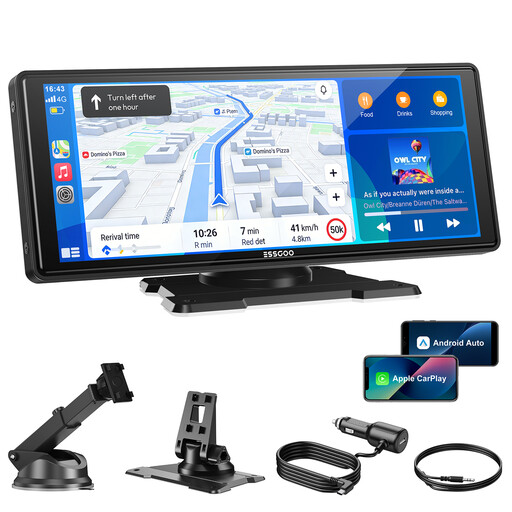
Why this product is a good fit: Ideal for drivers seeking a straightforward and reliable solution to equip their vehicle with the core functions of Wireless CarPlay and Android Auto. The focus is on a stable connection and a large, clear display without costly extra features.
Thanks to dual-band Wi-Fi (2.4/5 GHz), it avoids the pitfall of unstable connections. The 10.26-inch HD display with 1600x600 pixels ensures good readability, sidestepping the problem of low-quality screens.
Plug-and-play installation in minutes and four different audio options (including AUX and Bluetooth) for flexible, high-quality sound reproduction.

Why this product is a good fit: Perfect for commuters and anyone who spends a lot of time on the road and values safety. This device combines a full-featured CarPlay/Android Auto display with a powerful trip recording system.
As a 2-in-1 solution, it avoids the hidden costs and hassle of buying and installing a separate dash cam. The included 64 GB memory card makes the system ready to use right out of the box.
Integrated 4K front camera and 1080p rear camera with loop recording for seamless documentation of traffic events, enhancing safety and evidence collection in case of an incident.

Why this product is a good fit: For drivers whose vehicles already have a factory-installed but wired CarPlay or Android Auto system. This adapter converts the wired connection into a wireless one without needing an additional screen.
This device is highly specialized, avoiding the compromises of multi-function units. It uses 5.8 GHz Wi-Fi for maximum connection stability and retains the full functionality of the original infotainment system.
Enables wireless use of CarPlay/Android Auto on the original vehicle display. Installation is minimal (plug-and-play via the USB port), and the car's interior appearance remains unchanged.
We have compiled a complete, up-to-date list of products that fully meet these strict selection criteria and safety regulations.
There are several methods. The highest quality is typically achieved by connecting via an AUX cable to your car stereo's corresponding input. Another common method is the FM transmitter, where the device broadcasts a radio signal on a free frequency that you can receive with your car radio. However, this can be prone to interference. If your car stereo supports audio streaming via Bluetooth, this is also a good wireless option. The display's built-in speaker is usually only suitable for voice prompts.
Correct positioning is crucial for safety. The device should be mounted in a way that does not obstruct the driver's view of the road, as required by road safety regulations. Place it either low on the dashboard or in a corner of the windshield where it does not impede visibility. Flexible mounts help find a position that is both safe and easily accessible.
Most portable displays that have their own screen are universally compatible. They are powered via the 12V or 24V cigarette lighter socket and therefore work in almost all cars, SUVs, and trucks. An exception is adapter solutions like the OTTOCAST Dongle: these require that your vehicle already has factory-installed wired Apple CarPlay or Android Auto. Therefore, always check the manufacturer's compatibility list before purchasing.